10
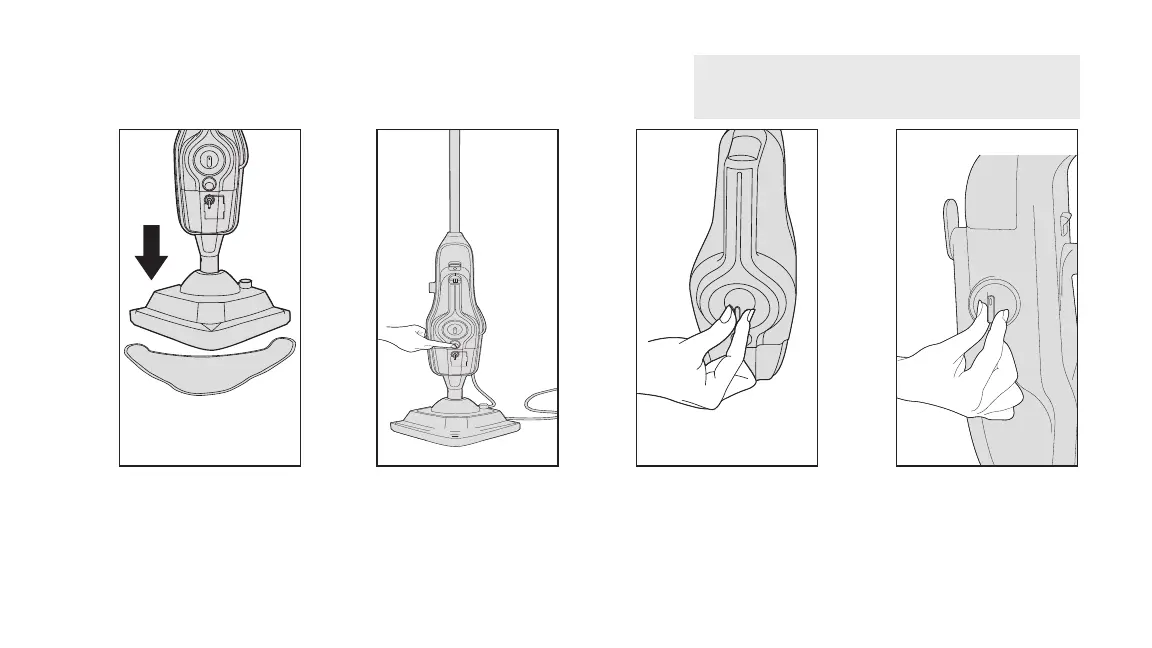
Place the microfiber pad on the
floor white side facing up. Place
floor head onto pad making sure
the entire pad covers the floor
head.
Plug into an outlet and Push On/O
switch to turn ON (I=ON). The blue
light will illuminate to show power
on. The green light will illuminate to
show the steam mop is ready to use.
Adjust the steam dial to desired
setting.
To steam your floors with
solution turn the dial to ON
(I=ON) and without solution
turn the dial to OFF (0=OFF).
1
2 3 4
WARNING: To reduce the risk of personal injury -
Unplug the steam cleaner when assembling the accessories.



 To Next Page
 Loading...