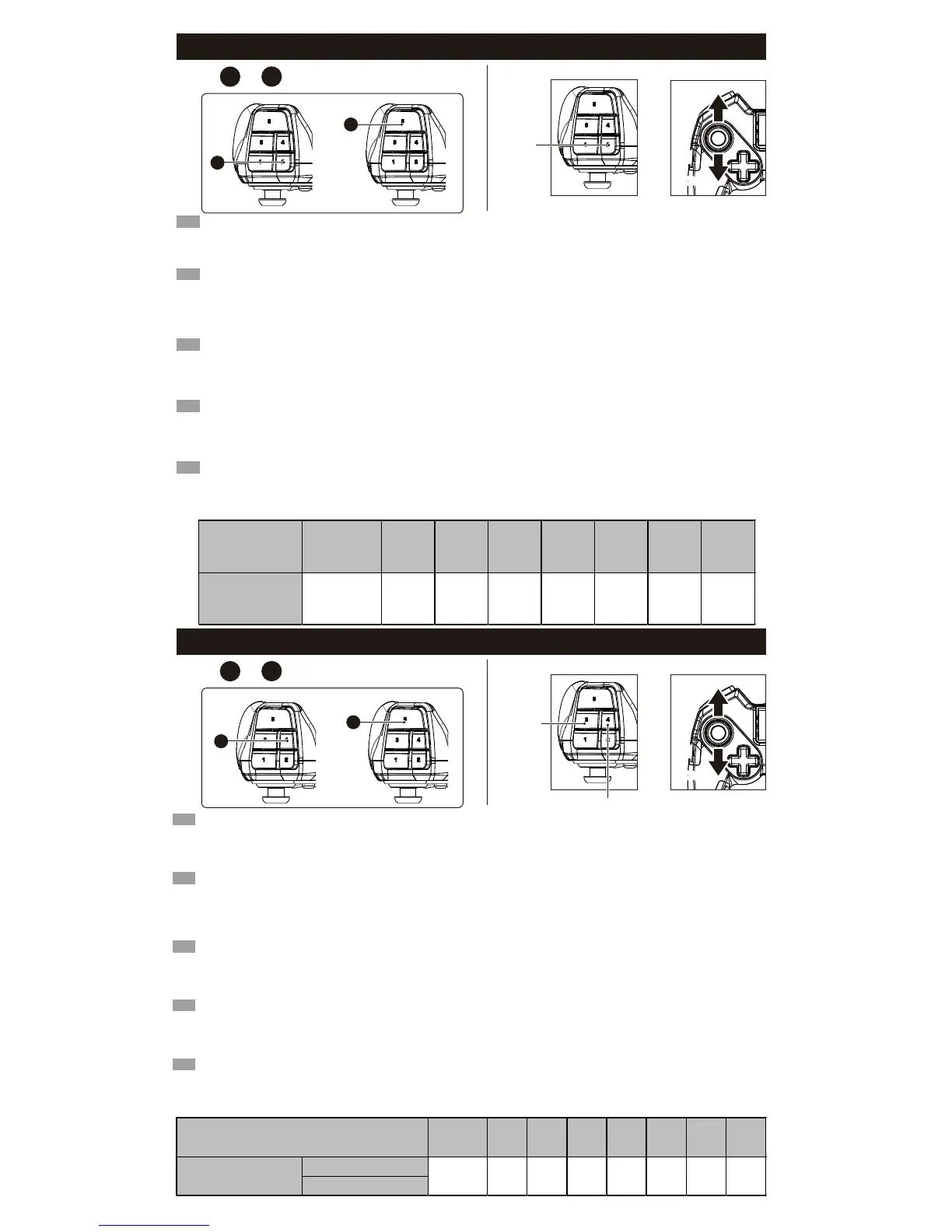
■ Walk Button / Bouton Marche / Gehen-Tastef / Pulsante di camminare / Botón Caminar
LED Colour
/ Couleur LED
/ LED-Farbe
/ Colore del LED
/ Color del LED
Light Off
/ Lumière éteinte
/ Licht aus
/ Luce spenta
/ Luz apagada
Green
/ vert
/ grün
/ verde
/ verde
Yellow
/ jaune
/ gelb
/ giallo
/ amarillo
Red
/ rouge
/ rot
/ rosso
/ rojo
Purple
/ pourpre
/ lila
/ Porpora
/ Morado
Blue
/ bleu
/ blau
/ blu
/ azul
Light Blue
/ Bleu clair
/ hellblau
/ Azzurro
/ Azul claro
White
/ blanc
/ weiss
/ bianco
/ blanco
Walk Rate
/ marche Taux
/ Gehgeschwindigkeit
/ Tasso di passeggiata
/ Ritmo
10% 20% 30% 40% 50% 60% 70% 80%
Premere i tasti sulla levetta sinistra mentre il pulsante Walk è equivalente a inclinare leggermente lo stick analogico di un
controller normale.
1. Posizionare la configurazione dello switch REGOLARE.
2. Tenendo premuto il pulsante ○, regolare la sensibilità spostando su / giù il joystick analogico.
3. La configurazione colore del LED (B) cambierà a seconda della sensibilità (vedi tabella sotto).
4. Re-regolare l'interruttore di impostazione in posizione OFF.
IT
Wenn man die Richtungstasten im Analog-Stick-Modus zusammen mit der Gehen-Taste drückt, erhält man einen ähnlichen Effekt,
wie wenn man den linken Analogstick auf einem Gamepad nur ein bisschen betätigt.
1. Schalten Sie den Tasteneinstellungsschalter auf "ADJUST".
2. Halten Sie die ○-Taste und passen Sie die Empfindlichkeit durch Drücken des Oben-Unten-Steuerkreuzes an.
3. Die Farbe des LEDs auf der Anzeigetafel ändert sich je nach Empfindlichkeit. (Siehe Tabelle unten.)
4. Schalten Sie den Tasteneinstellungsschalter auf "OFF".
DE
Appuyer sur les touches du Pad directionnel tout en mainteant la touche "Marche" est similaire à incliner légèrement le Stick Analogique
Gauche d'une manette classique. Vous pouvez en ajuster la sensibilité avec les manipulations suivantes :
1. Placez l'interrupteur de configuration sur la position "ADJUST".
2. Tout en appuyant sur le Touche ○, réglez la sensibilité à l'aide des touches Haut ou Bas sur le pavé directionnel.
3. La couleur du Configuration de la LED(B) change en fonction de la sensibilité.
(reportez-vous au tableau ci-dessous)
4. Pour finir, placez l'interrupteur de configuration sur la position "OFF".
FR
Pulsar las teclas del joystick izquierdo al mismo tiempo que el botón Caminar equivale a inclinar ligeramente el joystick analógico
de un controlador normal.
1. Coloca el interruptor de configuración en ADJUST.
2. Manteniendo apretado el botón ○, ajusta la sensibilidad moviendo hacia arriba/abajo el joystick analógico.
3. El color del LED de configuración (B) cambiará según la sensibilidad (ver tabla abajo).
4. Vuelve a ajustar el interruptor de configuración a la posición OFF.
ES
Pressing the left analog stick keys while holding the Walk button is similar to slightly tilting the left analog stick of a conventional controller.
1.Turn the Config Switch to “ADJUST”.
2.While pressing the ○ button, adjust the sensitivity by pressing Up or Down on the analog stick.
3.The colour of the Configuration LED (B) will change according to the sensitivity. (Refer to chart below.)
4.Turn the Config Switch to “OFF”.
EN
■ Snipe Button / Bouton Sniper / Snipe-Taste / Pulsante Snipe / Botón Francotirador
Mantén pulsado el botón Francotirador para disminuir temporalmente la sensibilidad del ratón y así lograr una mayor precisión.
1. Coloca el interruptor de configuración en ADJUST.
2. Para ajustar la sensibilidad en el plano horizontal, mueve el joystick analógico hacia arriba/abajo mientras mantienes pulsado el botón
□.
Para ajustar la sensibilidad en el plano vertical, mueve el joystick analógico hacia arriba/abajo mientras mantienes pulsado el botón △.
3. El color del LED de configuración (B) cambiará según la sensibilidad (ver tabla abajo).
4. Vuelve a ajustar el interruptor de configuración a la posición OFF.
ES
Tenere premuto il tasto Sniper per ridurre temporaneamente la sensibilità del mouse e ottenere una maggiore precisione.
1. Posizionare la configurazione dello switch REGOLARE.
2. Per regolare la sensibilità sul piano orizzontale, spostare il joystick analogico su / giù mentre si tiene premuto il tasto
□.
Per regolare la sensibilità sul piano verticale, muovere il joystick analogico su / giù mentre si tiene premuto il tasto △.
3. La configurazione colore del LED (B) cambierà a seconda della sensibilità (vedi tabella sotto).
4. Re-regolare l'interruttore di impostazione in posizione OFF.
IT
Die Snipe-Taste verringert die Bewegungsgeschwindigkeit der Maus, für präzises Zielen.
1. Schalten Sie den Tasteneinstellungsschalter auf "ADJUST".
2. Um die horizontale Empfindlichkeit anzupassen, drücken Sie die Auf- / Ab-Tasten, während Sie die
□-Taste gedrückt halten.
Um die vertikale Empfindlichkeit anzupassen, drücken Sie die Auf- / Ab-Tasten, während Sie die
△-Taste gedrückt halten.
3. Die Farbe auf der Anzeigetabel ändert sich je nach Empfindlichkeit. (Siehe Tabelle unten.)
4. Schalten Sie den Tasteneinstellungsschalter auf "OFF".
DE
Pla souris pour une précision accrue.
1.Tournez le bouton Configuration commutateur sur "ADJUST".
2.Pour régler la sensibilité dans le sens horizontal, appuyez sur le bouton Haut ou Bas du pavé directionnel tout en appuyant sur le bouton
□.
Pour régler la sensibilité dans le sens vertical, appuyez sur le bouton Haut ou Bas du pavé directionnel tout en appuyant sur le bouton
△.
3.La couleur du Configuration de la LED(B) change en fonction de la sensibilité. (Reportez-vous au tableau ci-dessous.)
4.Tournez le bouton Configuration commutateur sur "OFF".
FR
LED Colour / Couleur LED / LED-Farbe / Colore del LED / Color del LED
Light Off
/ Lumière éteinte
/ Licht aus
/ Luce spenta
/ Luz apagada
Green
/ vert
/ grün
/ verde
/ verde
Yellow
/ jaune
/ gelb
/ giallo
/ amarillo
Red
/ rouge
/ rot
/ rosso
/ rojo
Purple
/ pourpre
/ lila
/ Porpora
/ Morado
Blue
/ bleu
/ blau
/ blu
/ azul
Light Blue
/ Bleu clair
/ hellblau
/ Azzurro
/ Azul claro
White
/ blanc
/ weiss
/ bianco
/ blanco
10% 20% 30% 40% 50% 60% 70% 80%
Snipe Rate
/ Vitesse lorsque vous utilisez le mode Sniper
/ Geschwindigkeit im Snipe-Modus
/ Velocità di la Modalità SNIPE
/ Velocidad en el modo de francotirador
Horizontal Direction / Direction Horizontale
/ Horizontale Richtung / Piano orizzontale
/ Plano horizontal
Vertical Direction / Direction Verticale
/ Vertikale Richtung / Piano verticale
/ Plano vertical
Hold the Snipe Button to temporarily reduce mouse sensitivity for increased accuracy.
1.Turn the Config Switch to “ADJUST”.
2.To adjust the sensitivity in the horizontal direction, press up or down on the analog stick while pressing the
□ button.
To adjust the sensitivity in the vertical direction, press up or down on the analog stick while pressing the
△button.
3.The colour of the Configuration LED (B) will change according to the sensitivity. (Refer to chart below.)
4.Turn the Config Switch to “OFF”.
EN
+
16
19
+
19
16
Walk Button / Bouton Marche
/ Gehen-Tastef / Pulsante di camminare
/ Botón Caminar
UPUP
DOWN
DOWN
+
○ button
/ Touche ○
/○-Taste
/ Pulsante ○
/ Botón ○
18
19
+
Snipe Button / Bouton Sniper /
Snipe-Taste / Pulsante Snipe /
Botón de Snipe
+
19
18
UPUP
DOWN
DOWN
+
△ button / Touche △
/△-Taste / Pulsante △/ Botón △
□ button
/ Touche □
/□-Taste
/ Pulsante □
/ Botón □


 To Next Page
 Loading...