■ Includes / Inclus / inklusive / Incluso / Incluye
■ Platform / Plateforme / Plattform / Piattaforma / Plataforma
Instruction manual
/ Mode d'emploi
/ Bedienungsanleitung
/ Manuale di istruzioni
/ Manual de instrucciones
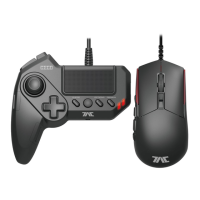
Mouse & Controller
/ Manette & Souris
/ Game Pad & Maus-Controller
/ Controller e mouse
/ Controlador y ratón
1902-53UK
Thank you for purchasing this product. Before using this product please read the instructions carefully.
After reading the instruction manual, please keep it for reference.
/ Merci d'avoir acheté ce produit. Lisez attentivement les instructions avant de l'utiliser.
Après avoir lu le feuillet d'instructions, conservez le bien pour référence.
/ Vielen Dank, dass Sie sich fur dieses Produkt entschieden haben.Bevor Sie dieses Produkt verwenden, lesen
Sie bitte die Kurzanleitung sorgfältig durch. Heben Sie die Kurzanleitung zu Ihrer Information auf.
/ La ringrazio molto per l'acquisto di questo prodotto. Prima dell'uso, leggere attentamente il presente manuale.
Una volta fatto questo, si consiglia di conservarlo per riferimenti futuri.
/ Muchas gracias por comprar este producto. Antes de usarlo, por favor, lee detenidamente este manual.
Una vez hecho esto, recomendamos conservarlo para futuras consultas.
PlayStation®4
/ PlayStation®3
Please note that the information provided is for the PlayStation®4 and PlayStation®3 systems.
Please refer to PlayStation®4 and PlayStation®3 system manuals for more information.
This product does not feature light bar, motion sensors, or force feedback.
EN
PlayStation®4
/ PlayStation®3
Notez bien que les renseignements fournis sont les systèmes PlayStation®4 et PlayStation®3 .
Merci de vous référer au manuel de la PlayStation®3 pour plus d'information.
Ce produit ne dispose pas de fonction pour barre lumineuse, détecteurs de mouvement,
ou retour de force.
FR
PlayStation®4
/ PlayStation®3
Bitte beachten Sie, dass die zur Verfügung gestellten Informationen für die PlayStation®4 und
PlayStation
®3 systeme.
Weitere Informationen finden Sie im Handbuch für die PlayStation®3 system.
Dieses Produkt verfügt nicht über Lichtbalken, Bewegungssensoren, für Force-Feedback.
DE
PlayStation®4
/ PlayStation®3
Si prega di notare che le informazioni fornite sono per la console PlayStation®3 e sistemi PlayStation®4.
Per ulteriori informazioni, consultare le istruzioni per l'uso per il sistema PlayStation®3.
Questo prodotto non ha luce, sensori di movimento o ritorno di forza bar.
IT
PlayStation®4
/ PlayStation®3
Ten en cuenta que la información que sigue se refiere a los sistemas PlayStation®3 y PlayStation®4.
Para más información, consulta el manual de instrucciones del sistema PlayStation®3.
Este producto no dispone de barra luminosa, sensores de movimiento o force feedback.
ES
Also compatible with PC* (Windows 10/8.1/8/7/Vista).
Spare PC USB port required / Port USB / USB-Anschluss / Porta USB / Puerto USB
*PC Compatibility not tested nor endorsed by Sony Interactive Entertainment Europe.
Instruction Manual / Mode d'emploi / Bedienungsanleitung
/ Manuale di istruzioni / Manual de instrucciones
Hand Strap
/ Sangle de soutien
/ Handschlaufe
/ Cinturino di soggezione
/ Correa de sujeción
TACTICALASSAULTCOMMANDER

 Need help?
 General











 To Next Page