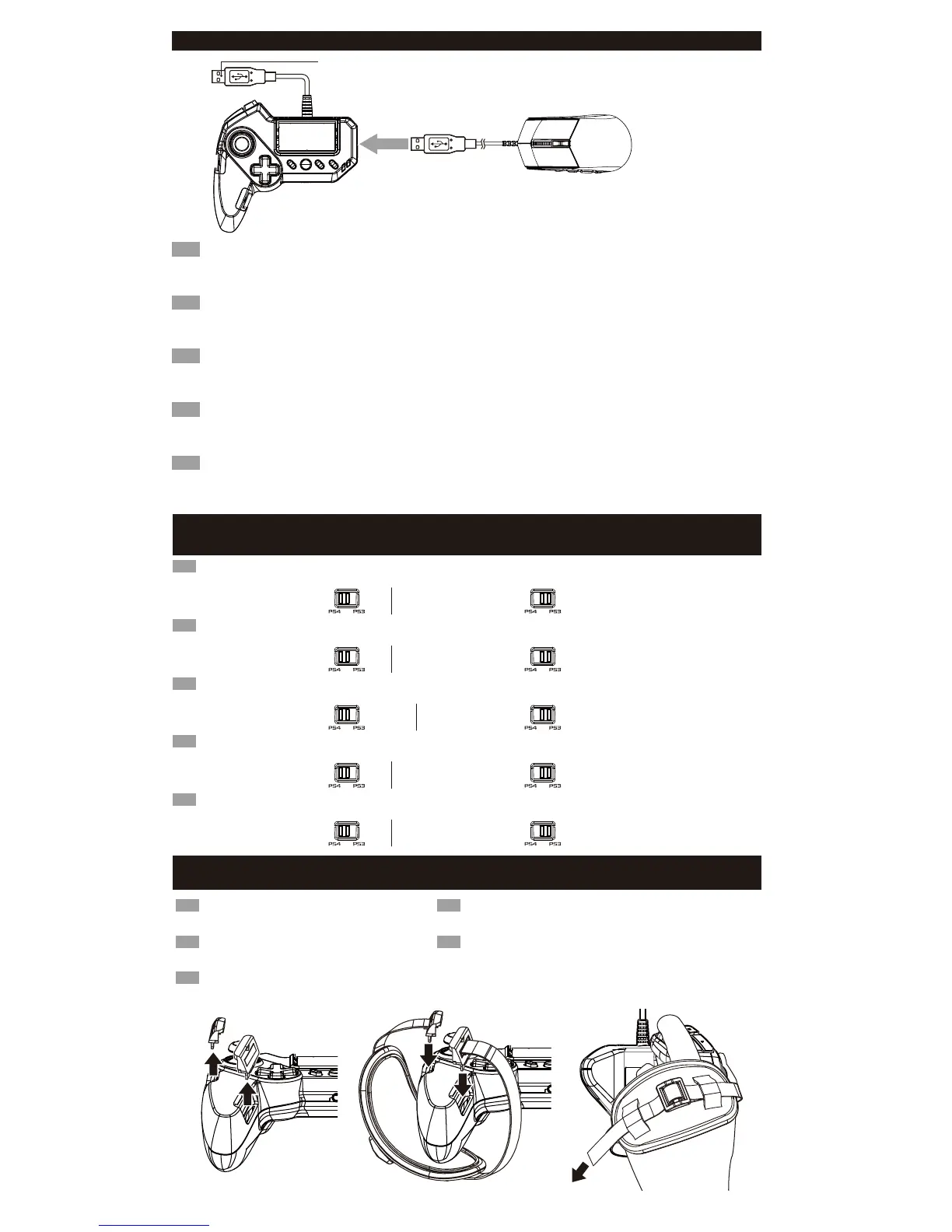
■ How to connect / Comment connecter / Wie wird eingeschaltet / Come connettersi / Modo de conexión
EN
1.Insert the USB connector of the mouse into the USB port of the controller.
In addition to the included mouse, other USB compliant mice may be used*.
※Not compatible with all mice. *Compatibility not tested nor endorsed by Sony Interactive Entertainment Europe.
2. Please insert the USB connector of the controller into the USB port of the PlayStation®4.
※ Please set the PS4
TM
/PS3
TM
System Toggle Switch to the desired console before connecting the product.
FR
1.Insérez le connecteur USB de la souris dans le port USB du contrôleur.
En plus de la souris fournie, toute autre souris conforme USB peut être utilisée*.
※Compatibilité non-garantie avec toutes les souris. * Compatibilité non-testée ni approuvée par Sony Interactive Entertainment Europe.
2.Merci de bien vouloir insérer la prise USB de la manette au port USB de la PlayStation®4.
※ Régler l'interrupteur PS4
TM
/PS3
TM
sur la console souhaitée avant de brancher le produit.
DE
1.Stecken Sie den USB-Stecker des Maus am USB-Anschluss der controller.
Zusätzlich zu der mitgelieferten Maus, können andere USB-kompatible Mäuse verwendet werden.
※ Nicht kompatibel mit allen Mäusen. * Kompatibilität nicht geprüft noch von Sony Interactive Entertainment Europe unterstützt.
2.Stecken Sie bitte den USB-Stecker des Controllers in den USB-Anschluss der PlayStation®4.
※ bitte korrigieren Sie die PS4
TM
/ PS3
TM
-System umschalten auf die gewünschte Konsole wechseln, bevor Sie das Produkt.
IT
1.Inserire il connettore USB del mouse alla porta USB del controller.
Oltre al mouse in dotazione, è possibile utilizzare anche altri mouse compatibile con il connettore USB.
※ Non compatibile con tutti i mouse. * Sony Interactive Entertainment Europe non ha verificato la compatibilità neanche la garanzia.
2. Inserire il connettore USB nel porto USB della PlayStation®4.
※ Prima di collegare il prodotto, impostare il sistema di console allenatore PS4 / PS3 desiderato.
ES
1.Inserta el conector USB del ratón en el puerto USB del controlador.
Además del ratón incluido, se pueden utilizar también otros ratones compatibles con conector USB.
※ No compatible con todos los ratones.* Sony Interactive Entertainment Europe no ha comprobado ni garantiza la compatibilidad.
2.Inserta el conector USB del controlador en el puerto USB de la PlayStation®4.
※Antes de conectar el producto, ajusta el seleccionador de sistema PS4 / PS3 según la consola utilizada.
■ PlayStation®4/ PlayStation®3 System Toggle Switch / Interrupteur système PlayStation®4 / PlayStation®3
/ PlayStation
®4 / PlayStation®3 System Schalter / Selettore di sistema PlayStation®4 / PlayStation®3
/ Seleccionador de sistema PlayStation
®4 / PlayStation®3
L'interrupteur plateforme permet de basculer entre.
PlayStation
®4 et PlayStation®3. Assurez-vous que L'interrupteur plateforme est bien positionné sur la bonne console avec de mettre
en marche votre console.
FR
The Platform Toggle Switch toggles between PlayStation®4 and PlayStation®3 compatibility.
Switch the toggle switch to the desired platform before connecting.
EN
Connecting to
the PlayStation
®4 system
Connecting to
the PlayStation®3 system
Connexion à la console
Playstation
®4
Connexion à la console
Playstationֽ®3
Verbinden mit dem
PlayStation
®4 system
Verbinden mit dem
PlayStation®3 system
Die Plattform Kippschalter schaltet zwischen PlayStation
®4 und PlayStation®3 Kompatibilität.
Bitte stellen Sie sicher, dass Sie den Kippschalter auf die gewünschte Plattform vor dem Anschluss umzuschalten.
DE
Collegamento al
sistema PlayStation
®4
Collegamento al
sistema PlayStation®3
L'interruttore selettore di piattaforma permette commutare tra il sostegno PlayStation
®4 e PlayStation®3.
Assicurarsi di selezionare la piattaforma utilizzata prima di collegare il controller alla console.
IT
Conexión al
sistema PlayStation
®4
Conexión al
sistema PlayStation®3
El interruptor seleccionador de plataforma permite alternar entre compatibilidad con PlayStation
®4 y PlayStation®3.
Asegúrate de seleccionar la plataforma utilizada antes de conectar el controlador a la consola.
ES
To PlayStation®4 / PlayStation®3 USB Port / Port USB PlayStation®4 / PlayStation®3
/ Zum PlayStation
®4 / PlayStation®3 USB-Port / In il porto USB di la PlayStation®4 / PlayStation®3
/ Al puerto USB de la PlayStation
®4 / PlayStation®3
■ How to adjust the hand strap / Comment utiliser la sangle / Gewusst wie: verwenden Sie Handschlaufe
/ Come usare il cinturino di la mano / Cómo fijar la correa de sujeción
EN
1. Remove both controller clips.
2. Thread the straps into the clips adjusting for
hand size.
3. Reattach clips to controller.
DE
1. Entfernen Sie die Abdeckung vom Controller.
2. Bitte legen Sie die Handschlaufe.
3. Im Einklang mit der Größe der Hand stellen
Sie die Länge des Riemens.
FR
1. Retirez le couvercle de la manette.
2. Veuillez attacher la sangle.
3. Veuillez ajuster la longueur de la sangle
conformément à la taille de la main.
IT
1. Sganciare i perni.
2. Far passare il cinturino attraverso di loro.
3. Regolare la lunghezza a seconda della dimensione della mano.
ES
1. Desengancha los pasadores.
2. Pasa la correa por ellos.
3. Ajusta el largo según el tamaño de la mano.
1. 2. 3.


 To Next Page
 Loading...