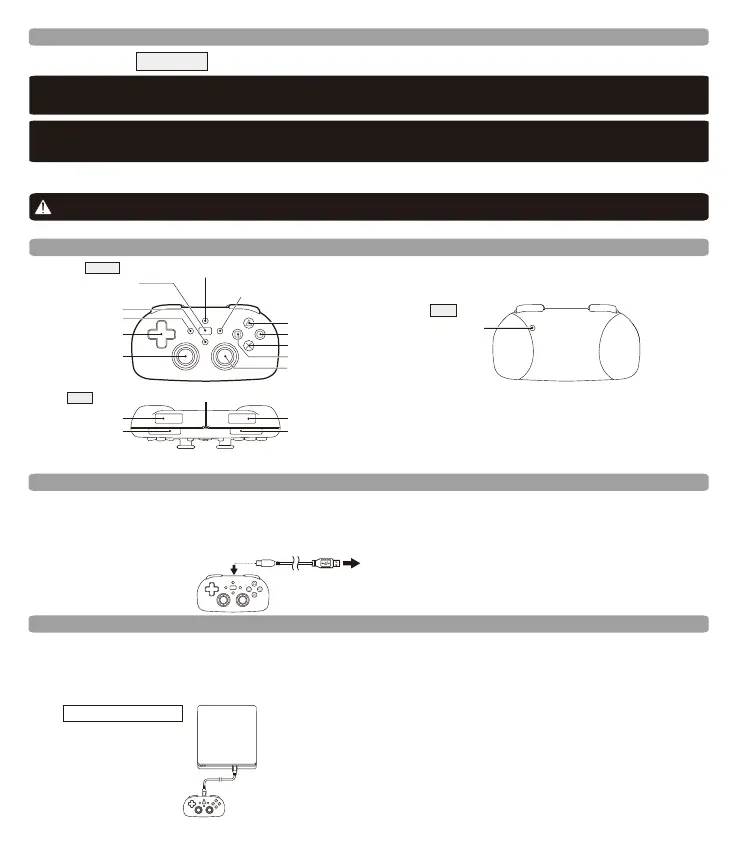
Charge this product by using a micro USB to connect this product with a USB port on the PlayStation®4 console.
When charging LED indicator will flash orange, and turn off when charging is complete.
※ThisproductisnotcompatiblewithPlayStation3,PlayStation2,PlayStationorPSOne.
※VisitourHORIWebSiteand/orSupportpage(http://www.hori.jp/support/)forfurthersupport.
※Thisproductdoesnothaveastereoheadsetjack,vibrationfunction,ormotionsensorfunction.
MaynotbecompatiblewitheveryPlayStation4softwaretitle.
Voice Chat
Tousevoicechat,connectaUSBorBluetoothheadset(soldseparately)directlytoyourPS4™system.
Layout
Top
L1button
L2button
R1button
R2button
MicroUSBport(Forchargingonly)
※PleasedonotpressanybuttonswhilethePS4isstartingupfromSleepMode.
Front
SHAREbutton
OPTIONSbutton
PSbutton
Directionalpad
Leftanalogstick
/L3button
TouchpadModeButton
TouchPadButton
/LightBarButton
△button
○button
×button
□button
Rightanalogstick
/R3button
Back
Resetbutton
How to Charge
*USB Cable not included.
To PlayStation®4 system USB port
Must pair with PlayStation®4 first.
※Once this product is paired, there is no need to pair again. Press PS button to use the product.
※If this product is paired to a different PlayStation
®4, it must be re-paired again to be used with the previous
※Cannot be paired using a USB cable PlayStation
®4.
How to Connect
Before you pair
ChargeviaUSBcablewhenbateryislow.
*CanbeonlychargedwhenPlayStation4isturnedONorinStandbyMode.
Thisproductusesa2.4GHzfrequencyband.Otherwirelessdevicesmayusethesamefrequencyband.
Topreventradiointerferencewithotherwirelessdevices,pleasepayattentiontothefollowingitems:
1.Beforeusingthisproduct,pleaseconfirmthatnootherwirelessdevicesarebeingusednearby.
2.Intheunlikelyeventthatradiointerferenceoccursbetweenthisproductandotherwirelessdevices,changetheareathis
productisusedorturntheotherwirelessdeviceoff.
Pleasedonotuseinprohibitedareassuchashospitalsornearotherelectronicdevices.
*Cardiacpacemaker,othermedicalelectronics,firealarms,automaticdoors,andotherautomaticallycontrolledelectronics.
※ForoptimalperformancepleaseupdatePlayStation4systemsoftwaretothemostrecentversion(Minimumrequiredversion:Ver.4.50)
beforeusingthisproduct.Forinformationaboutyoursystemsoftwareversionandupdatingsystemsoftware,pleaserefertotheinstructions
providedwithyourPlayStation4system.
PlayStation
4
®
Platform:
Important
BeforeusingthisproductwiththePlayStation4system,pleasereadtheincludedinstructionscarefully.
®
®
®
®
® ® ®
®
®















 To Next Page