Troubleshooting
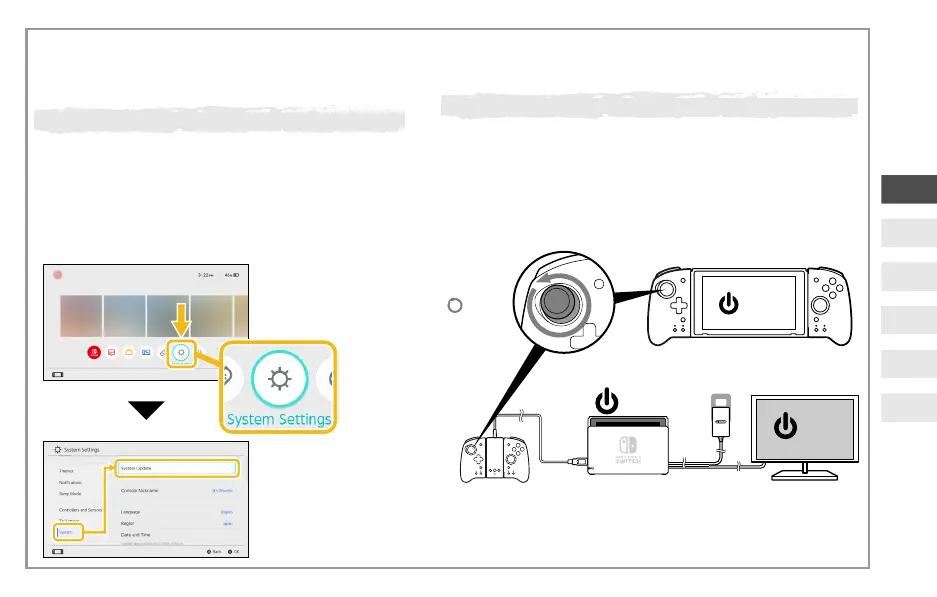
Disconnect and connect the controller from the Nintendo
Switch or Nintendo Switch Dock and turn ON the Nintendo
Switch. Once Nintendo Switch is ON, rotate the analog
stick 2~3 times.
The process above will only work when this product is
attached to the Nintendo Switch™ console and the power
supply is on.
The analog sticks are not responding correctly
* This product is not compatible with the "Calibrate Control
Sticks" option in the Nintendo Switch™ HOME Menu.
ON
2〜32 - 3
ON
ON
Select ‘System’ and then
‘System Update’ to update
to the latest system
firmware.
From the Home Menu
select ‘Settings’.
Make sure that your Nintendo Switch™ is
updated to the latest system firmware.
The controller is not functioning properly
Remove controller from the
Nintendo Switch™ console and reattach it.
・
・
EN
FR
DE
IT
ES
NL


 To Next Page