Turbo Mode:
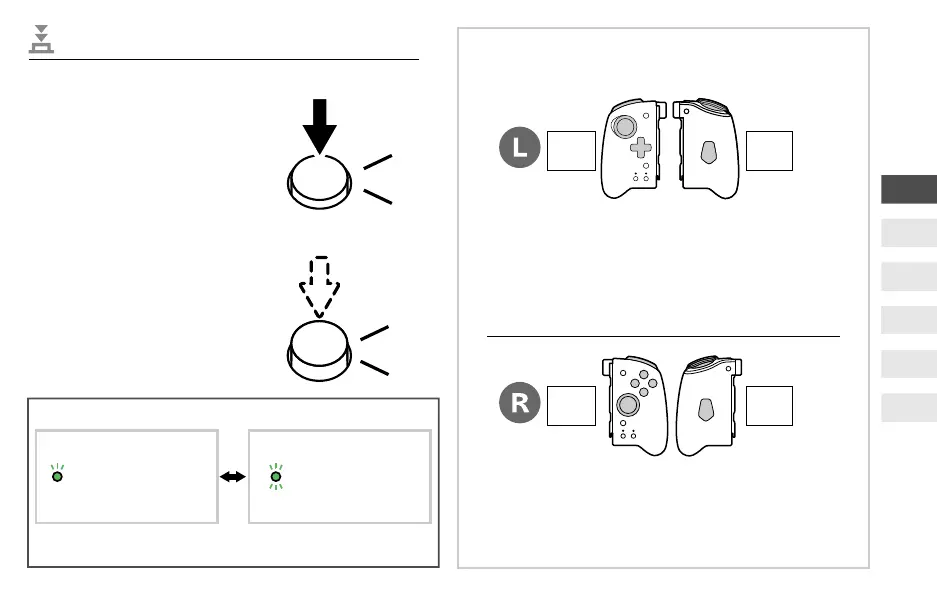
Button is set to continuously
activate the button function
as long as you press the
button.
* The Turbo LED (green) will lash at a rate corresponding
to the Turbo speed.
TURBO LED
turn Green
Setting up
Turbo function
TURBO LED
flashing (Green)*
Turbo function
activated
Turbo Hold:
Continuously activates
the button function
without pressing the
button.
A
TURBO
TURBO LED
Turbo Functions
TURBO
A
*1 Control Pad (UP, DOWN, LEFT or RIGHT) is not
compatible with the Turbo hold mode, and can only be
used to set Turbo mode.
*2 The FL Button will function only when a button function
is assigned to it.
*3 The FR Button will function only when a button function
is assigned to it.
Front
View
Back
View
Front
View
Back
View
L Button / ZL Button / L Stick Button
Control Pad (UP, DOWN, LEFT or RIGHT)
*1
FL Button
*2
R Button / ZR Button / R Stick Button
A Button / B Button / X Button / Y Button
FR Bottun
*3
The following buttons can be set to
Turbo or Turbo Hold mode:
EN
FR
DE
IT
ES
NL



 To Next Page