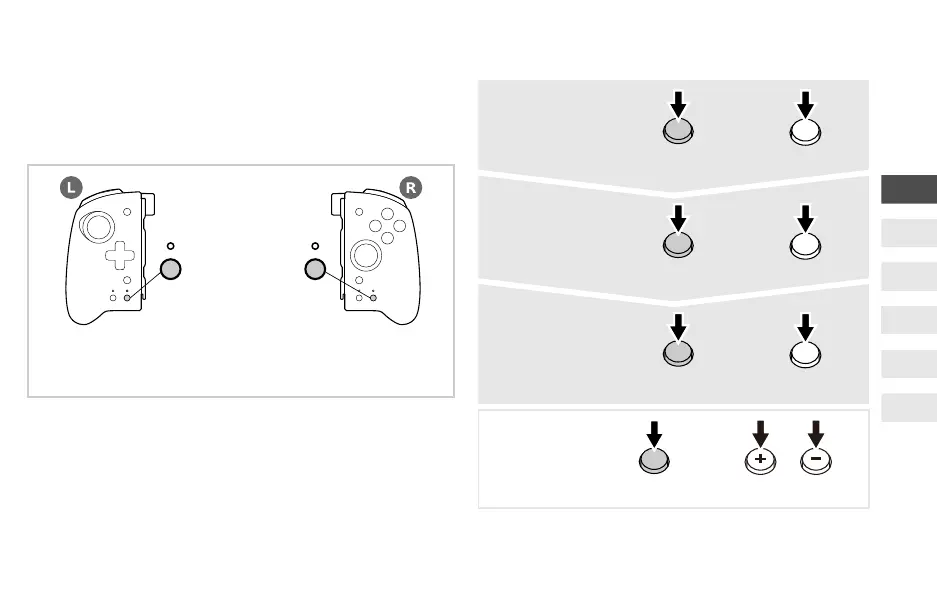
TURBO LED (L/R)
TURBO Button (L/R)
* Please use the TURBO Button (L) when setting button functions to (L).
Please use the TURBO Button (R) when setting button function to (R).
How to set up Turbo Function
Turbo OFF
(All buttons)
+
While pressing
TURBO Button (L/R)
- or + Button
or
Turbo Mode
ON
+
While pressing
TURBO Button (L/R)
the button that you
want to set to Turbo mode
A
Turbo Hold
ON
Button pressed in ①
+
While pressing
TURBO Button (L/R)
A
Turbo
OFF
+
While pressing
TURBO Button (L/R)
Button pressed in ②
A
* Please use the TURBO Button (L) and the - Button when adjusting
the Turbo Speed on (L).
Please use the TURBO Button (R) and the + Button when adjusting
the Turbo Speed on (R).
EN
FR
DE
IT
ES
NL



 To Next Page