Quick Start Guide
Important! Must be seeding in order to perform a completecalibration
For the following steps, if necessary, refer to the Calibration and
Operation section for more details.
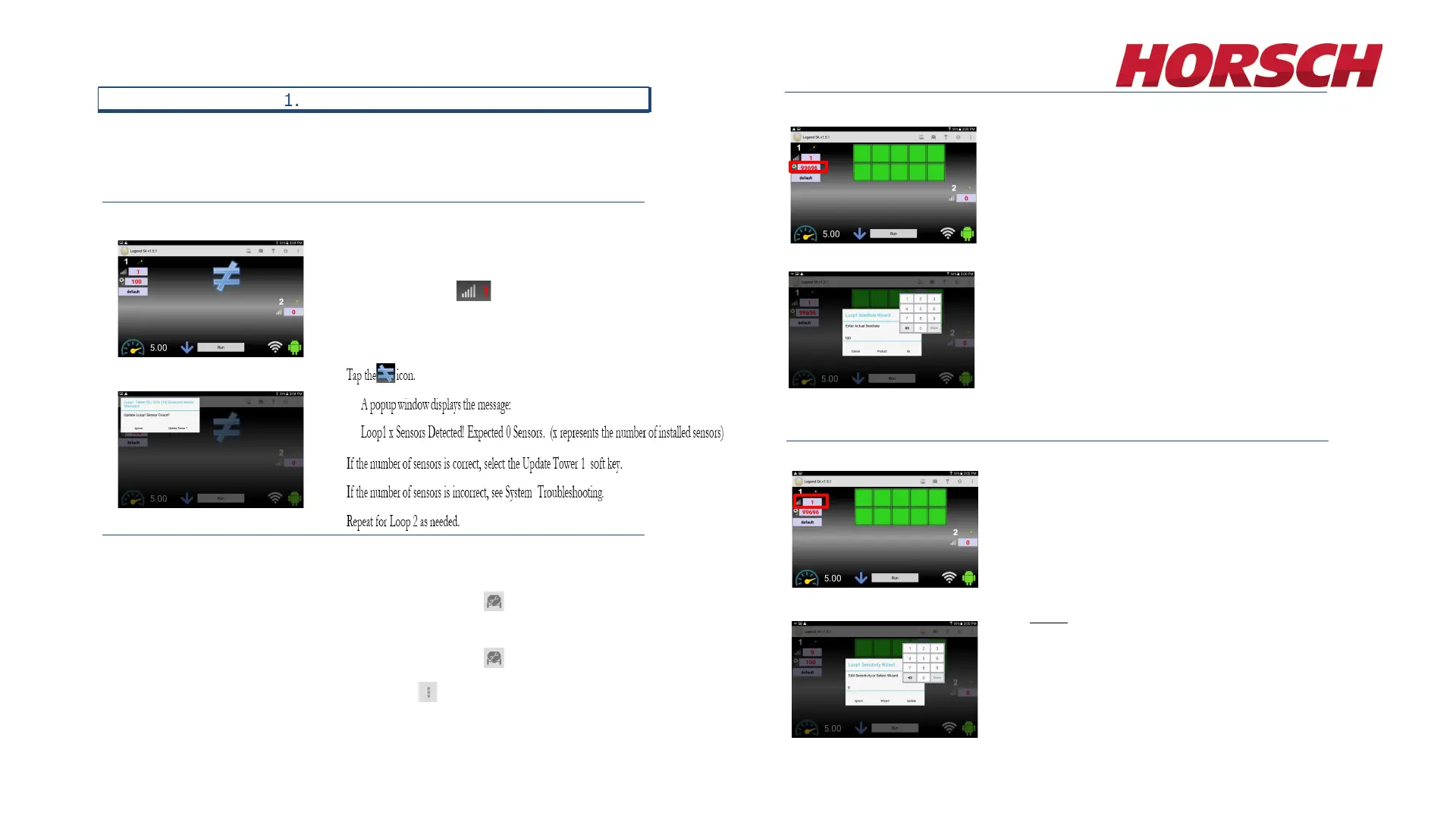
Verify Total Number of Sensors
On the Main screen:
Turn on Loop 1 Power by selecting the red number to the right
of the Sensitivity icon.
Set the Sensitivity to 1 and press Update.
A Speed is needed in order to set up the Seed Rate Wizard.
If you are using Test Speed:
1. On the Seeder Setup screen , set the Seeder Test Speed
value (speed normally travelled in field, ex: 5 mph).
If you are using GPS speed:
1. On the Seeder Setup screen , set Seeder Test Speed to
zero.
2. Tap the Menu icon and select GPS Settings.
3. On the GPS Setting screen, set the GPS Enable/Disable
button to Enable.
Figure 1-2
Speed Set-Up
Figure 1-1
Note:
In order for the Legend GPS to work, GPS
needs to be enabled on your tablet as well.
Please consult your tablets owner’s manual on
how to enable GPS.
Set Seed Rate Wizard
To start, tap the Run/Hold button to switch from Hold to Run. This
enables alarms. You must be seeding, with no blockages or sensor
errors, in order to use the Seed Rate Wizard.
On the Main screen:
1. Tap the Seed Rate field.
2. The Loop 1 Seed Rate Wizard pop up window appears.
3. Enter your desired seed rate and tap Ok.
Calibrating the Seed Rate Wizard also sets your Blockage
Sensitivity.
4. Repeat for Loop 2 as needed.
Figure 1-6
Figure 1-3
Figure 1-4
Set Sensitivity Wizard for Blockage Alarms
1. While seeding, tap the red number to the right of the
sensitivity icon.
The Loop1 Sensitivity Wizard pop up window appears.
2. Tap the Wizard button.
The system automatically selects the optimum sensitivity
value based on what you are seeding.
3. Repeat for Loop 2 as needed.
Figure 1-5
NOTE: If the system is powered On and left to sit
unattended for an extended period of time up to 30
minutes or more, the LEGEND system on the
blockage monitor will reset any previously set
sensitivity level back to zero (0).
26








 To Next Page