Every 25,000 Miles
Fan and Fan Belt
1. Check the fan for looseness and damage, such as bent, cracked or
missing blades, loose rivets or missing weights. Retighten if loose.
Replace if damaged.
2. Check for adequate clearance between the fan and the fan shroud
or other engine compartment components. Repair if the clearance
is inadequate.
3. Check the fan belt condition, belt tension, and belt alignment.
Correct if necessary.
Friction Facing
1. Checkforwearcondition.Replacewhenwornto1/16’’[0.159cm]
thick, oil spotted, or if burn marks are visible.
FAN DRIVE REMOVAL
1. VerifytheFanDrivemodelandthatcorrectreplacementpartst
this model.
AvoiddamagingtheRotaryAirUnionduringfaninstallation,removal,
or when servicing the Fan Drive.
2. DisconnecttheairlinefromtheRotaryAirUnion.
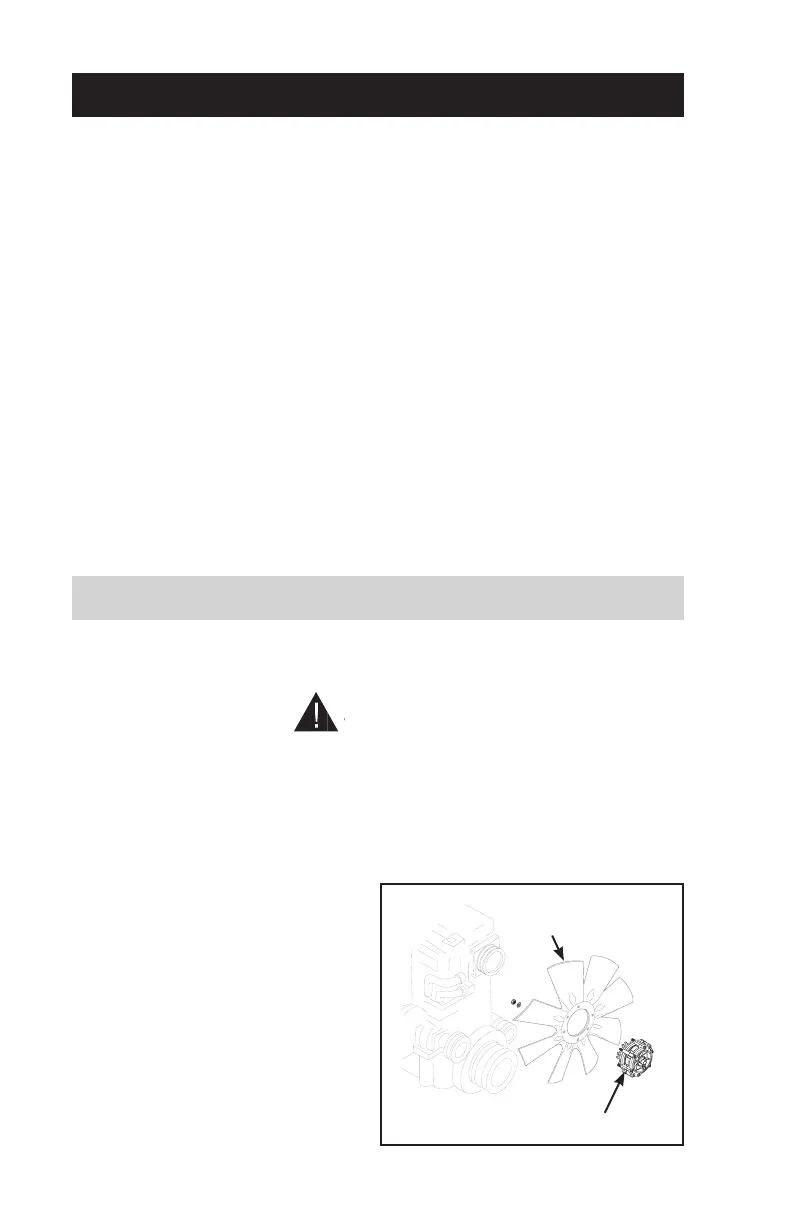
Steps 2-4
Fan
Fan
Drive
NOTE
Protect the radiator from
possible damage from the
fan during fan and Fan Drive
removal.
3. Remove the fan and Fan
Drive from the engine.
4. Remove the fan from the Fan
Drive.
4


 To Next Page