10 11
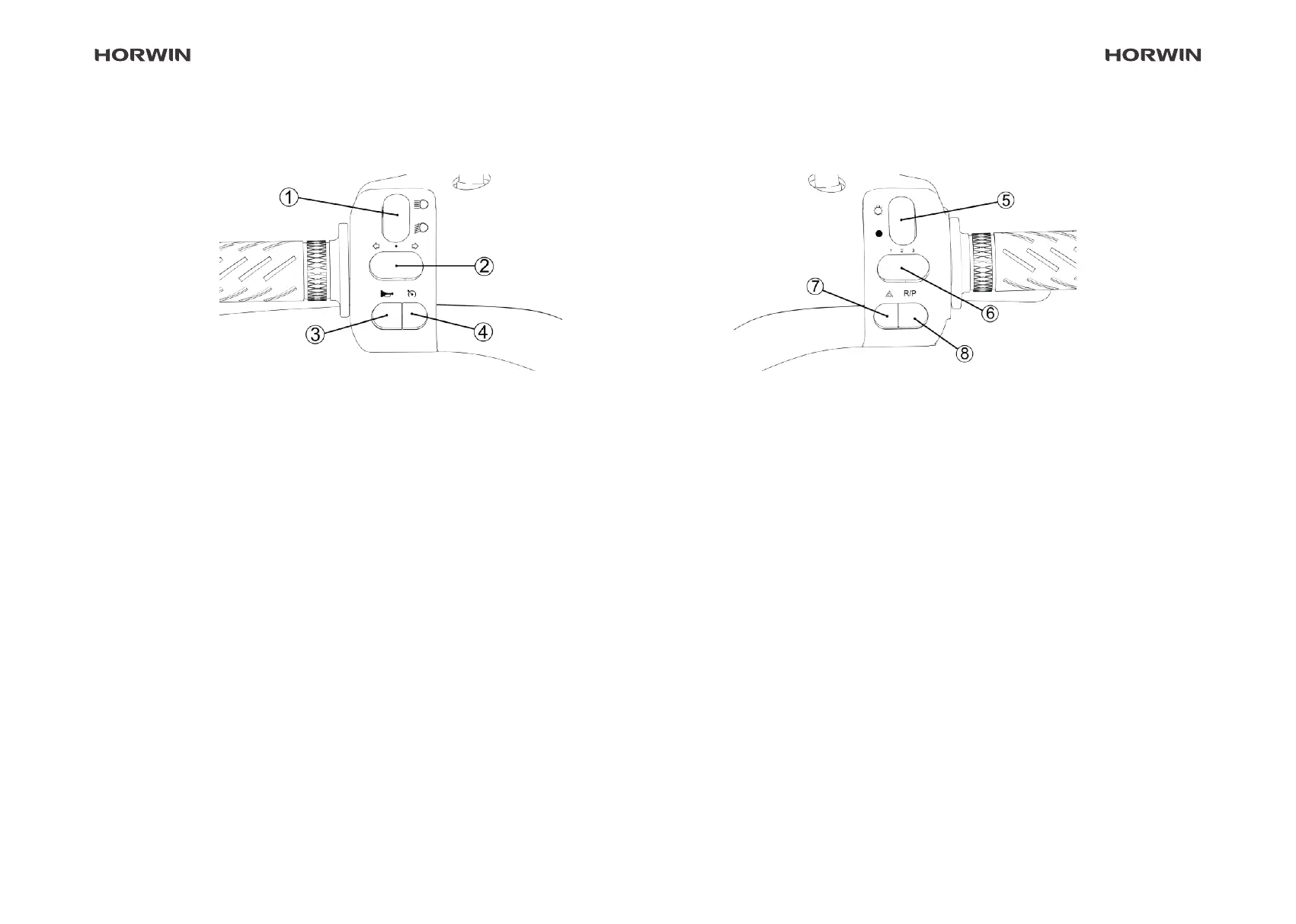
Combination switch
Left side
Right side
① Left-hand combination switch with high beam and dipped
beam
• Press the switch upwards to switch on the high beam.
• Press the switch down to switch on the dipped beam.
② Indicator
• Press the switch to the left to switch on the left indicator.
• Press the switch to the right to switch on the right indicator.
• Move the switch to the centre position to switch o the indica-
tor.
③ Horn
• Press the horn button to sound the horn signal.
• The horn signal ends when the horn button is released.
④ Cruise control
• Press the button to run the scooter at the current speed.
• To deactivate the cruise control, press this button again or
apply the brake.
⑤ Right-hand combination switch with main lighting
• Press the switch down to switch o the main lighting.
• Press the switch upwards to switch on the main lighting.
⑥ Riding mode selector switch
• Left position: 1. riding mode
• Centre position: 2. riding mode
• Right position: 3. riding mode
⑦ Hazard warning lights
• Press the button to activate the hazard warning lights. Press
the button again to deactivate the hazard warning lights.
⑧ Start\Reverse switch
• Press the button to switch to standby/READY mode.
• Press and hold the button to activate reverse mode and re-
lease it to return to forward mode.


 To Next Page