15
Balancing
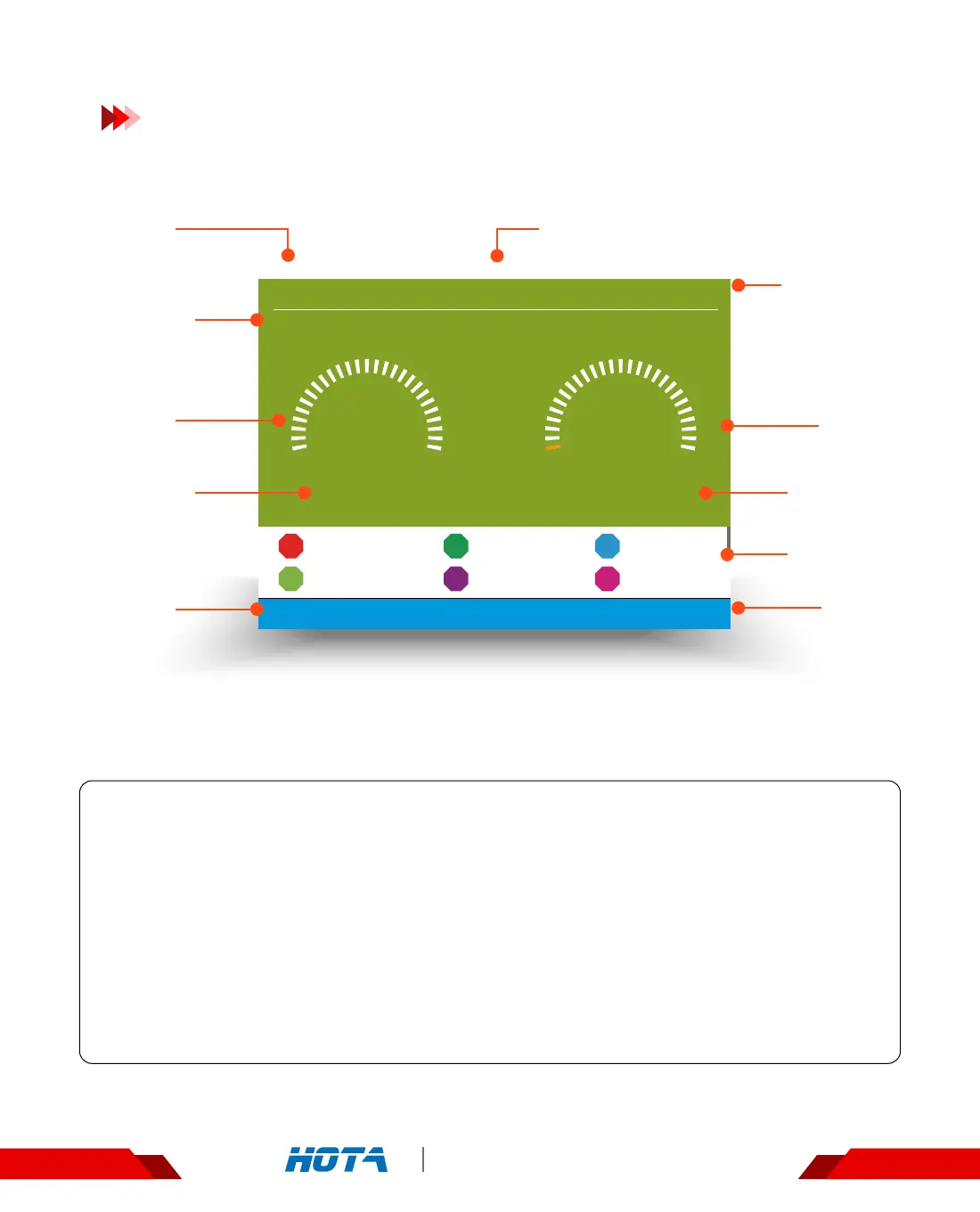
LiPo-6S(3.80V) 40% 00:00:22
CH1
1 mAh
22.70V
0.0A -6W
3.801V
3.799V
1
4
3.799V
3.798V
2
5
3.797V
3.703V
3
6
00:00:00
CH2
Standby
F6 4-Channel DC Smart Charger
Balancing
Operation and Setup
Working parameters Display
Balancing Status : Simple Operation
1. Connect power supply to the charger, wait for the system to complete its self-checking.
Connect the battery to the charger in the standby interface;
2. After selecting the corresponding channel, short press the speed shuttle key to pop up
the “Task Settings" menu, set the task to “Balance” ; adjust the task parameters, and
short press the speed shuttle key to start the task;
Scroll the speed shuttle key during operation can switch the display information in the lower half of the screen which are
cell voltage and the operating data;
3. When the balance task is executing, short press the speed shuttle key can pop up the“Adjust
Task" menu to adjust the balance current ; long press the CH key can stop the current task;
4. Enjoy.
Operation
Time
Capacity
charged
Task Status
Output
Current
Total Battery
Voltage
Output
Power
Operation
Time
Cell Voltage
Current
channel
Current
channel
Battery parameters and
Percentage of completion


 To Next Page