Standby
CH1
Standby
CH2
LiPo-�sCHG
CH4
LiPo-�sCHG
CH3
22.95
V
24.2V
22.99
V
24.2V
1.9
A
23.1V/45W
2.0
A
23.1V/46W
Working parameters Display
Operation and Setup
Split Screen Display
08
F6+ 4-Channel DC Smart Charger
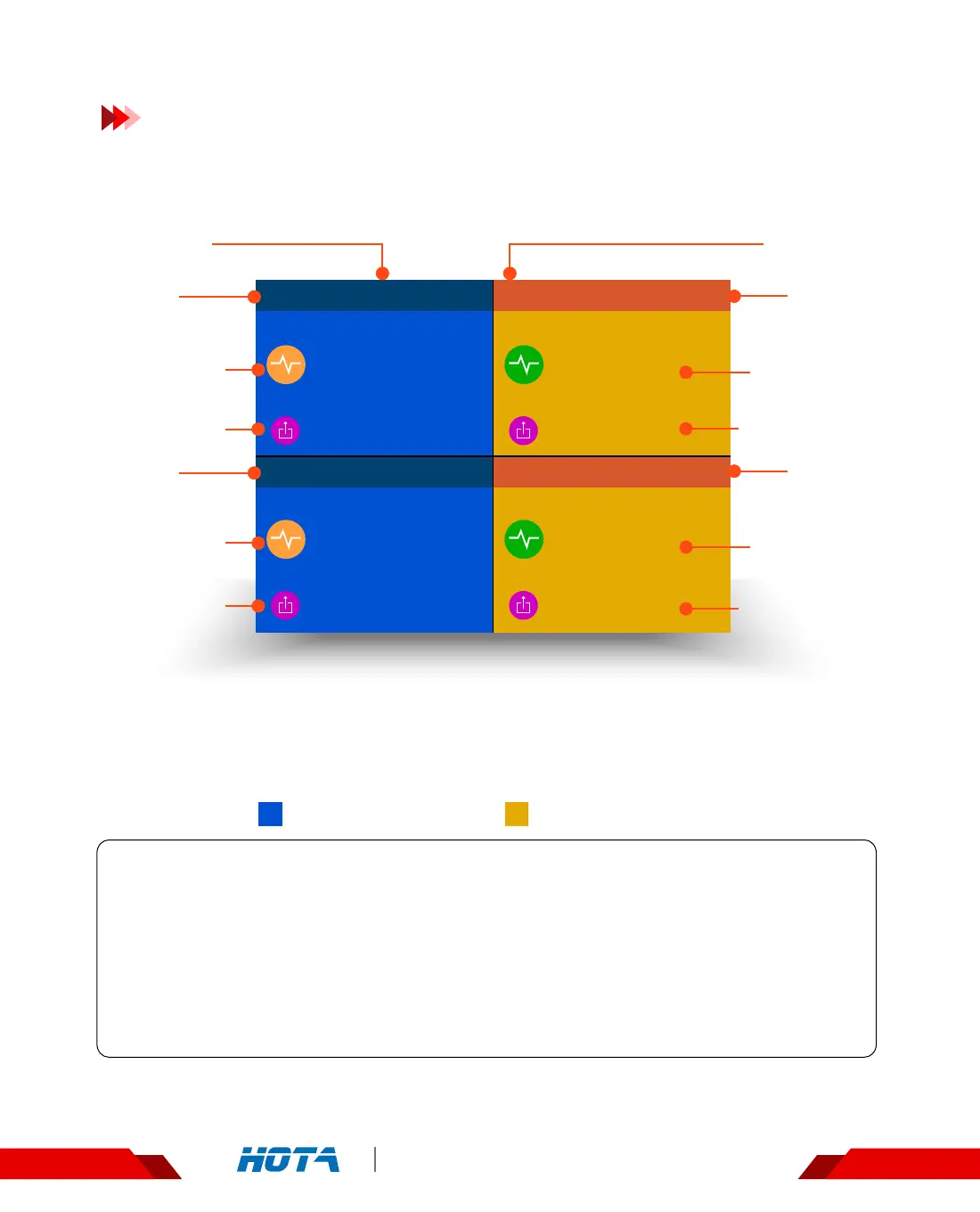
Current
channel
Current
channel
Electric current
of current task
Output voltage
/power
Electric current
of current task
Output voltage
/power
Electric current
of current task
Output voltage
/power
Electric current
of current task
Output voltage
/power
Battery
parameters
Battery
parameters
Channel 1,2 : Standby Channel 3,4 : Charging status
Task status
Task status
Split-Screen Display : Simple Operation
1. Boot into the Split-screen display ----- Standby state;
2. Long press the OK key to enter“Charger Settings”menu in the
standby state;
3. Short press CH key to display the channel you choose;
4. Long press the CH key to stop the current task of double channels .


 To Next Page