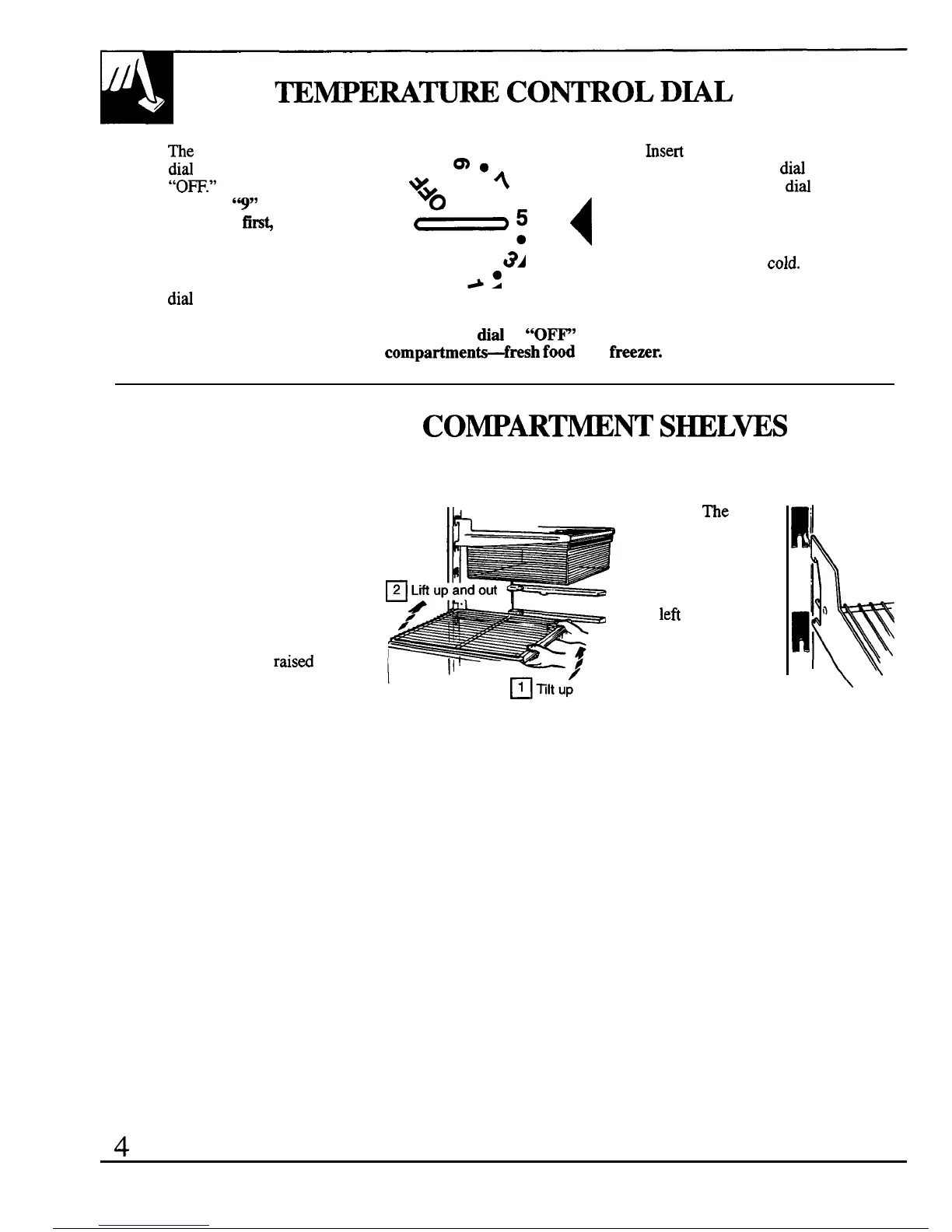
The temperature control
dird
has nine settings plus
“0~.”
“l” is the
warmest.
’9”
is the
coldest.
At
firs~
set the
dial at “5?’
After using the
refrigerator, adjust the
did
if necessary.
o
hsert
a coin into the slot
m.
*WO
4
in the middle of the
did
●
and you can turn the
dird
~g
4
to the setting that’s best
suited to your needs.
Allow 24 hours for the
a.
refrigerator to get
cold.
A.
NOTE: Turning the
did
to
“0~’
stops cooling
in both
compartmen~fresh
food
and freenr.
FRESH FOOD
CO~ARW~
SHELWS
Shelf supports at various levels allow you to custom-space your shelves.
HaM-Width Shelves
(on some models)
One end of the shelf rests on
Note:
The
shelf
a molded side-wall support; a
to the right of the
bracket on the other end hooks into
track is designed
a track on the rear cabinet wall.
to hook into the
To remove,
lift the shelf up at
right-hand slot;
front, then off the support and out
the shelf to the
of the track.
lefi
is designed
To replace,
select desired shelf
to hook into the
height. With shelf front
raisd
left-hand slot.
slightly, hook the bracket’s top lug
into the track, then lower the shelf
onto the support.
\
4



 To Next Page