EasyManua.ls Logo

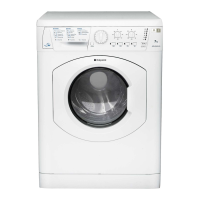
Hotpoint Aquarius WF101 - User Manual

Hotpoint Aquarius WF101
20 pages
Print Icon
To Next Page IconTo Next Page
Loading...
To the Installer:
Before installation, fill in the product details on the back cover of this
book. The information can be found on the rating plate.
To the User:
You must read these instructions prior to installing and using the
appliance and then retain them for future reference.
Instructions for Installation and Use
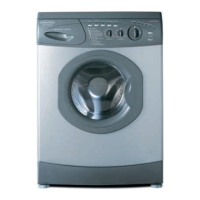
6kg Washing Machine
Aquarius
Question and Answer IconNeed help?

Do you have a question about the Hotpoint Aquarius WF101 and is the answer not in the manual?

Summary

Description

Installation

Unpacking

Instructions for safely removing the washing machine from its packaging.

Remove the transit fixings

Essential steps to remove transit bolts, washers, grommets, and spacers before use.

Location

Guidance on choosing a suitable and safe place for the washing machine.

Levelling

How to adjust machine feet to ensure stability and prevent noise.

Water Connection

Steps for connecting the cold water inlet hose to the supply tap.

Drainage Connection

Methods for connecting the drainage hose to a standpipe or under sink.

Electrical connections

Ensuring safe and compliant electrical hook-up for the appliance.

Before you start using your machine

Final checks and the first wash cycle to verify installation.

Control Panel Features

Starting a Programme

Starting a typical wash programme

Step-by-step guide on how to select and start a washing cycle.

Programme Table

Option Modifiers and Special Features

Option modifiers

Explanation of selectable options like Wash Enhance, Reduced Creases, and Rinse Hold.

Special features

Details on features like Fast Wash, Cool Wash, and Handwash programmes.

Automatic features

Description of Unbalanced load and No water detection systems.

Energy saving and water levels

Information on the machine's eco-friendly design and water usage.

Detergents and Laundry

Detergent dispenser

Guide to using the detergent drawer, including powder, liquid, and conditioner.

Washcare Tips

Advice on proper laundry handling, stain treatment, and garment care.

Care and maintenance

Cleaning

Instructions for cleaning the machine exterior, door, and dispenser drawer.

Moulded plug

Information regarding the fuse and fuse holder on the appliance plug.

Changing the plug

Guidance on replacing the power supply plug safely.

Cleaning the pump

Steps to access and clean the self-cleaning pump filter.

Precautions and advice

Safety advice

Essential safety guidelines for operating and maintaining the washing machine.

Saving energy and respecting the environment

Tips for efficient operation, reducing energy consumption and environmental impact.

Recycling and Disposal

Information on the proper disposal and recycling of old appliances and packaging.

Something Wrong? - Troubleshooting

General Troubleshooting

Common problems and solutions for the washing machine not starting or filling.

Specific Error Messages

Interpretation of error codes and indicator light flashing sequences.

Service

Before calling the Service Centre

Guide to self-help troubleshooting before contacting customer service.

Spare Parts

Information on obtaining and using genuine spare parts for repairs.

Key Contacts

Contact details for customer support, repair services, and accessories.

Summary

Description

Installation

Unpacking

Instructions for safely removing the washing machine from its packaging.

Remove the transit fixings

Essential steps to remove transit bolts, washers, grommets, and spacers before use.

Location

Guidance on choosing a suitable and safe place for the washing machine.

Levelling

How to adjust machine feet to ensure stability and prevent noise.

Water Connection

Steps for connecting the cold water inlet hose to the supply tap.

Drainage Connection

Methods for connecting the drainage hose to a standpipe or under sink.

Electrical connections

Ensuring safe and compliant electrical hook-up for the appliance.

Before you start using your machine

Final checks and the first wash cycle to verify installation.

Control Panel Features

Starting a Programme

Starting a typical wash programme

Step-by-step guide on how to select and start a washing cycle.

Programme Table

Option Modifiers and Special Features

Option modifiers

Explanation of selectable options like Wash Enhance, Reduced Creases, and Rinse Hold.

Special features

Details on features like Fast Wash, Cool Wash, and Handwash programmes.

Automatic features

Description of Unbalanced load and No water detection systems.

Energy saving and water levels

Information on the machine's eco-friendly design and water usage.

Detergents and Laundry

Detergent dispenser

Guide to using the detergent drawer, including powder, liquid, and conditioner.

Washcare Tips

Advice on proper laundry handling, stain treatment, and garment care.

Care and maintenance

Cleaning

Instructions for cleaning the machine exterior, door, and dispenser drawer.

Moulded plug

Information regarding the fuse and fuse holder on the appliance plug.

Changing the plug

Guidance on replacing the power supply plug safely.

Cleaning the pump

Steps to access and clean the self-cleaning pump filter.

Precautions and advice

Safety advice

Essential safety guidelines for operating and maintaining the washing machine.

Saving energy and respecting the environment

Tips for efficient operation, reducing energy consumption and environmental impact.

Recycling and Disposal

Information on the proper disposal and recycling of old appliances and packaging.

Something Wrong? - Troubleshooting

General Troubleshooting

Common problems and solutions for the washing machine not starting or filling.

Specific Error Messages

Interpretation of error codes and indicator light flashing sequences.

Service

Before calling the Service Centre

Guide to self-help troubleshooting before contacting customer service.

Spare Parts

Information on obtaining and using genuine spare parts for repairs.

Key Contacts

Contact details for customer support, repair services, and accessories.

Hotpoint Aquarius WF101 Specifications

General IconGeneral
TypeFront Load
Load Capacity5 kg
Energy RatingC
Spin Speed1000 RPM
Number of Programs16
Dimensions (H x W x D)85 x 59.5 x 54 cm
Capacity5 kg

Related product manuals