GB
7
Clock/Minute Minder
Operation (61DC & ARC60)
CLOCKFACE
The timer incorporates a 24 hour
clock.
SYMBOLS
A 'Bell' symbol will light up when
you select a Minute Minder
Period and will remain lit for the
period set.
At the end of the Minute Minder
Period, the timer will emit an
audible tone and the 'Bell'
symbol will flash.
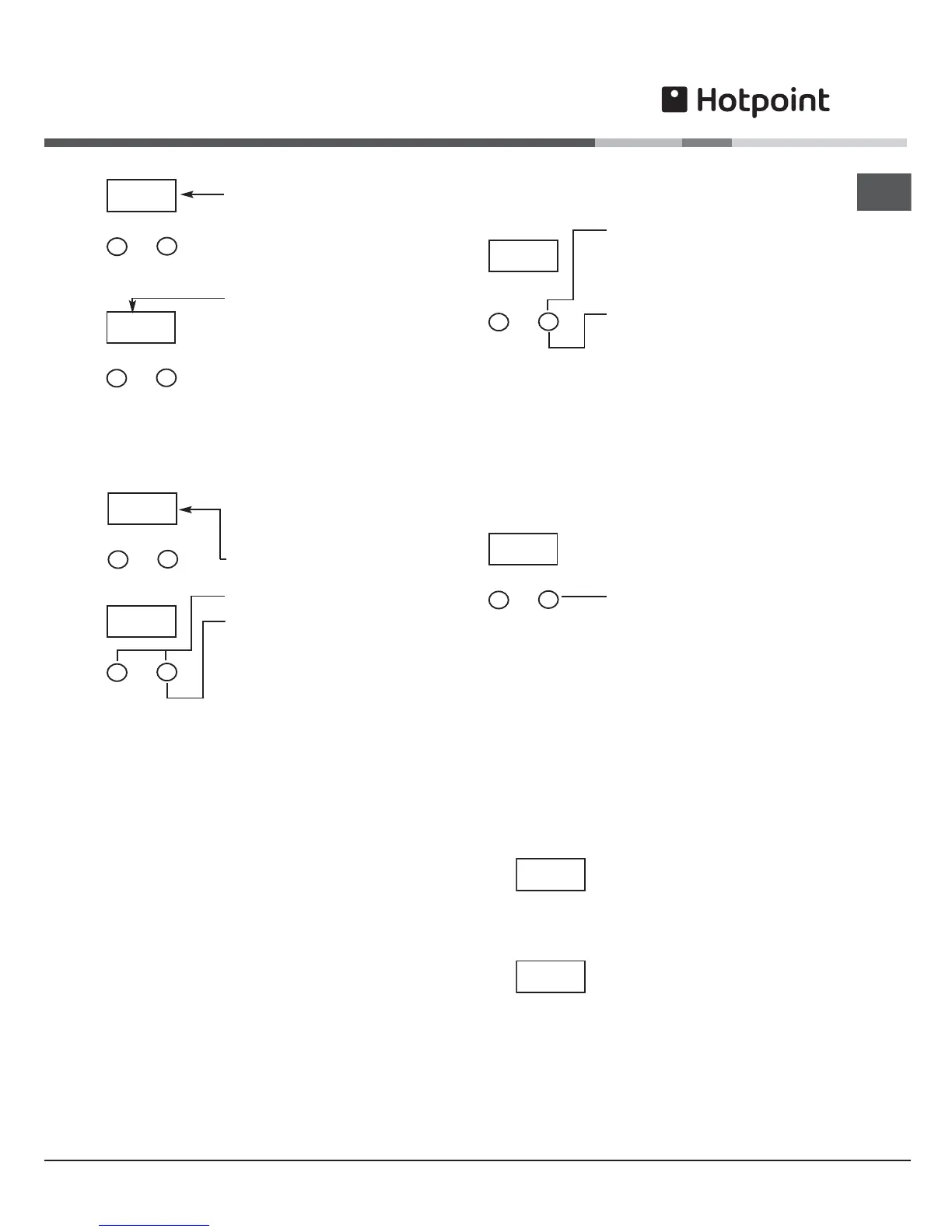
SETTING THE TIME OF DAY
Step 1 Make sure all oven
controls are turned off.
Step 2 Check the electricity
supply to the cooker is turned
on.
Step 3 When switched on, the
display will flash 0.00
Step 4 Press and release both
buttons simultaneously.
Step 5 Press the '+' button to
set the Time of Day. The Time of
Day can be adjusted, by using
the '+' button to increase the
time setting or the '-' button to
decrease the time setting. The
Time of Day is set if no
adjustments are made within 10
seconds.
THE TIME OF DAY IS NOW SET.
To change the time of day repeat Steps 4 & 5 above.
Here you can set a time period of up to 10 hours,
that will count down. When it reaches zero, the timer
will emit an audible tone.
For Example: If you set 20 minutes, the audible
tone will occur 20 minutes later.
-
+
0.00
Minute
Minder
0.00
0.00
0.00
SETTING THE MINUTE MINDER
Step 1 Ensure the time of day
is set correctly.
Step 2 Press and release the
'+' button.
Note: Step 3 must be started
within 10 seconds, otherwise
you must repeat Step 2.
Step 3 Press the '+' button to
set the required time period. A
'Bell' symbol will light up. The
time period can be adjusted, by
using the '+' button to increase
the time period or the '-' button
to decrease the time period.
Release all buttons, the timer display will show the
remaining time period.The 'Bell' symbol will remain
lit to signify that a time period has been set.
At the end of the set time an
audible tone will be heard and
the 'Bell' symbol will flash.
Step 4 To cancel the audible
tone press the '+' button.
To cancel the minute minder period press the '-'
button until 0.00 is displayed in the window then
release the button.
If at any time the display shows flashing zero's, it is
likely that the electricity supply has been
interrupted.
Reset the timer to the correct time of day.
Note: The Timer display will show the minute
minder period as follows:
Any period up to 99 minutes
and 50 seconds -
The display shows MINUTES and
SECONDS (10s intervals) eg. 19
minutes 50 seconds
Any period between 100
minutes (1 hour 40 minutes)
and
up to 10 hours -
The display shows HOURS and
MINUTES eg. 1 hour 41 minutes
0.00
0.00
19.50
1.41




 To Next Page