EasyManua.ls Logo

Hotpoint FDM 550 - Appliance Description and Control; Overall Appliance View; Control Panel Functions

Hotpoint FDM 550
16 pages
Print Icon
To Next Page IconTo Next Page
To Previous Page IconTo Previous Page
Loading...
6
EN
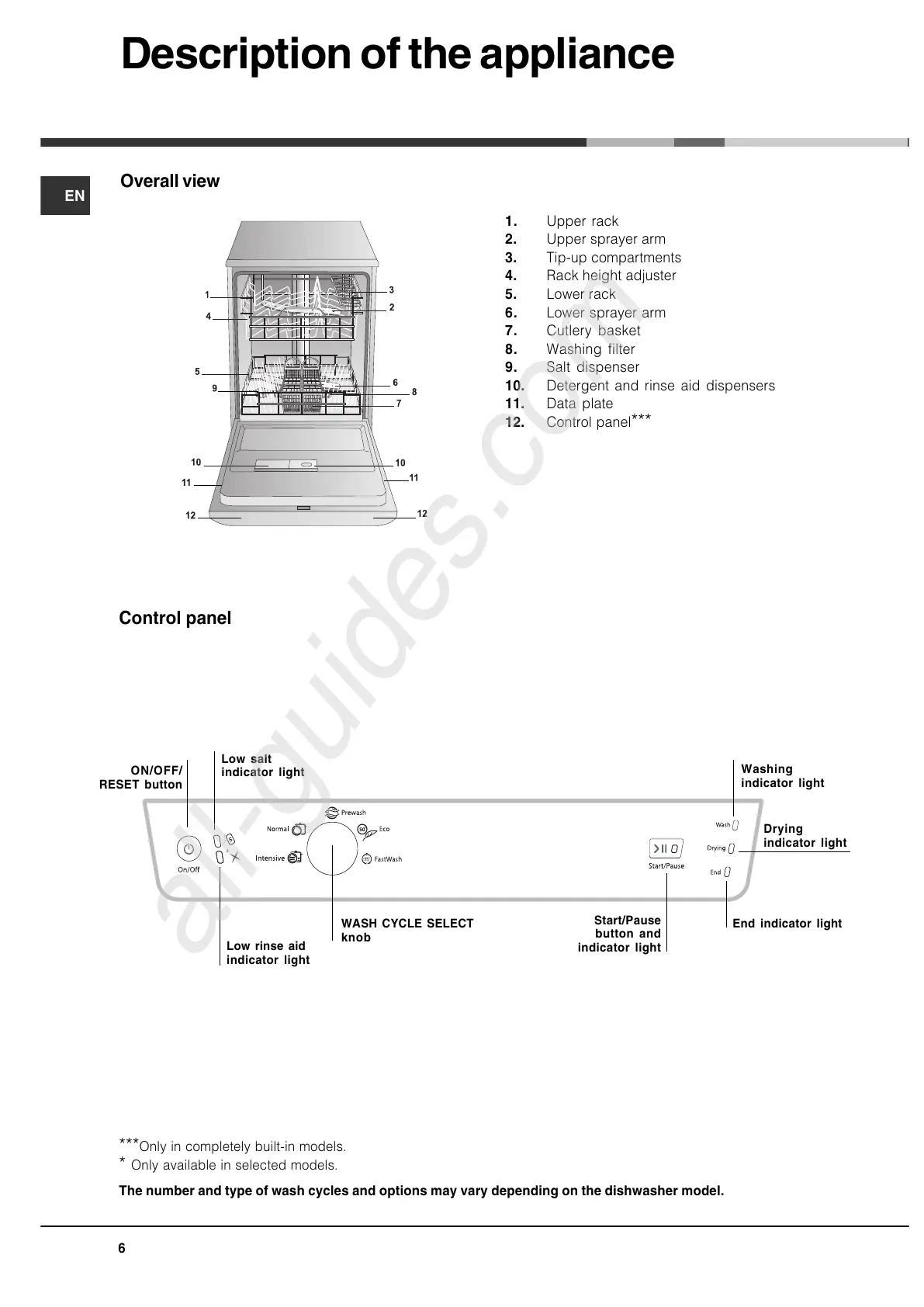
Overall view
1. Upper rack
2. Upper sprayer arm
3. Tip-up compartments
4. Rack height adjuster
5. Lower rack
6. Lower sprayer arm
7. Cutlery basket
8. Washing filter
9. Salt dispenser
10. Detergent and rinse aid dispensers
11. Data plate
12. Control panel
***
***Only in completely built-in models.
* Only available in selected models.
Description of the appliance
Control panel
The number and type of wash cycles and options may vary depending on the dishwasher model.
End indicator light
Washing
indicator light
Drying
indicator light
Start/Pause
button and
indicator light
ON/OFF/
RESET button
WASH CYCLE SELECT
knob
Low rinse aid
indicator light
Low salt
indicator light
All manuals and user guides at all-guides.com
all-guides.com

Related product manuals