www.sacoapartments.com welcome
Starting the dishwasher
1. Open the door and press the On/Off button
2. Put the dishwasher tablet into the detergent dispenser drawer
3. Load the dishwasher
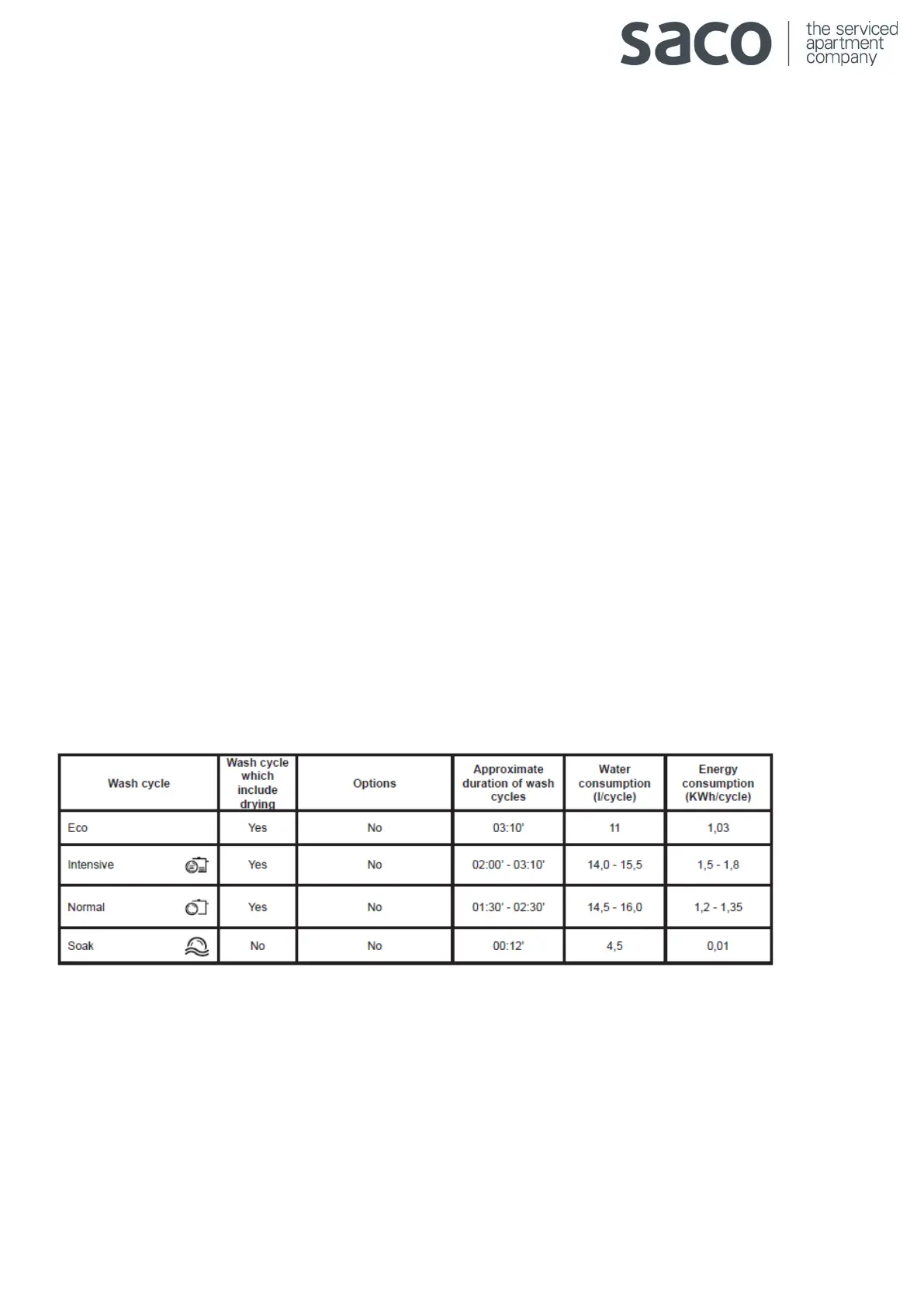
4. Select the wash cycle in accordance with the type of crockery and its soil level by pressing the P button.
5. Select the wash options
6. Start the wash cycle by shutting the door
7. The end of the wash cycle is indicated by beeps and by the flashing of the indicator light of the selected wash
cycle. Open the door; switch off the appliance by pressing the On/Off button.
8. Wait a few minutes before removing the crockery in order to avoid burns.
Changing a wash cycle in progress
If a mistake was made in the wash cycle selection process it is possible to change the cycle provided that it has only
just begun: open the door, taking care to avoid the escaping steam, press and hold the On/Off button; the machine
will switch off. Switch the machine back on using the On/Off button and select the new wash cycle and any options
desired; start the cycle by closing the door.
Wash cycles





 To Previous Page