Usingtheovencontrols,ransomemode s
Throughout this manual, features and appearance may vary from your model.
GEAppliances.com
OVEN CONTROLS TIME CONTROLS
COOKING
I AUTOMATICOVEF
Oven Control, Clock and Timer Features and Settings
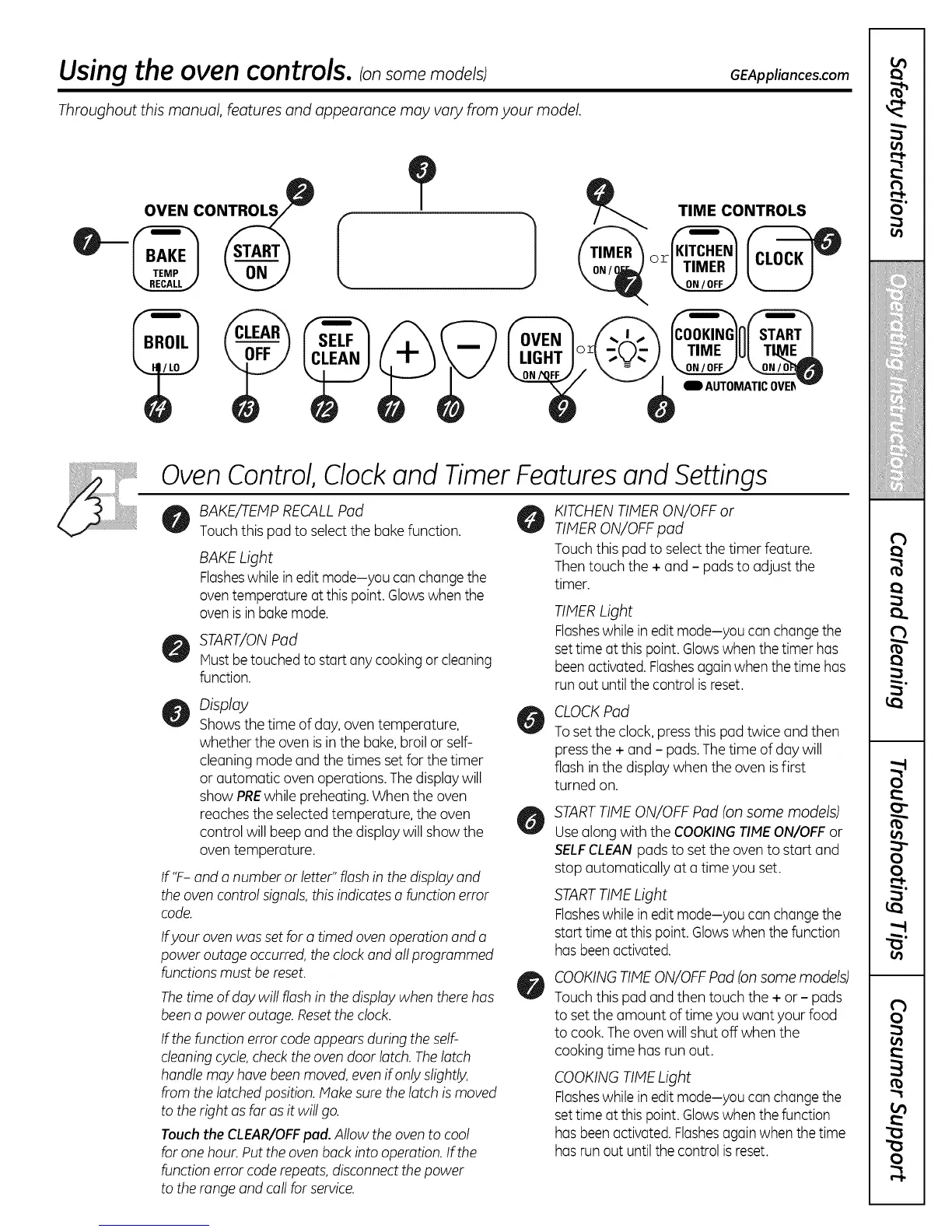
BAKE/TEMPRECALLPod
Touch this pad to select the bake function.
BAKE Light
Flasheswhilein edit mode-you can changethe
oventemperature atthis point. Glowswhen the
ovenisin bdkemode.
START/ONPod
Mustbe touched to startany cookingor cleaning
function.
Display
Showsthe time of day, oven temperature,
whether the oven isin the bake,broil or self-
cleaning mode and the times set for the timer
or automatic oven operations. The displaywill
show PREwhile preheating. When the oven
reaches the selected temperature, the oven
control will beep and the display will show the
oven temperature.
If "F- and a number or letter" flash in the display and
the ovencontrol signals,this indicates a function error
code.
Ifyour oven was set for a timed oven operation and a
power outage occurred, the clock and all programmed
functions must be reset.
The time of day will flash in the display when there has
been a power outage. Reset the clock.
If the function error code appears during the self-
cleaning cycle, check the oven door latch. The latch
handle may have been moved, even ifonly slightly,
from the latched position. Make sure the latch is moved
to the right as far as it willgo.
Touch the CLEAR/OFFpud. Allow the oven to cool
for one hour. Put the oven back into operation. Ifthe
function error code repeats, disconnect the power
to the range and call for service.
KITCHENTIMERON/OFF or
TIMERON/OFF pad
Touch this pad to select the timer feature.
Thentouch the + and - pods to adjust the
timer.
TIMERLight
Flasheswhilein edit mode-you can changethe
settime at this point.Glowswhenthe timer has
been activated.Flashesagainwhen the time has
run out untilthe control isreset.
CLOCKPad
Toset the clock, pressthis pad twice and then
pressthe + and - pads.The time of day will
flash inthe display when the oven is first
turned on.
STARTTIMEON/OFF Pad (on some models)
Usealong with the COOKINGTIMEON/OFF or
SELFCLEANpads to set the ovento start and
stop automatically at a time you set.
STARTTIMELight
Flasheswhilein edit mode-you can changethe
start time at this point.Glowswhen the function
hasbeen activated.
COOKINGTIMEON/OFFPad (onsome models)
Touch this pad and then touch the + or - pads
to set the amount of time you want your food
to cook. Theovenwill shut off when the
cooking time has run out.
COOKINGTIMELight
Flasheswhilein edit mode-you can changethe
settime at this point.Glowswhenthe function
hasbeen activated Flashesagainwhen the time
hasrun out untilthe control isreset.



 To Next Page