10
GB
PLEASE PHONE US TO REGISTER YOUR APPLIANCE AND ACTIVATE YOUR PARTS GUARANTEE ON 08448 24 24 24
Maintenance and care
Switching the appliance off
Disconnect your appliance from the electricity
supply before carrying out any work on it.
Cleaning the appliance
! Never use steam cleaners or pressure cleaners on
the appliance.
• The stainless-steel or enamel-coated external
parts as well as the rubber seals may be cleaned
using a sponge that has been soaked in
lukewarm water and neutral soap. If these stains
are difficult to remove, use only specialised
products. After cleaning, rinse and dry
thoroughly. Do not use abrasive powders or
corrosive substances.
• Ideally, the inside of the oven should be cleaned
after each use, when it is still lukewarm. Use hot
water and detergent, rinse and dry with a soft
cloth. Do not use abrasive products.
• The accessories can be washed like everyday
crockery (even in your dishwasher).
Cleaning the oven door
Clean the glass part of the oven door using a
sponge and a non-abrasive cleaning product, then
dry thoroughly with a soft cloth. Do not use rough
abrasive material or sharp
metal scrapers as these could
scratch the surface and cause
the glass to crack.
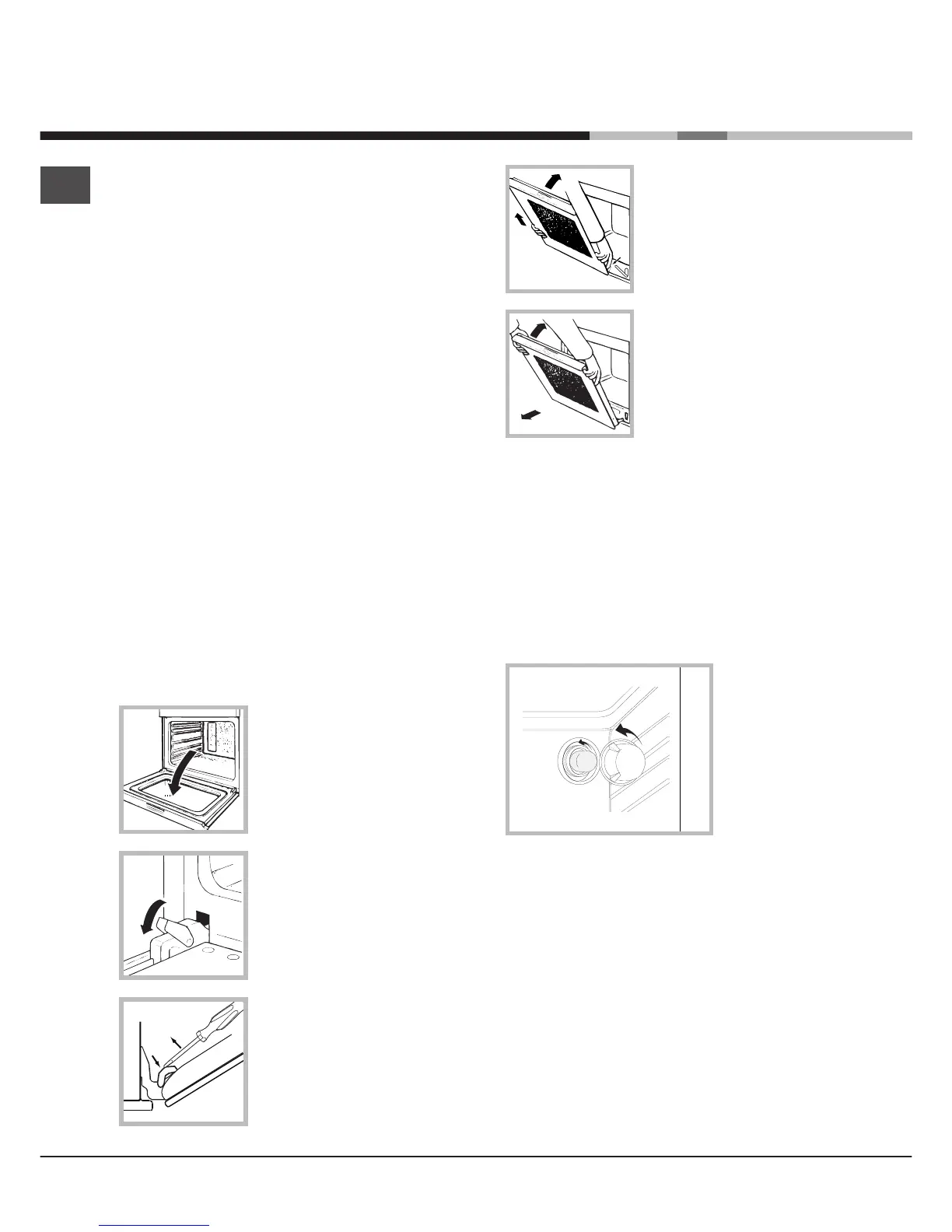
To clean more thoroughly, you
can remove the oven door.
1. Open the oven door fully
(
see diagram
).
2. Lift up and turn the small
levers located on the two
hinges (
see diagram
).
2. Use a screwdriver to lift up
and turn the small levers
FF
FF
F
located on the two hinges (
see
diagram
).
3. Grip the door on the two
external sides and close it
approximately half way. Unlock
the door by pressing on the
clamps
FF
FF
F, then pull the door
towards you lifting it out of its
seat (
see diagram
).*
3. Grip the door on the two
external sides and close it
approximately half way. Then
pull the door towards you
lifting it out of its seat (
see
diagram
).
To replace the door, reverse
this sequence.
Inspecting the seals
Check the door seals around the oven periodically. If
the seals are damaged, please contact your nearest
After-sales Service Centre (
see Assistance
). We
recommend not using the oven until the seals have
been replaced.
Replacing the light bulb
To replace the
oven light bulb:
1. Remove the
glass cover of the
lamp-holder.
2. Remove the
light bulb and
replace it with a
similar one:
Wattage 25 W,
cap E 14.
3. Replace the glass cover (
see diagram
).



 To Next Page