STEP 5
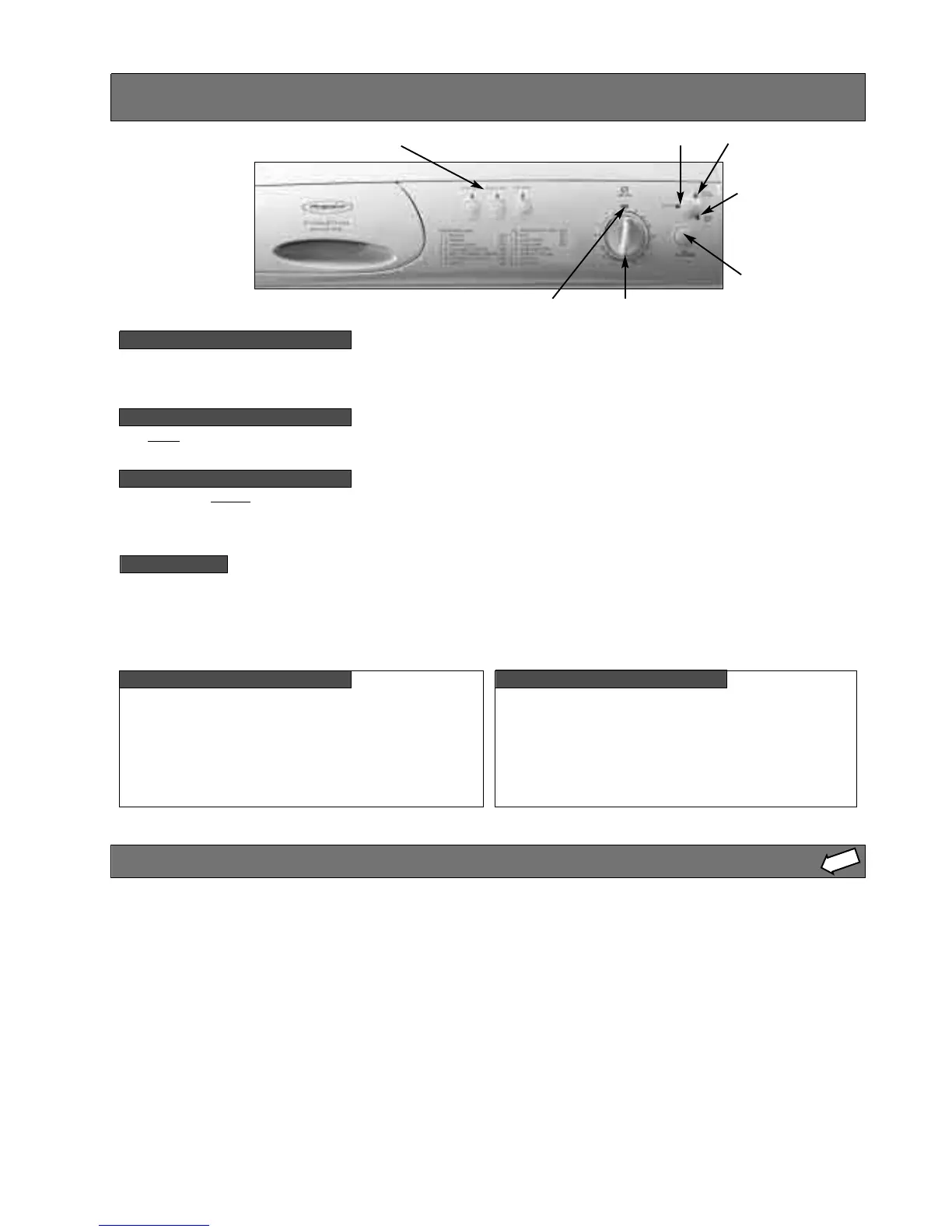
On-Off / Selecting a programme...
To pause a programme...
NOTE:
Progress indicator lights...
OFF position
Programme Active indicator light
Door Locked indicator light
‘START/Hold To Reset
button
Programme selector dial
Option buttons
Programme End light
The machine is switched on, by turning the programme selector dial away from the ‘OFF’ position to your selected programme.
To start the programme press and release the ‘START/Hold To Reset’ button.
NOTE: When the programme has finished, return the programme selector dial to the ‘OFF’ position.
To pause
a programme hold the ‘START/Hold To Reset’ button for two seconds until the ‘Prog End’ indicator light flashes.
To continue, press the ‘START/Hold To Reset’ button once more.
To change a programme...
If you want to change a programme hold the ‘START/Hold To Reset’ button for two seconds until the ‘Prog End’ indicator light
flashes.
You can then change the programme. Then press the ‘START/Hold To Reset’ button once more.
If you turn the programme selector dial during a programme, the ‘Active’ indicator light will flash to show that the programme
running is not that shown on the dial. Turn the dial to the original programme to stop the flashing.
The flashing will automatically stop when the programme enters the rinse phase.
The ‘Active’indicator light will come on as soon as the
selected programme has started. This light will remain lit
throughout the programme and will go out when the
programme has finished.
The ‘Prog End’ indicator light will come on after the
selected programme has finished. This light will remain lit
until you return the programme selector dial to its ‘OFF’
position, or start another programme.
Door Locked indicator light...
The ‘Door Locked’indicator light will come on two
seconds after you press the ‘START/Hold to Reset’ button
and will stay lit throughout the programme. A short time
after the programme has finished the indicator light will go
out and you can then open the door.
Selected programmes will not start if the door is not closed
properly, the ‘Door Locked’indicator light will flash to show
this. Push the door shut until you hear the catch click.
WARNINGS:
In the unlikely
event of something
not working, see
‘Troubleshooting’
STEP 8.



 To Next Page