mph
TRIP
mile
S
BELL
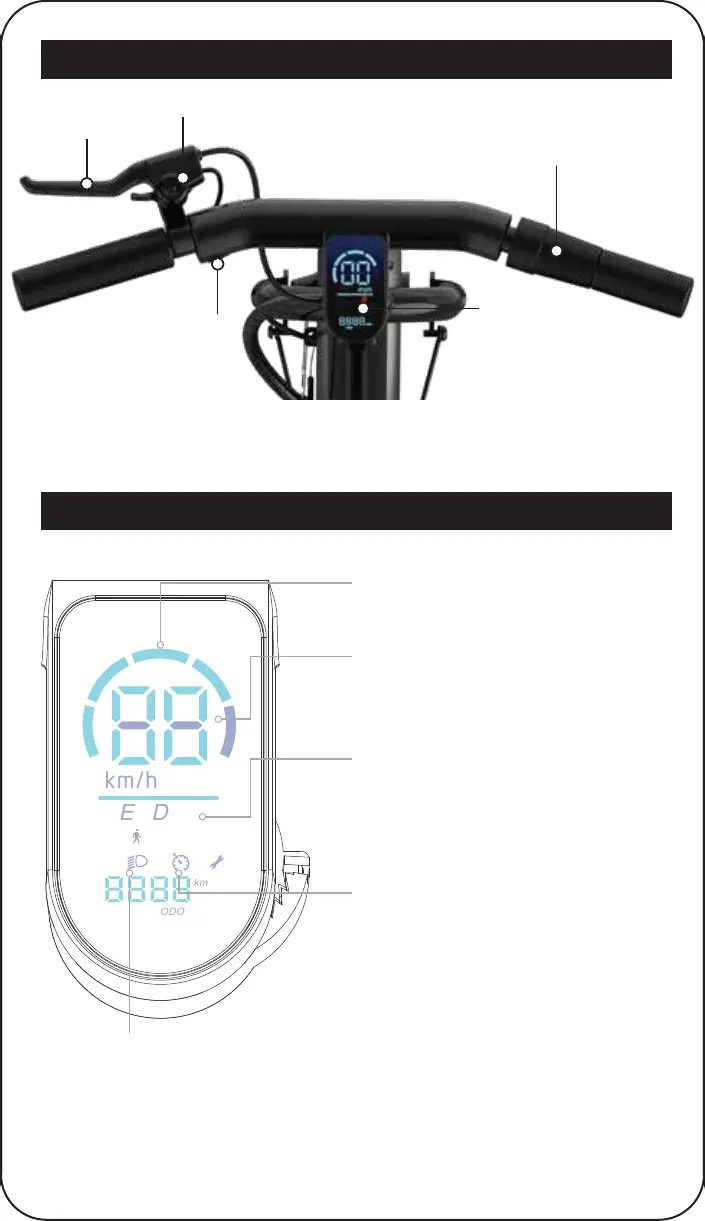
LED DISPLAY
THROTTLE
BRAKE HANDLE
POWER BUTTON
HOVER-1 ALPHA CARGO DIAGRAM
LED DISPLAY
SPEEDOMETER
Displays your current speed in mph or
km/h. Quickly press the power button 3
times to switch between mph and km/h.
When the E-Scooter is powered on, press
the power button once to switch between
each speed mode. Each speed mode has
a different top speed. Refer to “SPEED
MODES” on page 19 for more information.
SPEED MODES
BATTERY INDICATOR
Displays your current battery level.
CRUISE CONTROL ICON
Indicates cruise control is activated.
To activate cruise control, quickly press
the power button 4 times and listen for 1
beep. Ride at a constant speed over 3
mph for 5-8 seconds, and cruise control
will automatically engage. Twist the
throttle or squeeze the brake handle to
cancel cruise control. You can disable
cruise control by quickly pressing the
power button 4 times again. You should
only hear 1 beep to indicate it is
disabled.
HEADLIGHT ICON
Indicates the headlight is activated.
Quickly press the power button two
times to turn the headlight on/off.
16


 To Next Page