18
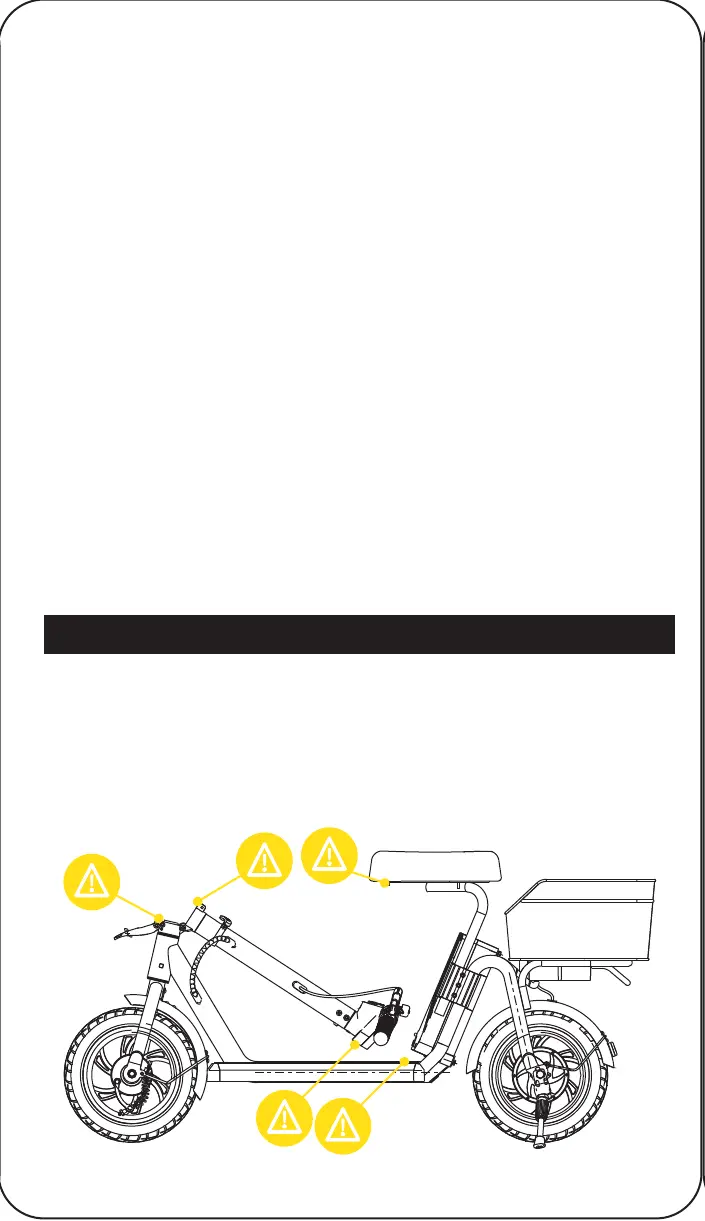
Some parts of your Alpha Cargo can injure you if mishandled.
Moving and folding parts can cut skin. Clamps and pivoting parts
such as brake levers can pinch. When folding and unfolding your
Alpha Cargo, please watch for pinch points where injury may be
sustained. Do not leave your hand in these areas during the folding or
unfolding process.
• Ensure that the charging port is clean and dry.
• Make sure that there is no dust, debris, or dirt inside the port.
• Plug the charger into a grounded wall outlet.
• Connect the cable with the power supply (100V-240V; 50 Hz/60 Hz).
• Align and connect the 1-pin charging cable into the charging port
of the Alpha Cargo (DO NOT FORCE OR BEND THE CHARGING
CABLE AS IT MAY CAUSE THE PRONGS TO BEND OR BREAK).
• The charging indicator light on the charger itself should change to
red, indicating that your E-Scooter is now being charged.
• When the red indicator light on your charger changes to green,
your E-Scooter is fully charged.
• After fully charging your E-Scooter, unplug the charger from your
device and from the wall outlet.
• If the E-Scooter is not used for an extended period of time, you may
need to recharge the battery every 2 months to maintain the battery
life.
PINCH POINTS
INSTALL THE SEAT
Insert the seat poles into the holes at the rear of the frame. Adjust the
seat height to the desired level, then tighten the nearby screws using
the hex key (6 screws total).
INSTALL THE BASKET
Align the 2 screw holes in the bottom of the basket to the holes in the
rear of the frame. Attach a washer to each screw and insert them into
the screw holes. Tighten each screw with a hex key.
INFLATE THE TIRES
Remove the air stem cap of each tire and use an air pump to inflate
each tire to 40 psi. Screw the stem caps back on.


 To Next Page