20
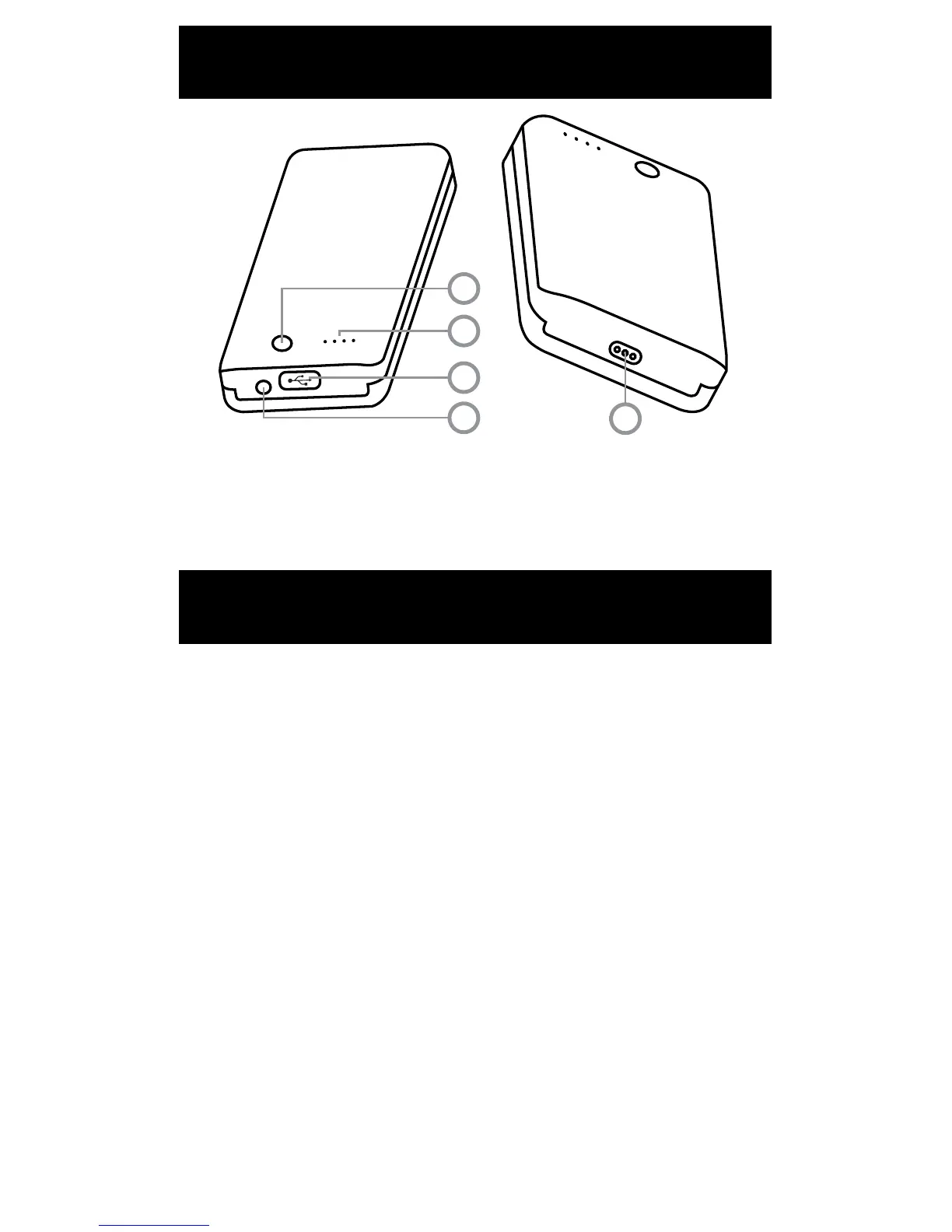
BATTERY PACK DIAGRAM
CHARGING DEVICES
5
1
2
3
4
1. Power Button
2. Battery Power Indicator Lights
3. USB Port
4. Charge Port
5. Battery Dock Port
FEATURES/PARTS
The Fuel’s battery pack doubles as a portable charging
solution for your mobile devices and tablets. Check to
make sure your battery pack has suicient battery
power to charge devices. If it does not have suicient
battery power, fully charge the battery pack before
charging any mobile device or tablet.
To charge a mobile device or tablet, rst remove the
battery pack from the Fuel’s battery dock and press the
power button to turn the battery pack on.
Next, insert your mobile device’s or tablet’s charging
cable USB connector to the USB port on the battery
pack. Then, insert the charging cable into your mobile
device or tablet. Your device will begin charging.
Remember to turn the battery pack o when not in use
to preserve battery power.
DO NOT CHARGE ANY MOBILE DEVICE OR TABLET WHILE THE
BATTERY PACK IS POWERING THE Fuel.



 To Next Page