EasyManua.ls Logo

Hover-1 Fuel - Display Panel Overview

Hover-1 Fuel
33 pages
Print Icon
To Next Page IconTo Next Page
To Previous Page IconTo Previous Page
Loading...
18
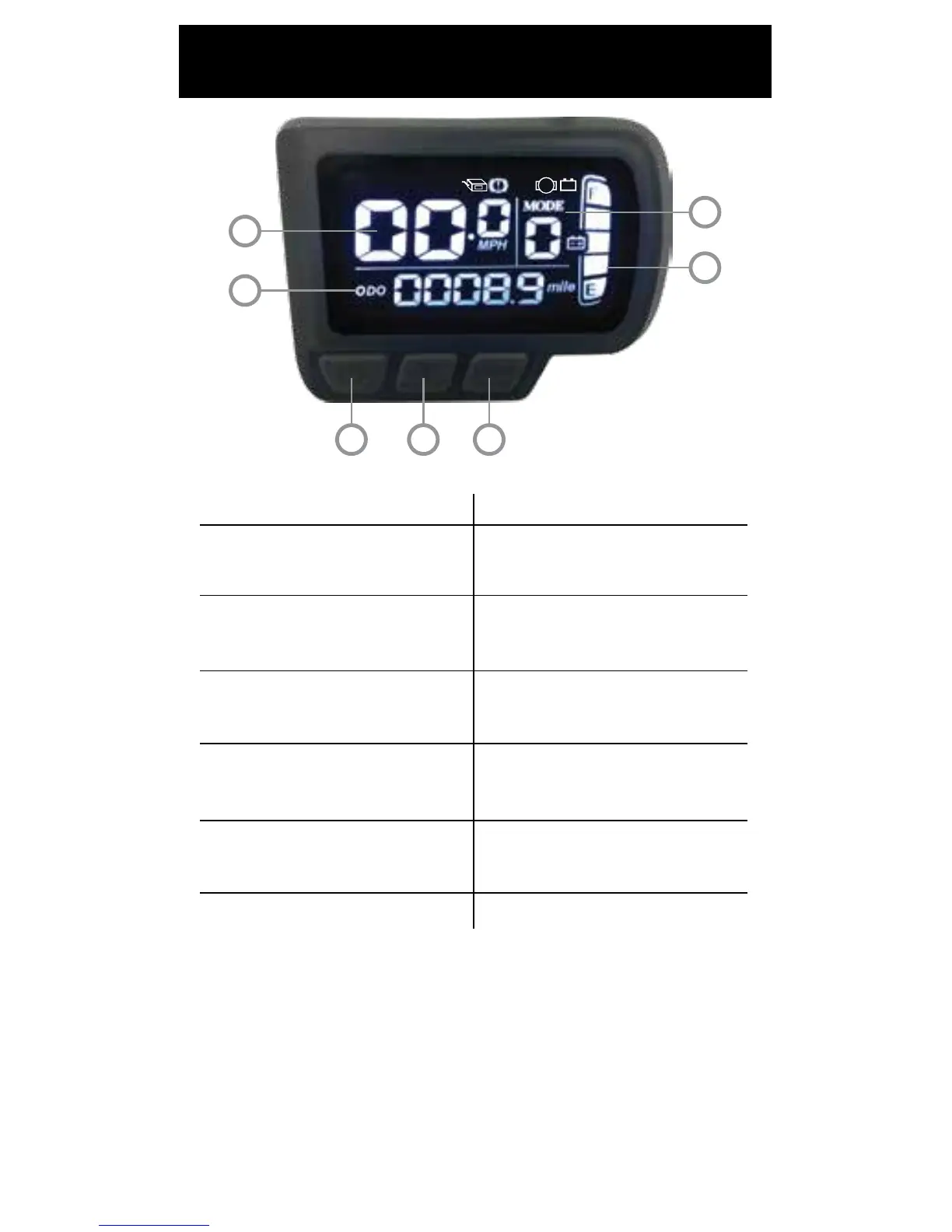
DISPLAY PANEL
M
LOW
7
6
5
4
1 2 3
1. POWER BUTTON
2. PEDAL-ASSIST LEVEL
INCREASE BUTTON
3. PEDAL-ASSIST LEVEL
DECREASE BUTTON
4. ODOMETER
5. SPEEDOMETER
6. PEDAL-ASSIST MODE
7. BATTERY INDICATOR
Turns Pilot on/o.
Increase pedal-assist
mode up 1 level.
Decrease pedal-assist
mode down 1 level.
Displays total trip
distance traveled.
Displays current speed in
mph.
Displays level of
pedal-assist mode.
Indicates battery level.
ODO - Odometer
TRIP - Trip Distance
VOL - Battery Voltage
TI - Riding Time
NOTE: The LCD display on your pilot can display the
following information:
When the LCD display is on, press the power button to
cycle through the display information.

Related product manuals