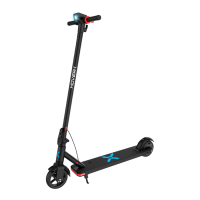
The Hover-1 Switch (Model: H1-SWCH) is a versatile personal transporter that can be used as either an electric skateboard or a scooter. This device is designed for safe operation and offers various features for user convenience and maintenance.
Function Description:
The Hover-1 Switch allows users to convert between an electric skateboard and a scooter. In skateboard mode, it functions as a motorized skateboard, while in scooter mode, a scooter attachment with handlebars, a brake lever, and an acceleration lever is added. The device is controlled via a remote control that enables throttle, braking, and reverse functions. The remote also displays battery indicators for both the Switch and the remote itself.
Important Technical Specifications:
- Net Weight: 19.5 lbs (8.87 kg)
- Max Supported Weight: 132 lbs (60 kg)
- Min Supported Weight: 44 lbs (20 kg)
- Max Speed:
- Scooter: 9 mph (15 km/h)
- Skateboard: 7 mph (12 km/h)
- Max Distance Range: Up to 6 miles (9.8 km)
- Battery Type: Lithium-ion
- Motor Power: 90W Brushless
- Battery Voltage: 25.2 V
- Battery Capacity: 2.0 Ah
- Charge Time: Up to 2.5 hours
- Power Requirement: AC 100-240V, 50/60Hz
- Product Dimensions:
- Scooter: 32.9 in x 16.1 in x 39.8 in (84 cm x 41 cm x 101 cm)
- Skateboard: 27.6 in x 8.7 in x 6.3 in (70 cm x 22 cm x 16 cm)
- Skateboard Weight: 24.6 lbs (11.2 kg)
- Board Size: 26.8 inch x 8.3 inch
- Wheel Size:
- Scooter Assembly: 4.7 inch
- Skateboard: 2.75 inch
- Remote Battery: 220 mAh
- Remote Connectivity: 2.4G wireless connection
- Remote Charging Time: Up to 2 hours
- Operating Temperature Range (Charger & Switch): 32°F - 104°F (0-40°C)
- Storage Temperature: -4°F - 77°F
- Storage Humidity: 5% - 95%
Usage Features:
- Conversion: The device can be converted from a skateboard to a scooter by replacing the front wheel assembly with the scooter attachment. The remote control is then inserted into a slot on the scooter assembly to enable throttle and brakes and act as a battery indicator.
- Handlebar Attachment: Handlebars are attached by placing them into sockets and twisting them into the correct direction.
- Bridge Adjustment: The bridge (trucks) on the skateboard can be adjusted using a wrench to make it harder (clockwise) or softer (counter-clockwise) for different riding preferences.
- Power ON/OFF: The device is powered on by pressing the power button on the underside of the skateboard. It will beep once to indicate it's on. To power off, press the power button again.
- Remote Pairing: To pair the remote with the Switch, first power on the skateboard and hold its power button for 5 seconds until it beeps (pairing mode). Then, on the remote, hold the power button for 3 seconds. The remote's indicator light will change from solid green to flashing green, and the skateboard will stop beeping when pairing is successful.
- Battery Indicators:
- Switch Battery: The remote displays the Switch's battery level with LED lights: 3 solid red for 100-70%, 2 solid red for 70-40%, and 1 flashing red for 40-10% (requiring immediate charge).
- Remote Battery: The remote also has an LED light that flashes below 25% charge, indicating the remote needs charging.
- Riding Controls: The remote features a throttle/brake lever for acceleration and deceleration, a power button, and a reverse button.
- Safety Precautions:
- Always wear a CPSC or CE safety-certified helmet.
- Obey all local traffic laws and ride defensively.
- Do not ride on icy or slippery surfaces, in low visibility without bright clothing, or in crowded areas.
- Avoid operating under the influence of drugs/alcohol or when restless/sleepy.
- Do not exceed weight limits (132 lbs max, 44 lbs min).
- Do not attempt stunts, jump on/off, or ride off-road.
- The Switch is for single-person use only.
- Avoid extreme temperatures (below 40°F or above 104°F) as they can affect performance and battery life.
Maintenance Features:
- Charging: Use only the supplied charger (Model: HLT-118C-2941000). Ensure the charging port is clean and dry. Plug the charger into a grounded wall outlet and connect it to the Switch. The charging indicator light will be RED while charging and turn GREEN when fully charged (up to 2.5 hours). Unplug after charging.
- Battery Care:
- Do not disassemble the battery or attempt to separate it from the Switch.
- Do not connect the Switch or battery directly to a car's cigarette lighter.
- Keep away from fire, direct sunlight, and excessive heat.
- Do not continue charging if the battery does not recharge within the specified time.
- Recycle or dispose of lithium-ion batteries properly according to local, state, and federal laws.
- Do not modify, change, or replace the battery.
- If the battery emits odor, overheats, or leaks, discontinue use and seek medical assistance if exposed to any emitted substance.
- Do not touch leaking materials or breathe fumes.
- Keep children and animals away from the battery.
- General Maintenance:
- Avoid exposing the Switch to liquid, moisture, or humidity to prevent damage to internal circuitry.
- Do not use abrasive cleaning solvents.
- Avoid extremely high or low temperatures to prevent shortening battery life or distorting plastic parts.
- Do not dispose of the Switch in fire.
- Avoid contact with sharp objects.
- Prevent the Switch from falling from high places.
- Do not disassemble the Switch (except for swapping the front assembly) as this voids the warranty.
- Store the Switch in a dry, ventilated environment.
- Recharge the battery every 2 months if not used for an extended period to maintain battery life.
- Avoid violent crashes or impacts during transport.

 Need help?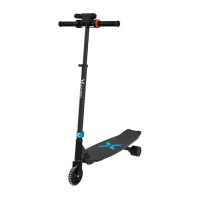

 To Next Page
 General