Need help?
Do you have a question about the HoverCam Pilot and is the answer not in the manual?
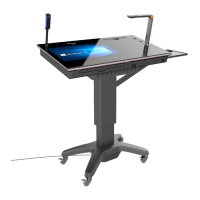
Labels identifying the physical parts of the HoverCam Pilot device.
Description of the device's control panel buttons, input ports, and output connections.
Details the 13MP camera and autofocus capabilities for presentations.
Describes the platform's ability to present objects from multiple angles.
Instructions for connecting PCs, Macs, iPads, and other mobile devices.
Synchronizes 1080p high-definition videos wirelessly with interactive displays.
Details the software installation procedure and choosing the installation directory.
Guides through confirmation screens and completion of the software installation.
Process for logging into an existing account or registering a new one.
Displays the main software modules: Lesson Recorder, Document Camera, etc.
How to record classes and upload them to the cloud for notes.
Entering lesson names and descriptions for easy searching and organization.
Utilizing multi-pane display and overlaying software for editing.
Instructions on how to take snapshots and start recording video sessions.
Tools for cropping image areas, OCR, auto-focus, and straightening.
Activating the touch-enabled whiteboard for interactive sessions.
Explanation of icons for capturing pictures and saving files.
Overview of marking tools like lines, graphs, and subtitles.
Detailed explanation of each marker button's specific use.
Creating class information for efficient student management.
Storing and finding generated videos and pictures from recordings and the platform.
 General
| Type | Document Camera |
|---|---|
| Connectivity | USB |
| Document Camera | Yes |
| Built-in Microphone | Yes |
| LED Lighting | Yes |
| Frame Rate | 30fps |
| Focus | Auto-focus |
| Compatibility | Windows |

 To Next Page