Optical drive
Description Spare part number
DVD+/-RW Double-Layer SuperMulti Drive 750636-001
Before removing the optical drive, follow these steps:
1. Shut down the computer. If you are unsure whether the computer is o or in Hibernation, turn the
computer on, and then shut it down through the operating system.
2. Disconnect all external devices connected to the computer.
3. Disconnect the power from the computer by rst unplugging the power cord from the AC outlet and then
unplugging the AC adapter from the computer.
4. Remove the battery (see Battery on page 31).
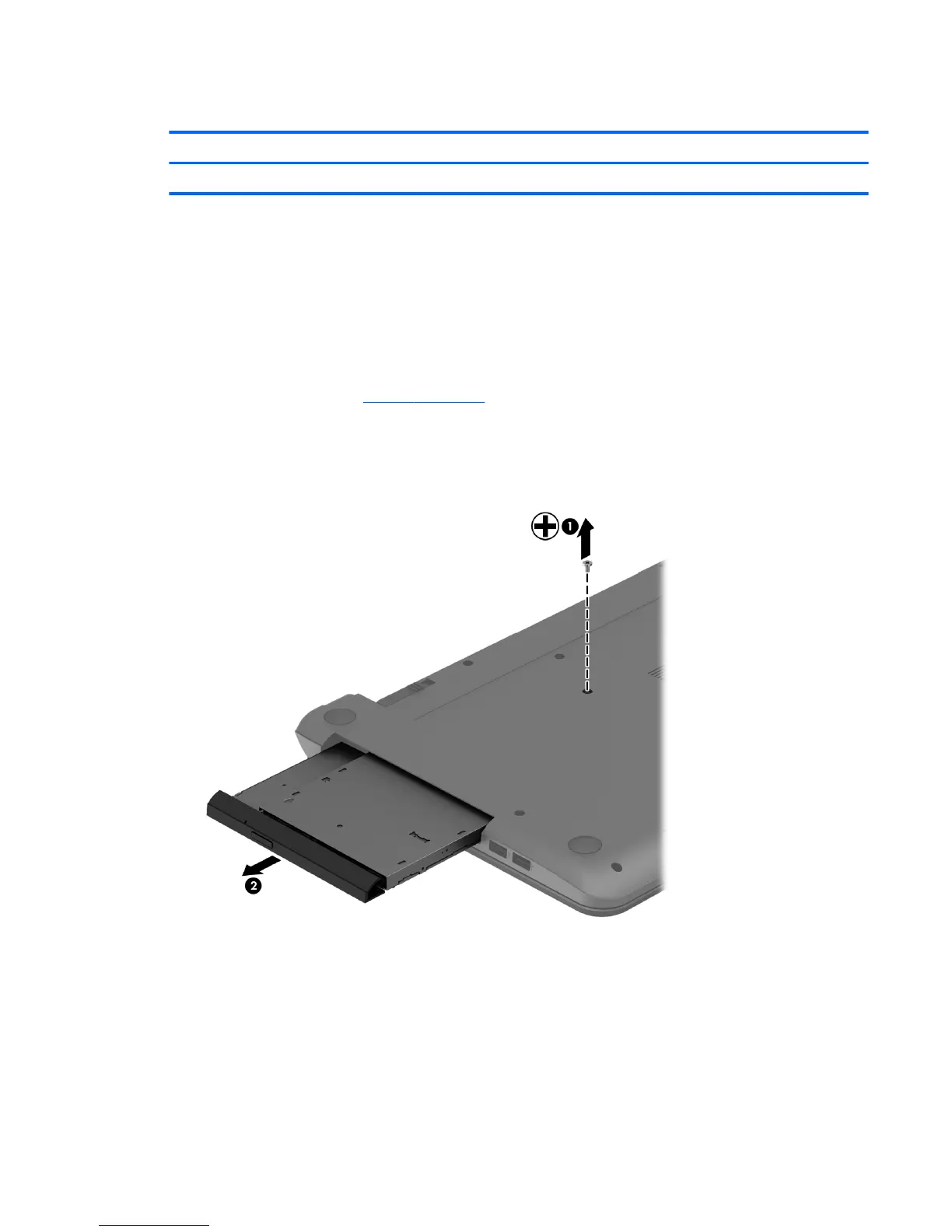
To remove the optical drive:
1. Remove the Phillips PM2.5×5.0 screw (1) that secures the optical drive to the computer.
2. Remove the optical drive (2) by sliding it out of the optical drive bay.
3. If it is necessary to replace the optical drive bracket on the rear of the optical drive, position the optical
drive with the rear panel toward you.
4. Remove the two Phillips PM2.0×3.0 screws (1) that secure the bracket to the optical drive.
Component replacement procedures 33


 To Next Page