EasyManua.ls Logo

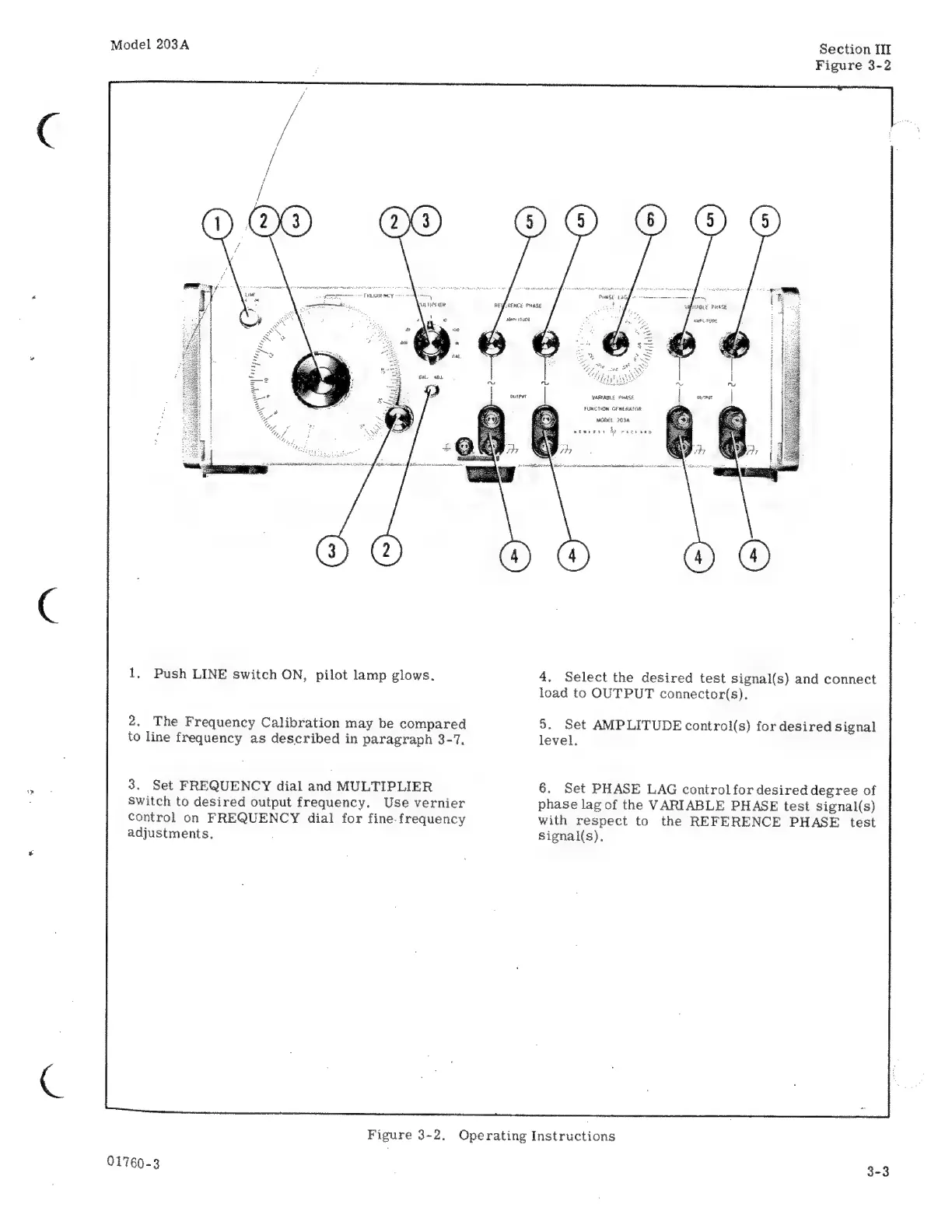
HP 203A - Set FREQUENCY; Set PHASE

HP 203A
68 pages
Print Icon
To Next Page IconTo Next Page
To Previous Page IconTo Previous Page
Loading...
Model
203A
Section
Ш
Figure
3-2
А
БЕНСЕ
PHASE
Мэта
(1404
D
“ун,
ю
wm
Ip
\
Y
QV
WARIADIE
РиеАХЕ
FUNCTION.
GENERATOR
маімі.
203A
1.
Push
LINE
switch
ON,
pilot
lamp
glows.
4.
Select
the
desired
test
signal(s)
and
connect
load
to
OUTPUT
connector(s).
2.
The
Frequency
Calibration
may
be
compared
9.
Set
AMPLITUDE
control(s)
for
desired
signal
to
line
frequency
as
described
in
paragraph
3-7.
level.
3.
Set
FREQUENCY
dial
and
MULTIPLIER
6.
Set
PHASE
LAG
controlfor
desired
degree
of
Switch
to
desired
output
frequency.
Use
vernier
phase
lag
of
the
VARIABLE
PHASE
test
signal(s)
control
on
FREQUENCY
dial
for
fine.frequency
with
respect
to
the
REFERENCE
PHASE
test
adjustments.
signal(s).
Figure
3-2.
Operating
Instructions
01760-3
3-3

Related product manuals