Installation
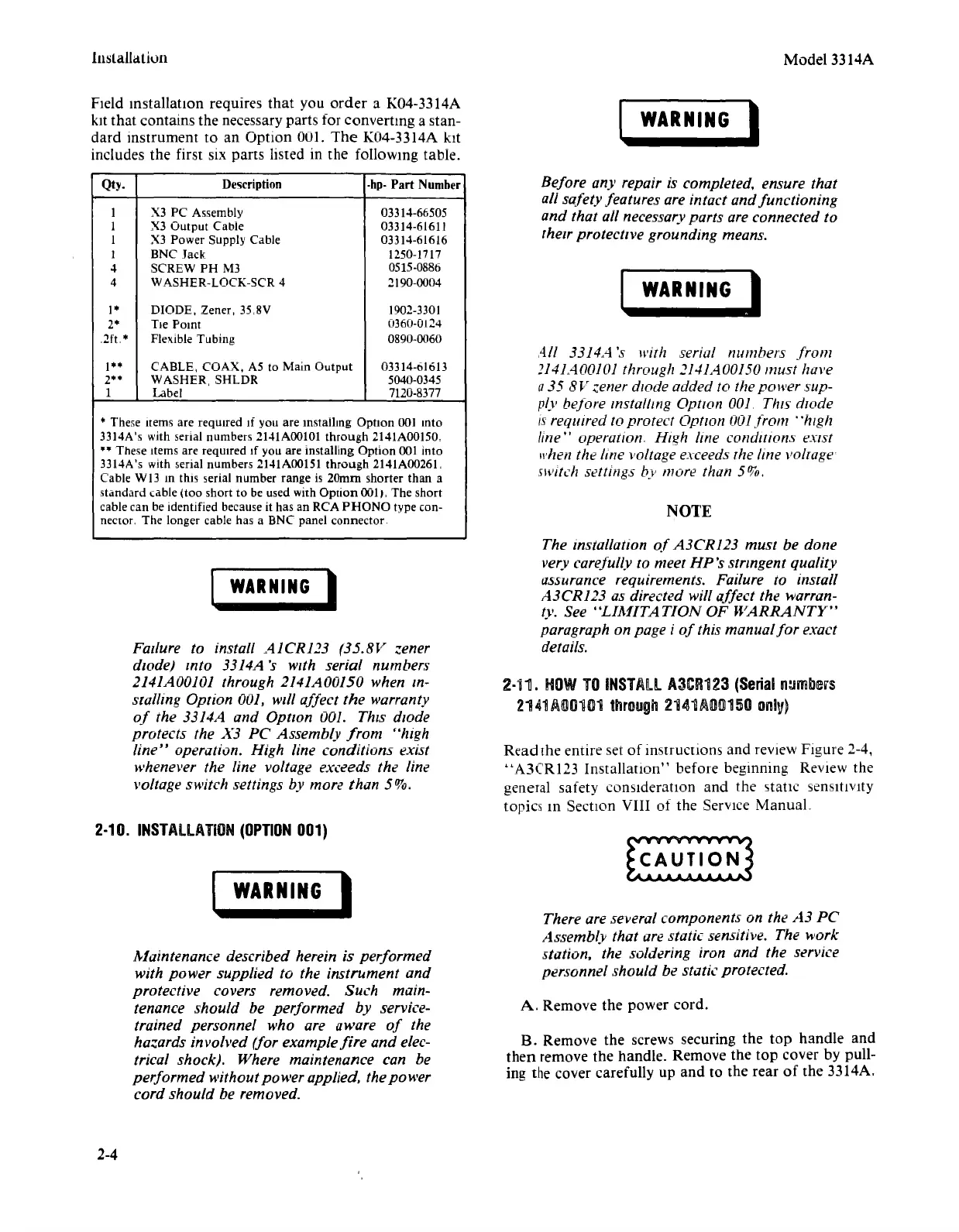
FIeld
mstallation requires
that
you
order
a K04-3314A
kit that contains the necessary parts for converting a stan-
dard instrument to an Option 001.
The
K04-3314A kit
includes the first six
pans
listed in the following table.
Qty. Description
-hp-
Part
Number
I
X3 PC Assembly
03314-66505
I X3 Output Cable 03314-61611
I X3 Power Supply Cable 03314-61616
I BNC Jack 1250-1717
4 SCREW PH M3
0515-0886
4 WASHER-LOCK-SCR 4
2190-0004
1*
DIODE, Zener, 35,8V
1902-3301
2*
Tie Point
0360-0124
,2ft.*
FleXibleTubing
0890-0060
1**
CABLE, COAX, A5 to Main Output 03314-61613
2**
WASHER, SHLDR
5040-0345
I
Label 7120-8377
* These Items are required If you are mstallmg Option 001 mto
3314A's with serial numbers
2141AOOIOI
through
2141AOO150,
••
These Items are required If you are installing Option 001 into
3314A's with serial numbers
2141AOOl51
through 2141A0026L
Cable WI3
10
this serial number range is 20mm shorter than a
standard cable (too short to be used with
Option
001" The short
cable
can be identified because it has an RCA
PHONO
type con-
nector. The longer cable has a
BNe
panel connector.
I
WARNING
I
Failure to install A1CR123 (35.8V zener
diode) tnto 3314A's
WIth
serial numbers
2141A00101 through 2141A00150 when tn-
stalling Option 001, will affect
the
warranty
of
the 3314A and Option 001.
ThIS
diode
protects the X3 PC Assembly
from
"high
line"
operation. High line conditions exist
}..
-henever
the line voltage exceeds the line
voltage switch settings by more than 5%,
2·10.
INSTALLATION
(OPTION
001)
WARNING
I
Maintenance described herein is performed
with power supplied to the instrument and
protective covers removed. Such main-
tenance should be performed by service-
trained personnel who are aware
of
the
hazards involved (for example
fire
and elec-
trical shock), Where maintenance can be
performed without power applied, the power
cord should be removed.
2-4
Model 3314A
WARNING
I
Before an)' repair is completed, ensure that
all safety features are intact and functioning
and that all necessaryparts are connected to
their protecttve grounding means.
WARNING)
All 3314A's with serial numbers
from
2141AOO101
through 2141A00150 must have
a
35
8V
zener diode added to the power sup-
ply before tnstalttng Option 001 ThIS diode
/s required TOprotect Option 001from
"high
line" operation. High line conditions exist
whenthe line voltage exceeds
The
line voltage
switch settings by more than 5%,
NOTE
The installation
of
A3CR123 must be done
very carefully
to meet
HP's
stnngent quality
assurance requirements. Failure to install
A3CR123 as directed will affect the warran-
ty, See
"LIMITATION
OF
WARRANTY"
paragraph on page i
of
this manual
for
exact
details.
2-111.
HOW
TO
INSTALL
A3CR123
(Serial
numbers
2141/.\00101
through
2141~O«ll150
onl1')
Read
[he entire set
of
instructions and review Figure 2-4,
"A3CRl23
Installation"
before beginning Review the
general safety
consideration and the static sensitivity
topics m Section VIII of the Service
Manual
There are several components on the
A3
PC
Assembly that are static sensitive. The work
station, the soldering iron and the service
personnel should be static protected.
A, Remove the power cord.
B. Remove the screws securing the
top
handle
and
then
remove the handle. Remove the
top
cover by pull-
ing the cover carefully up
and
to the rear
of
the 3314A,


 To Next Page
 Loading...












