EasyManua.ls Logo

HP 3326A - Page 4

HP 3326A
16 pages
Print Icon
To Next Page IconTo Next Page
To Previous Page IconTo Previous Page
Loading...
Voltage
Range/Selection
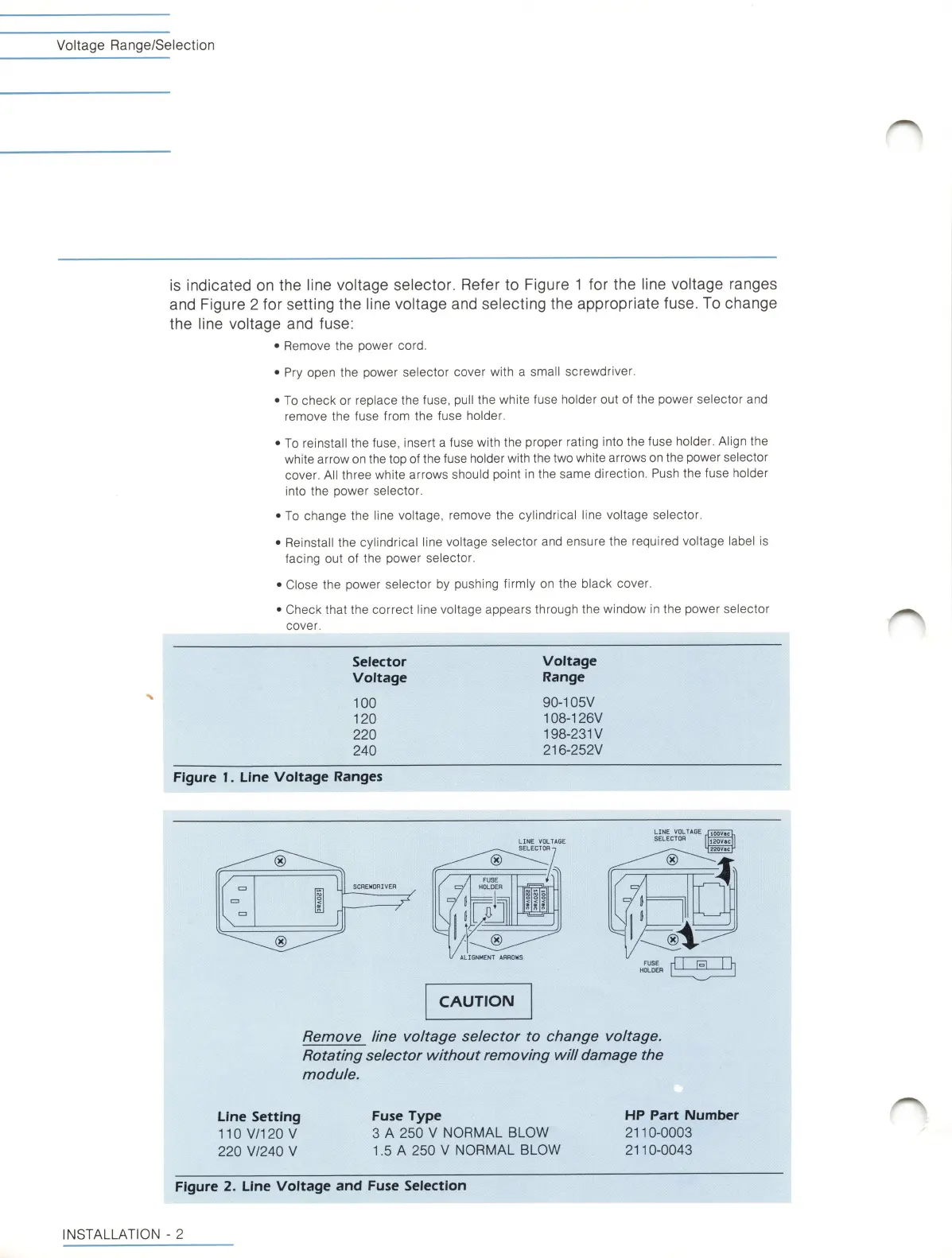
is
indicated
on
the
i
ine
voitage
seiector.
Refer
to
Figure
1
for
the
l
ine
voltage
ranges
and
Figure
2
tor
setting
the
l
ine
voltage
and
selecting
the
appropriate
fuse.
To
change
the
line
voltage
and
fuse;
Remove
the
power
cord.
Pry
open
the
power
selector
cover
with
a
small
screwdriver.
To
check
or
replace
the
fuse,
pul
l
the
white
fuse
holder
out
of
the
power
selector
and
remove
the
fuse
from
the
fuse
holder.
To
reinstall
the
fuse,
insert
a
fuse
with
the
proper
rating
into
the
fuse
holder.
Al
ign
the
white
arrow
on
the
top
of
the
fuse
holder
with
the
two
white
arrows
on
the
power
selector
cover.
All
three
white
arrows
should
point
in
the
same
direction.
Push
the
fuse
holder
into
the
power
selector.
To
change
the
line
voltage,
remove
the
cylindrical
l
ine
voltage
selector.
Reinstall
the
cylindrical
l
ine
voltage
selector
and
ensure
the
required
voltage
label
is
facing
out
of
the
power
selector.
Close
the
power
selector
by
pushing
firmly
on
the
black
cover.
Check
that
the
correct
line
voltage
appears
through
the
window
in
the
power
selector
cover.
Voltage
Range
90-105V
108-126V
198-23IV
216-252V
Selector
Voltage
N
100
120
220
240
Figure
I.
Line
Voltage
Ranges
LINE
VOLTAGE
SELECTOR
120V8C
g20V«c
LINE
VOLTAGE
SELECTOR
-j
®
FUSE
HOLDER
SCREWDRIVER
i
7^
I
Li
®
ALIGNMENT
ARROWS
FUSE
HOLDER
CAUTION
Remove
line
voltage
selector
to
change
voltage.
Rotating
selector
without
removing
will
damage
the
module.
HP
Part
Number
2110-0003
2110-0043
Fuse
Type
3
A
250
V
NORMAL
BLOW
1.5
A
250
V
NORMAL
BLOW
Line
Setting
110
V/120
V
220
V/240
V
Figure
2.
Line
Voltage
and
Fuse
Selection
INSTALLATION
-
2

Related product manuals