EasyManua.ls Logo

HP 3457A - 3-25. Current Measurements (Manual Operation); 3-26. Function Selection

HP 3457A
273 pages
Print Icon
To Next Page IconTo Next Page
To Previous Page IconTo Previous Page
Loading...
Operation
3457A
3-22.
Integration
Time.
The
Integration
time
can
be
changed
to
reduce
measurement
noise
or
to
permit
faster
readings.
The
integration
time
is
dependent
upon
the
power
line
frequency
and
is
expressed
in
num-
ber
of
power
line
cycles
(NPLC).
There
are
six
integration
times
available;
100
PLC,
10
PLC,
|
PLC,
.1
PLC,
005
PLC
and
.0005
PLC.
The
greater
the
PLC
number,
the
quieter
and
more
accurate
the
reading
will
be
and
the
slower
the
measurement
speed.
©
To
select
the
Integration
Time
-
Press
the
NPLC
/
A
configuration
key.
Use
the
[/AUTO
or
|/HOLD
scroll
key
to
display
the
desired
number
and
press
the
ENT
/
LAST
ENTRY
key.
The
Integration
Time
can
also
be
changed
by
pressing
the
NPLC/A
key,
entering
the
desired
number
directly
using
the
MATH
keys
and
pressing
the
ENT/LAST
ENTRY
key.
3-23,
Input
Connections.
For
2-Wire
Ohms
measurements,
the
unknown
resistance
is
connected
to
the
INPUT
HI
and
LO
terminals.
This
applies
to
both
front
and
rear
terminal
operation.
When
using
one
of
the
optional
Plug-In
assemblies,
the
input
would
be
connected
to
the
HI
and
LO
inputs
of
a
particular
channel.
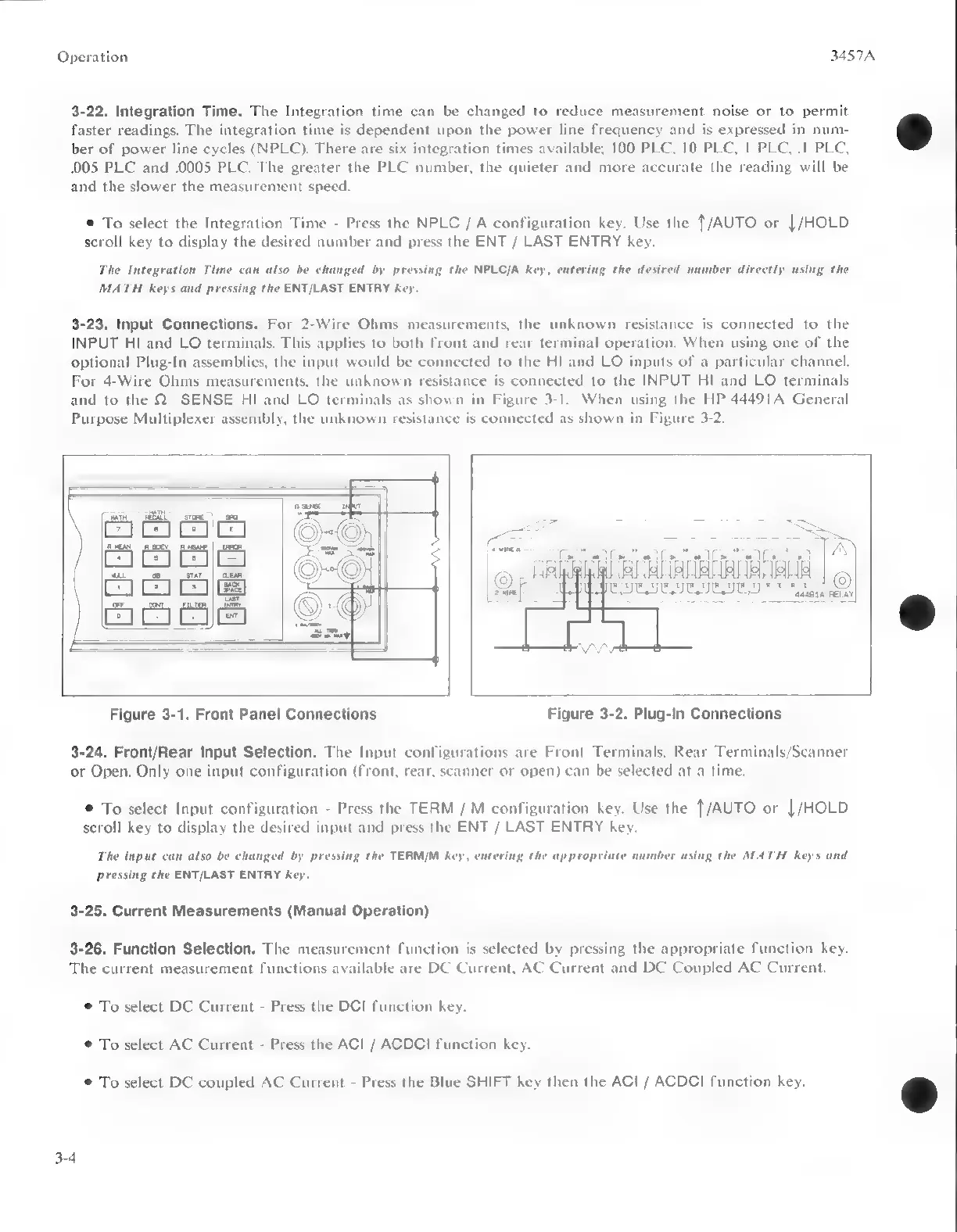
For
4-Wire
Ohms
measurements,
the
unknown
resistance
is
connected
to
the
INPUT
HI
and
LO
terminals
and
to
the
Q
SENSE
HI
and
LO
terminals
as
shown
in
Figure
3-1.
When
using
the
HP
44491A
General
Purpose
Multiplexer
assembly,
the
unknown
resistance
is
connected
as
shown
in
Figure
3-2.
Figure
3-1.
Front
Panel
Connections
Figure
3-2.
Plug-in
Connections
3-24.
Front/Rear
Input
Selection.
The
Input
configurations
are
Front
Terminals,
Rear
Terminals/Scanner
or
Open.
Only
one
input
configuration
(front,
rear,
scanner
or
open)
can
be
selected
at
a
time.
©
To
select
Input
configuration
-
Press
the
TERM
/
M
configuration
key.
Use
the
{/AUTO
or
|/HOLD
scroll
key
to
display
the
desired
input
and
press
the
ENT
/
LAST
ENTRY
key.
The
input
can
also
be
changed
by
pressing
the
TERM/M
key,
entering
the
appropriate
number
using
the
MATH
keys
and
pressing
the
ENT/LAST
ENTRY
key.
3-25.
Current
Measurements
(Manual
Operation)
3-26.
Function
Selection.
The
measurement
function
is
selected
by
pressing
the
appropriate
function
key.
The
current
measurement
functions
available
are
DC
Current,
AC
Current
and
DC
Coupled
AC
Current.
©
To
select
DC
Current
-
Press
the
DCI
function
key.
©
To
select
AC
Current
-
Press
the
ACI
/
ACDCI
function
key.
®
To
select
DC
coupled
AC
Current
-
Press
the
Blue
SHIFT
key
then
the
ACI
/
ACDCI
function
key.
3-4

Other manuals for HP 3457A

Related product manuals