HP 4120 Quick Start Guide
5
E
N
G
L
I
S
H
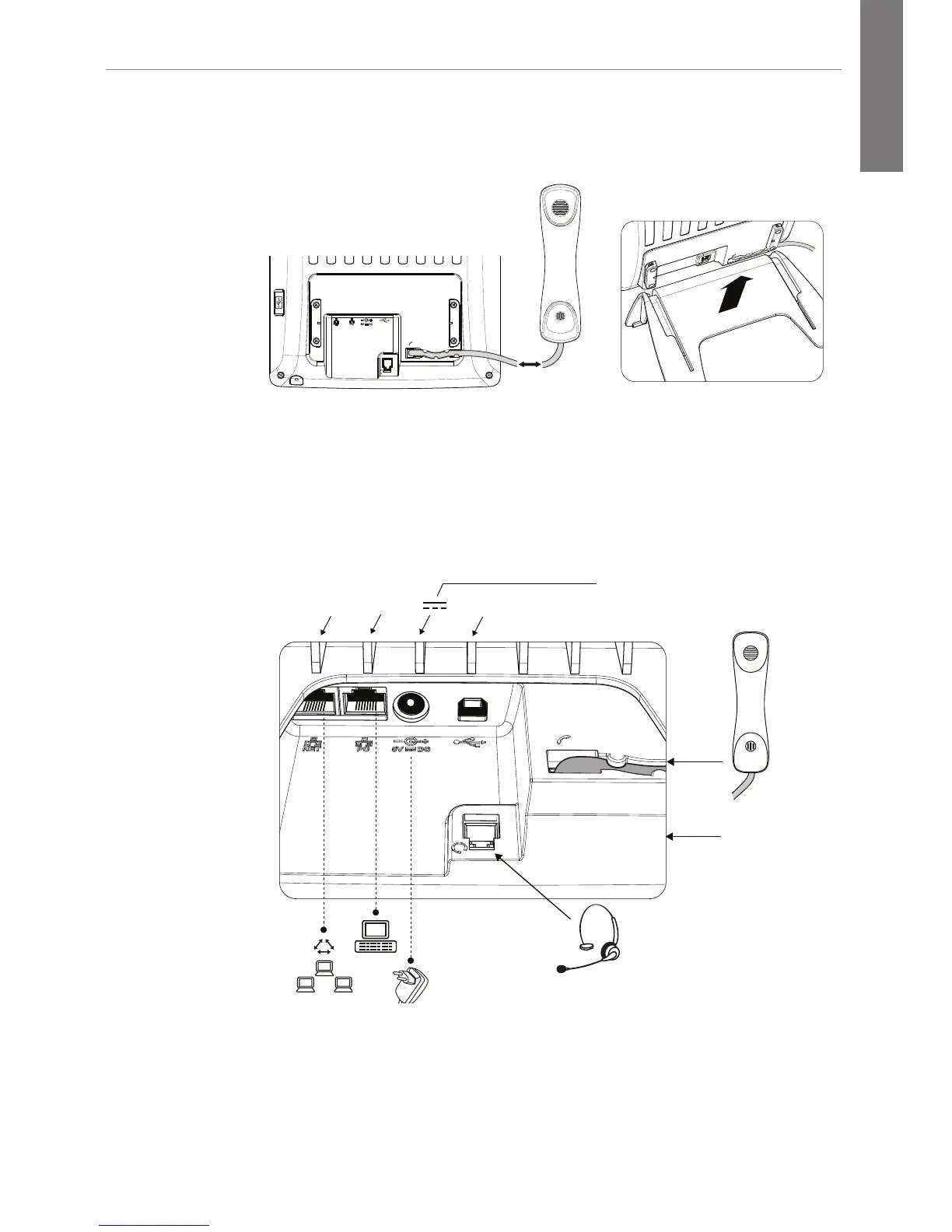
2. Attach the phone cord (Step 1), then slide the phone into the
phone stand (Step 2).
1.
2.
3. Connect the Ethernet cable into the NET port (left-most
port). If you are not using PoE, also connect an HP 5V
power supply. Caution: A 48V supply, as used by other IP phone
vendors, will permanently damage this phone. Use only a Hewlett-
Packard (HP) 5V external power supply (J9767A)
.
.
A-B USB
USB port
(not usable
at this time;
pending future
enhancements)
NET PC 5V DC
If no PoE
available
*Headsets: The following headsets have been tested with the HP 4120
IP Phone: GN Netcom headset (Part 8800-01-06)and snom headset
(HS-MM2). The Plantronics cable (38099-01) has also been tested.






 To Next Page