Item Component Description
(9) Hard drive light
●
Blinking white: The hard drive is being accessed.
●
Off: The hard drive is idle.
(10) Power light
●
White: The computer is on.
●
Blinking white: The computer is in the Sleep state.
●
Off: The computer is off or in Hibernation.
Right side
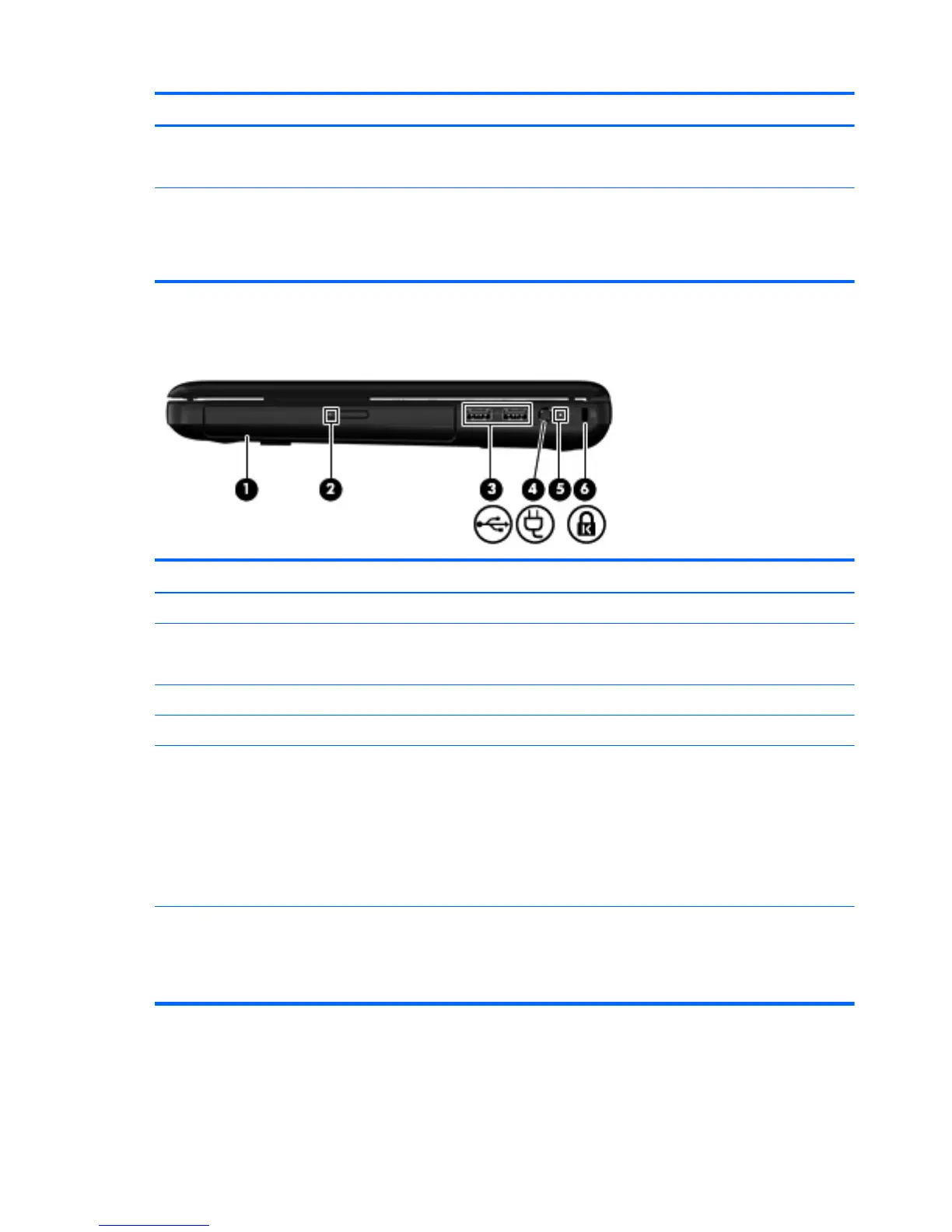
Item Component Description
(1) Optical drive (select models only) Reads and writes to an optical disc.
(2) Optical drive light
●
On: The optical drive is in use.
●
Off: The optical drive is idle.
(3) USB ports (2) Connect optional USB devices.
(4) Power connector Connects an AC adapter.
(5) Battery/AC adapter light
●
White: The computer is connected to external power
and the battery is fully charged.
●
Amber: A battery is charging.
●
Blinking amber: The battery has reached a low
battery level, or there is a battery error. When a
battery reaches a critical battery level, the battery
light begins blinking rapidly.
(6) Security cable slot Attaches an optional security cable to the computer.
NOTE: The security cable is designed to act as a
deterrent, but it may not prevent the computer from being
mishandled or stolen.
16 Chapter 2 External component identification






 To Next Page