EasyManua.ls Logo

HP 5355A - Page 24

HP 5355A
50 pages
Print Icon
To Next Page IconTo Next Page
To Previous Page IconTo Previous Page
Loading...
Model
5355A
Operation
and
Programming
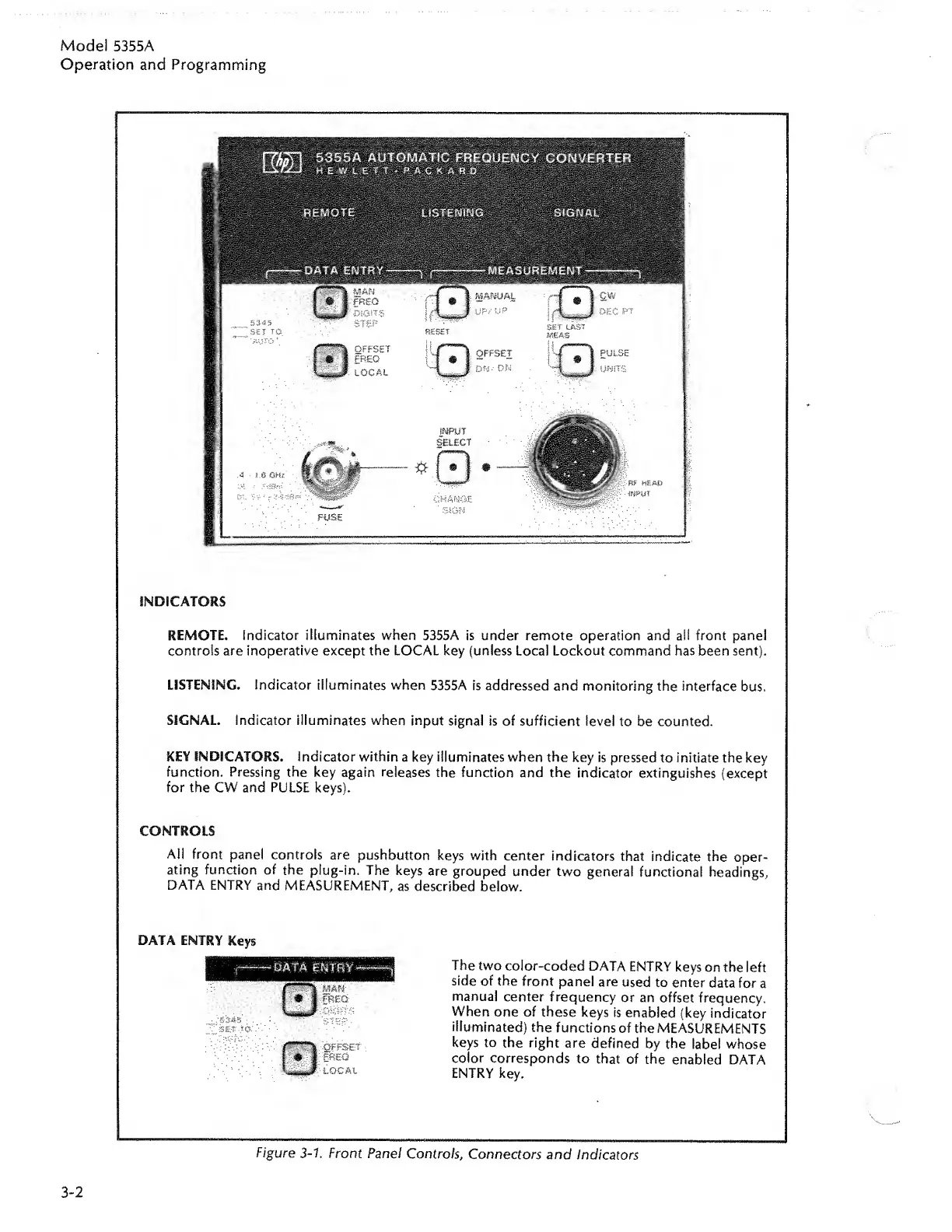
INDICATORS
REMOTE.
Indicator
illuminates
when
5355A
is
under
remote
operation
and
all
front
panel
controls
are
inoperative
except
the
LOCAL
key
(unless
Local
Lockout
command
has
been
sent).
LISTENING.
Indicator
illuminates
when
5355A
is
addressed
and
monitoring
the
interface
bus.
SIGNAL.
Indicator
illuminates
when
input
signal
is
of
sufficient
level
to
be
counted.
KEY
INDICATORS.
Indicator
within
a
key
illuminates
when
the
key
is
pressed
to
initiate
the
key
function.
Pressing
the
key
again
releases
the
function
and
the
indicator
extinguishes
(except
for
the
CW
and
PULSE
keys).
CONTROLS
All
front
panel
controls
are
pushbutton
keys
with
center
indicators
that
indicate
the
oper¬
ating
function
of
the
plug-in.
The
keys
are
grouped
under
two
general
functional
headings,
DATA
ENTRY
and
MEASUREMENT,
as
described
below.
The
two
color-coded
DATA
ENTRY
keys
on
the
left
side
of
the
front
panel
are
used
to
enter
data
for
a
manual
center
frequency
or
an
offset
frequency.
When
one
of
these
keys
is
enabled
(key
indicator
illuminated)
the
functions
of
the
MEASUREMENTS
keys
to
the
right
are
defined
by
the
label
whose
color
corresponds
to
that
of
the
enabled
DATA
ENTRY
key.
Figure
3-1.
Front
Panel
Controls,
Connectors
and
Indicators
DATA
ENTRY
Keys
3-2

Related product manuals