EasyManua.ls Logo

HP 5355A - Page 35

HP 5355A
50 pages
Print Icon
To Next Page IconTo Next Page
To Previous Page IconTo Previous Page
Loading...
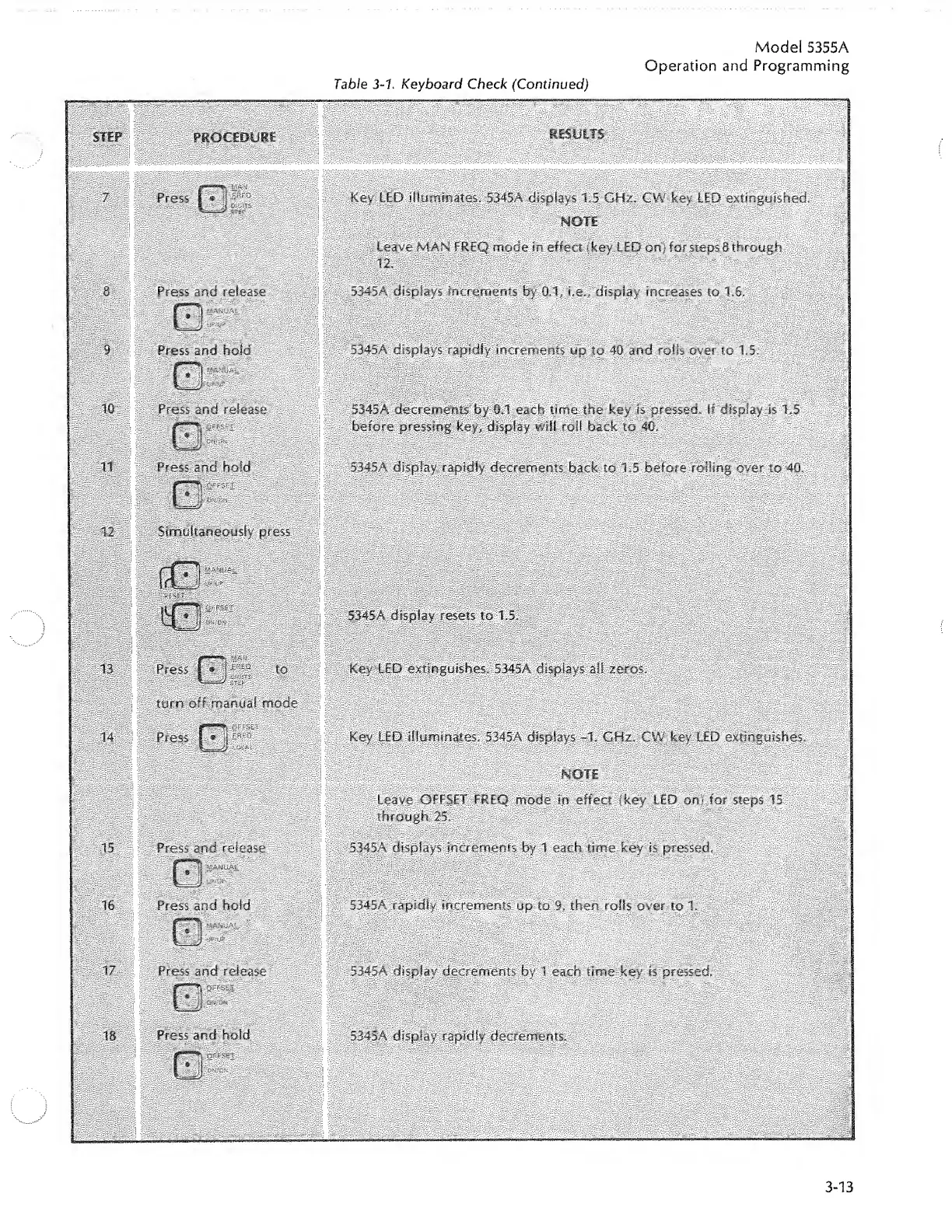
Table
3-1.
Keyboard
Check
(Continued)
Model
5355A
Operation
and
Programming
PROCEDURE
RESULTS
Press
I
®
1
Key
LED
illuminates.
5345A
displays
13
GHz.
CW
key
LED
extinguished.
Press
and
release
Press
and
hold
Press
and
release
Press
and
hold
Simultaneously
press
leave
MAN
FREQ
mode
in
effect
(key
LED
on)
for
steps
8
through
12
.
5345A
displays
increments
by
0.1,
i.e.,
display
increases
to
1.6.
5345A
displays
rapidly
increments
up
to
40
and
rolls
over
to
1.5.
5345A
decrements
by
0.1
each
time
the
key
is
pressed,
if
display
is
1.5
before
pressing
key,
display
will
roll
back
to
40.
5345A
display
rapidly
decrements
back
to
1.5
before
roiling
oyer
to
40.
5345A
display
resets
to
1.5.
Press
1
®
turn
off
manual
mode
Press
I
»
!j
-
Key
LED
extinguishes.
5345A
displays
all
zeros.
Key
LED
illuminates,
5345A
displays
-1.
GHz.
CW
key
LED
extinguishes.
Press
and
release
Press
and
hold
Press
and
release
Leave
OFFSET
FREQ
mode
in
effect
(key
LED
on)
for
steps
15
through
25.
5345A
displays
increments
by
1
each
time
key
is
pressed.
5345A
rapidly
increments
up
to
9,
then
rolls
over
to
1.
53.45A
display
decrements
by
1
each
time
key
is
pressed.
Press
and
hold
5345A
display
rapidly
decrements.

Related product manuals