EasyManua.ls Logo

HP 5355A - Page 38

HP 5355A
50 pages
Print Icon
To Next Page IconTo Next Page
To Previous Page IconTo Previous Page
Loading...
Model
5355A
Operation
and
Programming
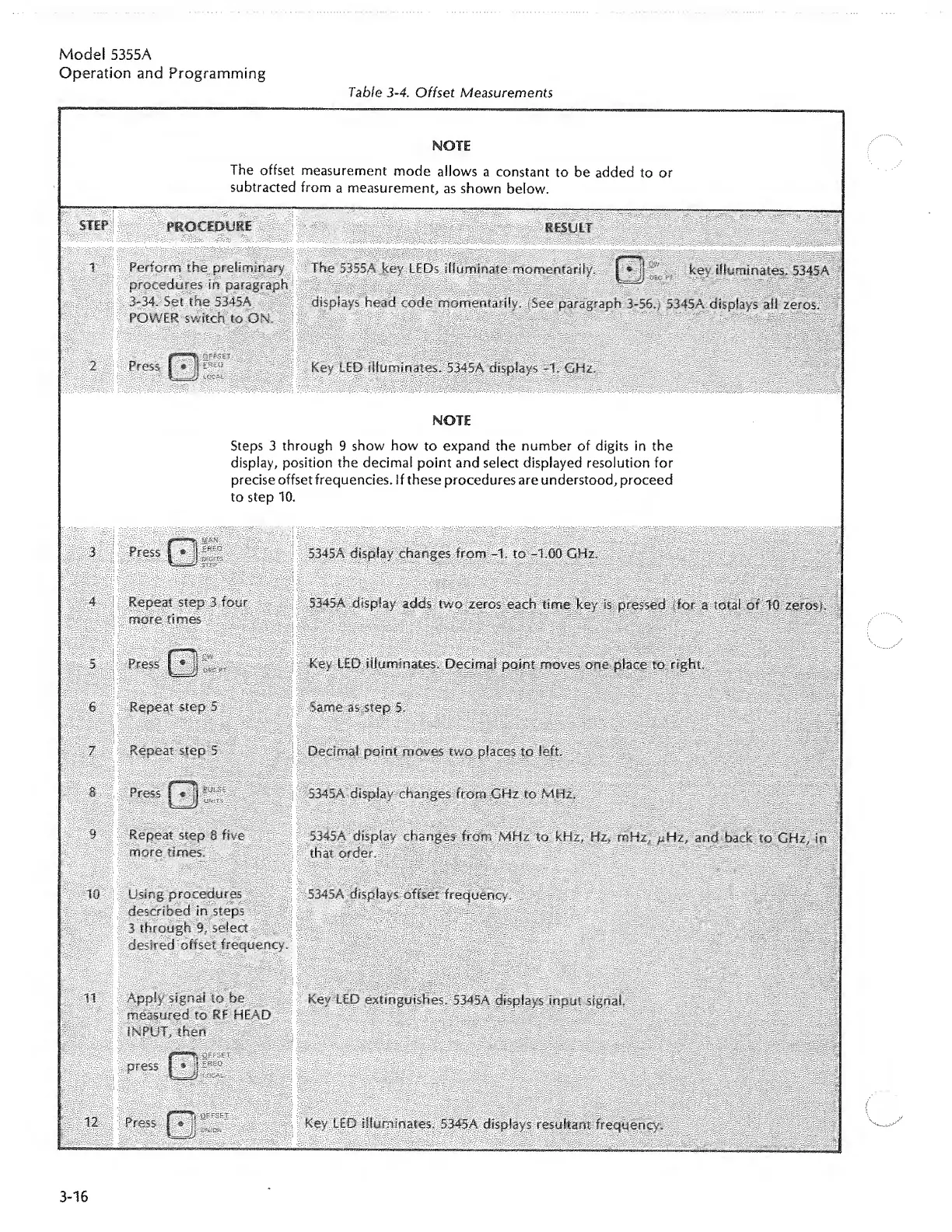
Table
3-4.
Offset
Measurements
————
———-
MOTE
The
offset
measurement
mode
allows
a
constant
to
be
added
to
or
subtracted
from
a
measurement,
as
shown
below.
STEP
PROCEDURE
RESULT
1
i
Perform
the
preliminary
procedures
in
paragraph
3-34.
Set
the
5345A
POWER
switch
to
ON.
The
5355A
key
LEDs
illuminate
momentarily,
key
illuminates.
5345A
displays
head
code
momentarily.
(See
paragraph
3-56,}
5345A
displays
ail
zeros.
2
Press
I
*
Key
LED
illuminates.
5345A
displays
-1.
GHz.
NOTE
Steps
3
through
9
show
how
to
expand
the
number
of
digits
in
the
display,
position
the
decimal
point
and
select
displayed
resolution
for
;
precise
offset
frequencies,
if
these
procedures
are
understood,
proceed
to
step
10.
3
Press
f7||
5345A
display
changes
from
-1,
to
-1.00
GHz.
4
Repeat
step
3
four
more
times
5345A
display
adds
two
zeros
eacn
time
key
is
pressed
(for
a
total
of
10
zeros;.
s
press
Q'i-
Key
LED
illuminates.
Decimal
point
moves
one
place
to
right.
6
Repeat
step
5
Same
as-
step
5.
Repeat
step
5
Decimal
point
moves
two
places
to
left.
8
p
ress
(Tjj
5345A
display
changes
from
GHz
to
MHz,
9
Repeat
step
8
five
more
times.
5345A
display
changes
from
MHz
to
kHz,
Hz,
mHz,
p.Hz,
and
i>ade
to
GHz,
in
that
order.
10
Using
procedures
described
in
steps
3
through
9,
select
desired
offset
frequency.
5345A
displays
offset
frequency.
11
Apply
signal
to
be
measured
to
RF
HEAD
INPUT,
then
Key
LED
extinguishes.
5345A
displays
input
signal.
press
PS
1
--
SJ
12
Press
01-
Key
LED
illuminates.
5345A
displays
resultant
frequency.
3-16

Related product manuals