HP Fax basics 17
Navigate the menus
Navigate the menus
Ready mode
Whenever the HP Fax is ready for faxing and copying (called Ready mode), it will
display the date, time, and answer mode. For example,
OCT-05 14:23 FAX.
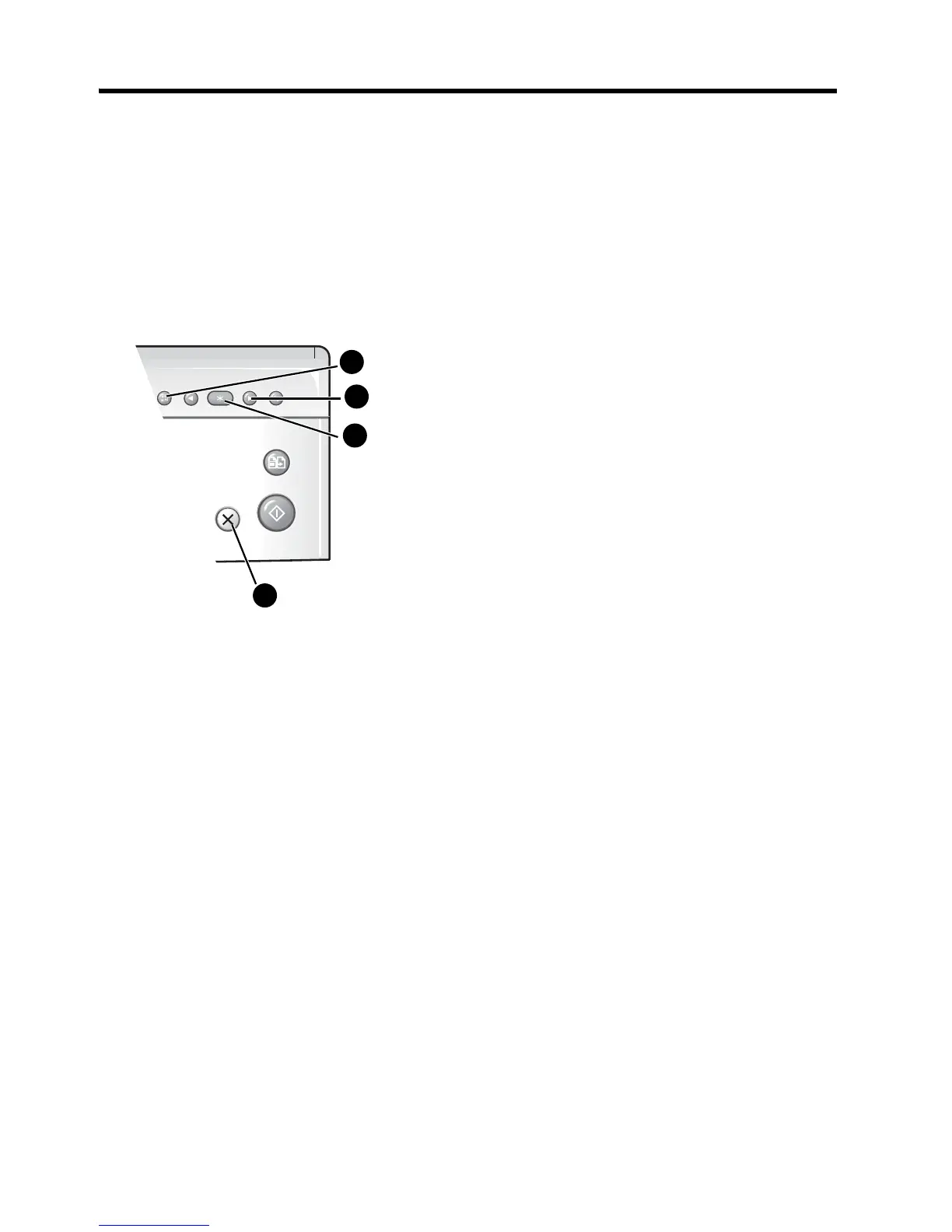
Menu buttons
Use the Menu buttons to navigate the menu items.
Example To change the default Resolution setting to Fine, you would take the
following steps.
1. Press the Menu button repeatedly until
BASIC FAX
displays.
2. Press OK.
Silent Mode
will display.
3. Use the to scroll until
Resolution
displays.
4. Press OK.
Standard
will display.
5. Use the to scroll until
Fine
displays.
6. Press OK.
7. Press Cancel to return to Ready mode.
1 Press the Menu button to access the menu
system.
2 Use the buttons to scroll through the
options on a particular level.
3 Press OK to select a particular menu option.
4 Press Cancel to return to Ready mode.



 To Next Page