30 Additional features
Image TCR
Delete a document
1. Press Favorites repeatedly until
DELETE
appears and press OK.
2. Press
to select to delete one or all documents and when the correct
document ID is displayed, press OK.
3. Select
Y
and press OK when the machine asks if you are sure.
Send a document
1. Press Favorites repeatedly until
SEND
appears and press OK.
2. Press
to scroll to the document you want to send and press OK.
3. Enter the fax number.
4. Press OK when the correct number is displayed.
If you have more destinations, select
Y
and press OK when asked
Another?
Y/N
and repeat from step 3.
Print a document
1. Press Favorites repeatedly until
Print
appears and press OK.
2. Press
to select to print one or all documents and when the correct
document ID is displayed, press OK.
Image TCR
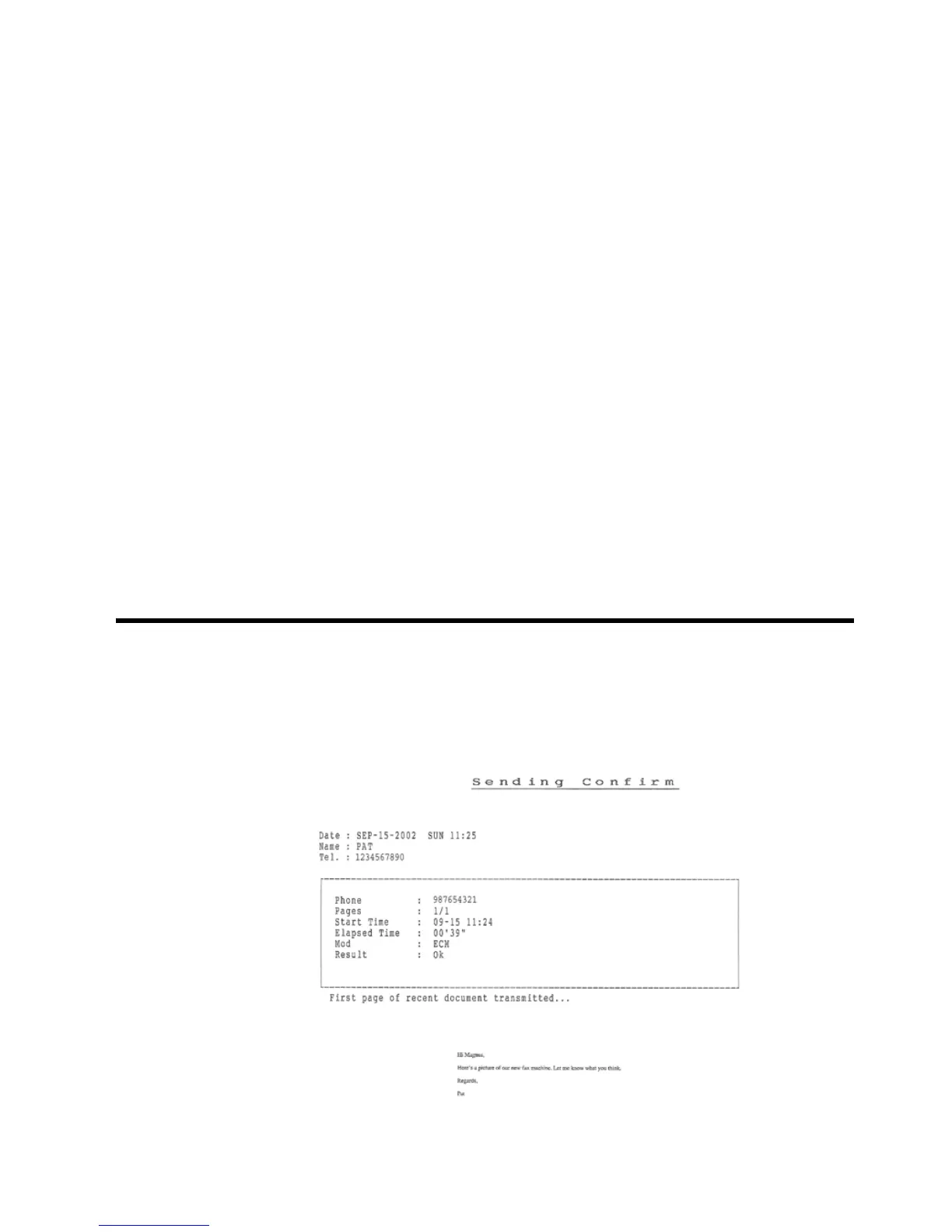
Image TCR (Transmission Confirmation Report) is a valuable tool for keeping
records of faxes you send. It prints a Sending Confirm page with a miniaturized
image of the first page of the fax on it. See the following example.



 To Next Page