EasyManua.ls Logo

HP 8340b - Page 472

HP 8340b
530 pages
Print Icon
To Next Page IconTo Next Page
To Previous Page IconTo Previous Page
Loading...
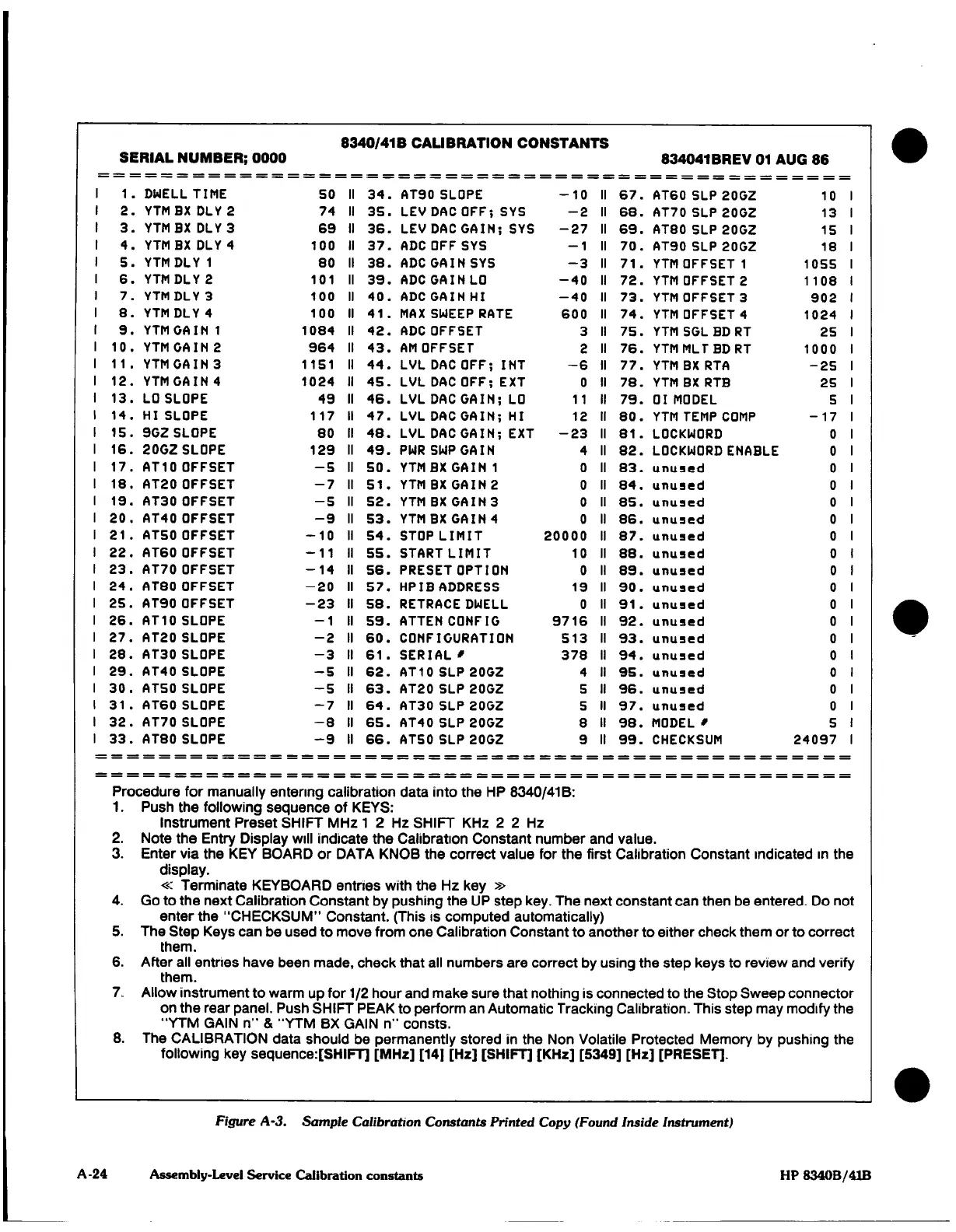
8340/41
B
CALIBRATION CONSTANTS
SERIAL NUMBER;
0000
834041 BREV
01
AUG 86
1.
DWELL
TIME
SO
II
34.
AT90
SLOPE
-10
11
67.
AT60 SLP
20GZ
10
2.
YTMBXDLY2
74
II
35.
LEV
DAC
OFF;
SYS
-2
II
68.
AT70 SLP
20GZ 13
3.
YTMBXDLY3 69
II
36.
LEV
DAC
GAIN;
SYS
-27
II
69.
AT80 SLP
20GZ
15
4.
YTMBXDLY4
100
11
37.
ADC
OFF
SYS
-1
II
70.
AT90
SLP
20G2 18
5.
YTMDLY1
80
II
38.
ADCGAINSYS
-3
II
71.
YTM
OFFSET
1
1055
6.
YTMDLY2
101
II
39.
ADC
GAIN
LO
-40
II
72.
YTM
OFFSET
2
1108
7.
YTMDLY3
100
II
40.
ADCGAINHI
-40
II
73.
YTM
OFFSET
3
902
8.
YTMDLY4
100
II
41.
MAX
SWEEP RATE
600
II
74.
YTM
OFFSET
4
1024
9.
YTMGAIN1
1084
II
42.
ADC
OFFSET
3 II
75.
YTM
SGL BD
RT
25
10.YTMGAIN2
964
II
43.AMOFFSET
2
II
76.
YTM
MLT
BD
RT
1000
11.
YTM
CAIN
3
1151
II
44.
LVL
DAC
OFF;
INT
-6
II
77.
YTM
BX
RTA
-25
12.
YTM
GAIN
4
1024
11
45.
LVL
DAC
OFF;
EXT
0
11
78.
YTM
BX
RTB
25
13.
LO
SLOPE
49
II
46.
LVL
DAC
GAIN;
LO
11
11
79.
01 MODEL
5
14.
HI
SLOPE
117
II
47.
LVL
DAC
GAIN;
HI
12
II
80.
YTM
TEMP COMP
-17
15.
9G2
SLOPE
80
II
48.
LVL
DAC
GAIN;
EXT
-23
II
81.
LOCKMORD
0
16.
20GZ
SLOPE
129
11
49.
PMRSMPGAIN
4
11
82.
LOCKMORD
ENABLE
O
17.
AT10
OFFSET
-5
11
50.
YTMBXGAIN1
0 II
83.
unused
0
18.
AT20
OFFSET
-7
II
51.
YTM
BX
GAIN
2
0
11
84.
unused
0
19.
AT30
OFFSET
-5
11
52.
YTM
BX
GAIN
3 0
11
85.
unused
0
20.
AT40
OFFSET
-9
11
53.
YTM
BX
GAIN
4
0 11
86.
unused
0
21.
AT50
OFFSET
-10
II
54.
STOP
LIMIT
20000
II
87.
unused
0
22.
AT60
OFFSET
-11
II
55.
START
LIMIT
10
II
88.
unused
0
23.
AT70
OFFSET
-14
II
56.
PRESET
OPTION
O II
89.
unused
0
24.
AT80 OFFSET
-20
II
57.
HPIBADDRESS
19
II
90.
unused
0
25.
AT90 OFFSET
-23
II
58.
RETRACE
DWELL
O
II
91.
unused
0
26.
AT10
SLOPE
-1
II
59.
ATTENCONFIG
9716
II
92.
unused
0
27.
AT20
SLOPE
-2
II
60.
CONFIGURATION
513
II
93.
unused
0
28.
AT30
SLOPE
-3
II
61.
SERIAL" 378
II
94.
unused
0
29.
AT40 SLOPE
-5
II
62.
AT10
SLP
20G2
4
II
95.
unused
0
30.
AT50 SLOPE
-S
II
63.
AT20
SLP
20GZ
5 II
96.
unused
0
31.
AT60
SLOPE
-7
II
64.
AT30
SLP
20GZ
5
II
97.
unused
0
32.
AT70
SLOPE
-8
II
65.
AT40
SLP
20GZ
8
II
98.
MODEL'
5
33.
AT80
SLOPE
-9
II
66.
AT50
SLP 20GZ
9 II
99.
CHECKSUM
24097
Procedure for
manually
entering
calibration data into
the
HP
8340/41
B:
1.
Push
the following
sequence
of
KEYS:
Instrument Preset
SHIFT
MHz
1
2
Hz
SHIFT
KHz
2 2
Hz
2.
Note
the
Entry Display
will
indicate
the
Calibration Constant
number
and
value.
3.
Enter
via
the
KEY BOARD
or
DATA KNOB
the
correct
value
for the
first
Calibration
Constant
indicated in
the
display.
«
Terminate
KEYBOARD
entries
with
the
Hz key
»
4.
Go to
the
next
Calibration
Constant
by pushing
the
UP
step
key.
The
next
constant
can
then be
entered.
Do
no
enter
the
"CHECKSUM"
Constant.
(This
is
computed
automatically)
5.
The
Step
Keys
can
be
used to
move
from
one
Calibration
Constant to another
to either
check
them
or
to
correc
them.
6.
After
all
entries have
been
made,
check
that
all
numbers
are
correct
by
using
the
step keys
to
review
and
verify
them.
7.
Allow
instrument to
warm
up
for
1/2
hour
and
make
sure
that
nothing
is
connected
to
the
Stop
Sweep
connecto
on
the
rear
panel.
Push
SHIFT
PEAK
to
perform
an
Automatic
Tracking Calibration.
This
step may
modify
the
"YTM
GAIN
n"
&
"YTM
BX GAIN
n"
consts.
8.
The
CALIBRATION
data
should be
permanently
stored
in
the
Non
Volatile Protected
Memory
by
pushing
the
following
key
sequence:[SHIFT]
[MHz]
[14]
[Hz]
[SHIFT]
[KHz] [5349] [Hz]
[PRESET].
i
t
t
y
r
i
3
Figure
A-3.
Sample
Calibration
Constants
Printed
Copy (Found
Inside
Instrument)
A
-24
Assembly-Level Service Calibration
constants
HP
8340B/41B

Table of Contents

Other manuals for HP 8340b

Related product manuals