EasyManua.ls Logo

HP 8753D - Page 276

HP 8753D
678 pages
Print Icon
To Next Page IconTo Next Page
To Previous Page IconTo Previous Page
Loading...
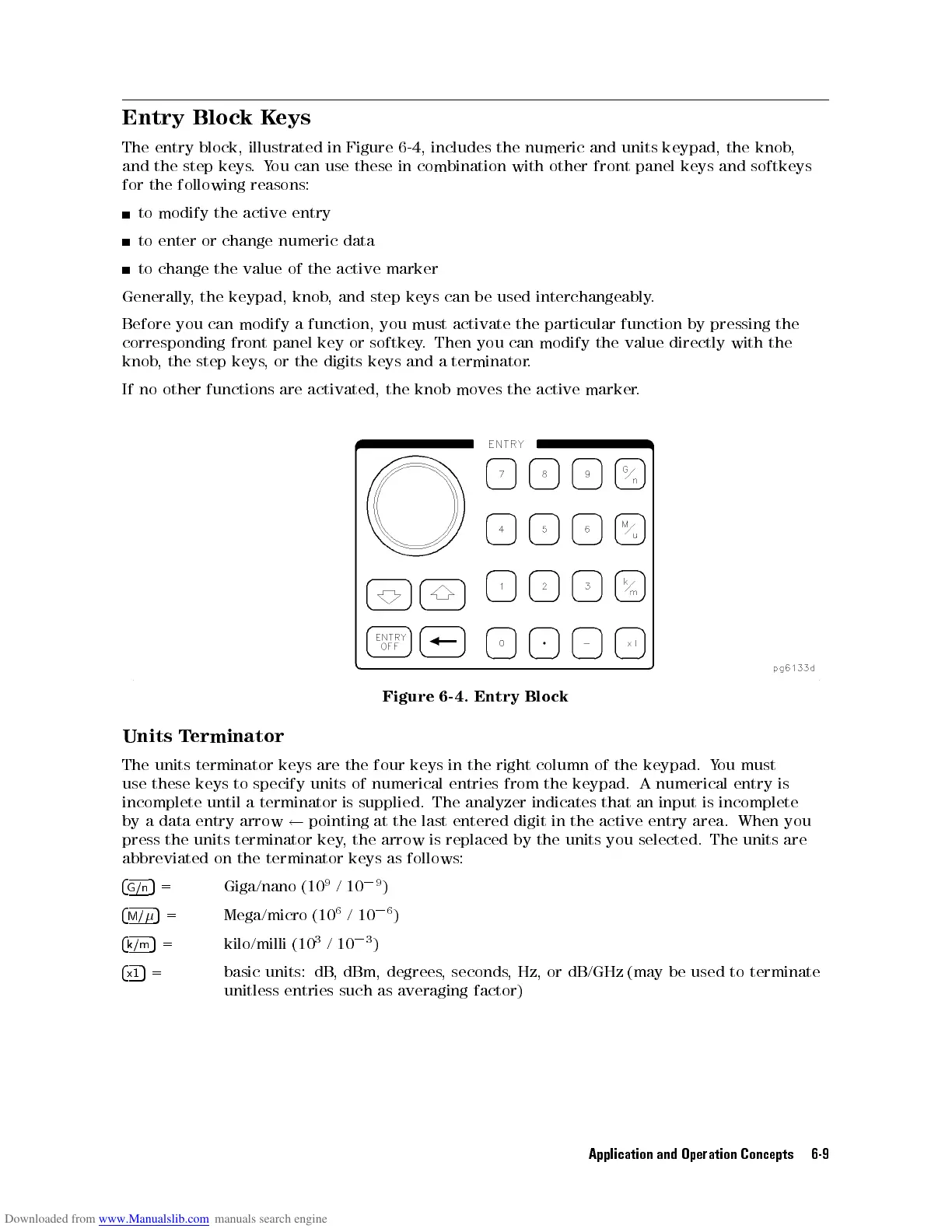
Entry Block
Keys
The
entry
block,
illustrated
in Figure
6-4,
includes the
numeric and
units keypad,
the knob
,
and
the
step
keys
.
Y
ou can
use these
in combination
with other
front panel
keys and
softkeys
for
the
following
reasons:
to
modify
the
active
entry
to
enter
or
change
numeric
data
to
change
the
value
of
the
active marker
Generally
,
the
keypad,
knob
,
and step
keys can
be used
interchangeably
.
Before
you
can modify
a function,
you must
activate the
particular
function
by
pressing
the
corresponding
front
panel key
or softkey
. Then
you can
modify
the
value
directly
with
the
knob
,
the step
keys,
or the
digits keys
and
a
terminator
.
If
no
other functions
are activated,
the knob
moves the
active
marker
.
Figure
6-4.
Entry
Block
Units
T
erminator
The
units
terminator
keys
are
the
four
keys
in
the
right
column
of
the
keypad.
Y
ou
must
use
these keys
to
specify
units
of
numerical
entries
from
the
keypad.
A
numerical
entry
is
incomplete
until a
terminator
is
supplied.
The
analyzer
indicates
that
an
input
is
incomplete
by
a data
entry arrow
pointing
at
the
last
entered
digit
in
the
active
entry
area.
When
you
press
the
units
terminator
key
,the
arrow
is
replaced
by
the
units
you
selected.
The
units
are
abbreviated on the terminator keys as
follows:
4
G/n
5
=
Giga/nano (10
9
/10
0
9
)
4
M/
5
=
Mega/micro (10
6
/10
0
6
)
4
k/m
5
=
kilo/milli (10
3
/10
0
3
)
4
x1
5
= basic units: dB
, dBm, degrees
, seconds
, Hz, or dB/GHz (may be used to terminate
unitless entries such as averaging factor)
Application and Operation Concepts 6-9