EasyManua.ls Logo

HP 8753D - Page 310

HP 8753D
678 pages
Print Icon
To Next Page IconTo Next Page
To Previous Page IconTo Previous Page
Loading...
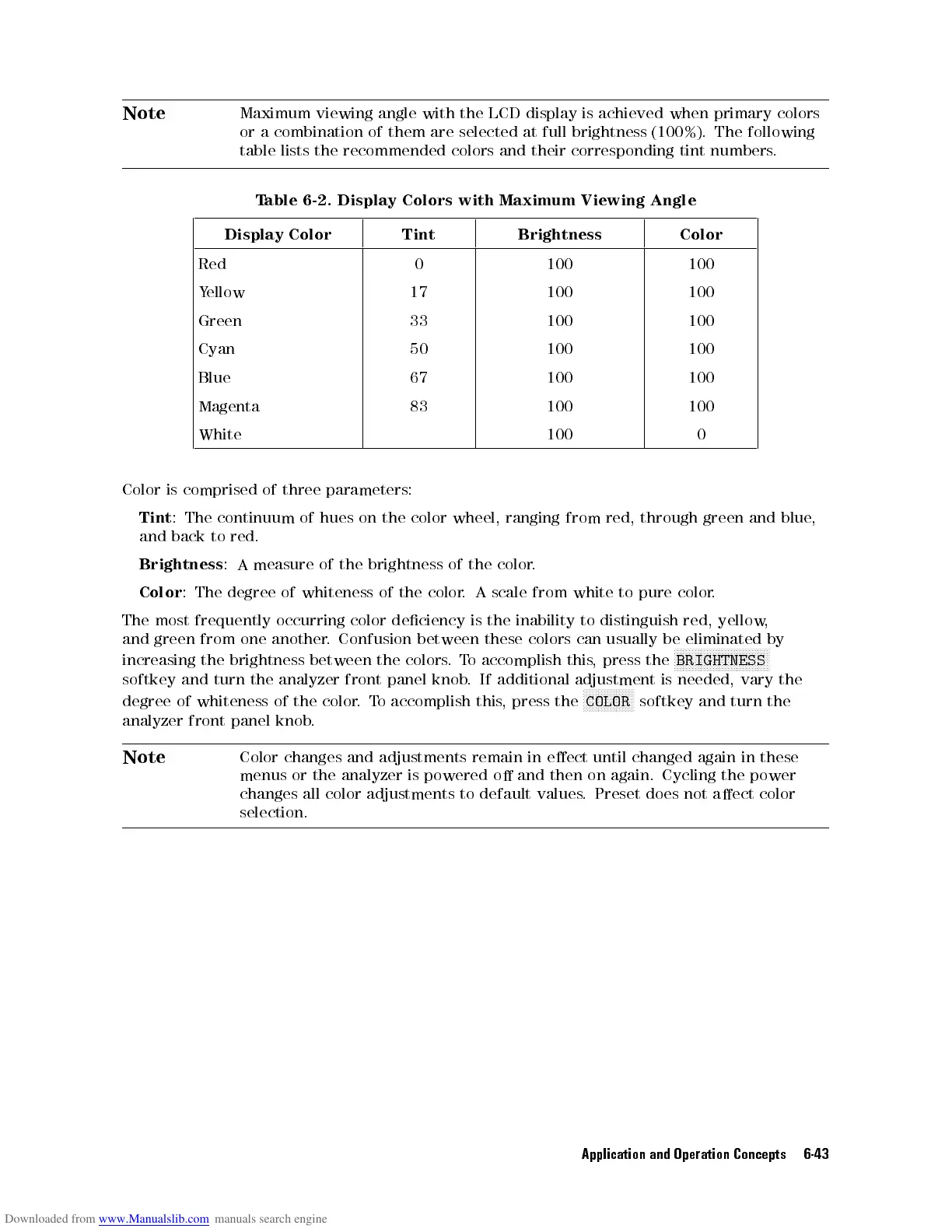
Note
Maximum
viewing
angle
with
the
LCD
display
is achieved
when primary
colors
or
a
combination
of
them
are
selected
at full
brightness (100%).
The following
table
lists
the
recommended
colors
and
their
corresponding tint
numbers.
T
able 6-2.
Display Colors
with Maximum
Viewing
Angle
Display
Color
Tint Brightness Color
Red 0 100 100
Y
ellow
17 100 100
Green 33 100 100
Cyan 50 100 100
Blue 67 100 100
Magenta 83 100 100
White 100 0
Color
is comprised
of three
parameters:
Tint
:
The
continuum of
hues on
the
color
wheel,
ranging
from
red,
through
green
and
blue
,
and
back
to
red.
Brightness
:
A
measure
of
the brightness
of
the
color
.
Color
:
The
degree
of
whiteness
of
the
color
.
A
scale
from
white
to
pure
color
.
The
most
frequently
occurring
color
deciency
is
the
inability
to
distinguish
red,
yellow
,
and
green
from
one
another
.
Confusion
between
these
colors
can
usually
be
eliminated
by
increasing
the
brightness
between the
colors.
To
accomplish
this
,
press
the
N
N
N
N
N
N
N
N
N
NN
N
N
N
N
N
N
N
N
N
N
N
N
N
N
N
N
N
N
N
N
N
BRIGHTNESS
softkey
and
turn
the
analyzer
front
panel
knob
.
If
additional
adjustment
is
needed,
vary
the
degree
of
whiteness of
the color
.
T
o
accomplish
this
,
press
the
N
N
N
N
N
N
NN
NN
N
N
N
N
N
N
N
COLOR
softkey
and turn
the
analyzer
front panel
knob.
Note
Color
changes
and adjustments
remain in
eect until
changed
again
in
these
menus or
the
analyzer
is
powered
o
and
then
on
again.
Cycling
the
power
changes all
color
adjustments
to
default
values
.
Preset
does
not
aect
color
selection.
Application and Operation Concepts 6-43