Markers
The
4
MARKER
5
key displays
a movable
active
marker
on
the
screen
and
provides
access
to
a
series
of menus
to control
up
to
ve
display
markers
for
each
channel.
Markers
are
used
to
obtain
numerical readings
of measured
values
.
They
also
provide
capabilities
for
reducing
measurement
time by
changing stimulus
parameters,
searching
the
trace
for
specic
values
,
or
statistically
analyzing part
or
all
of
the
trace
.
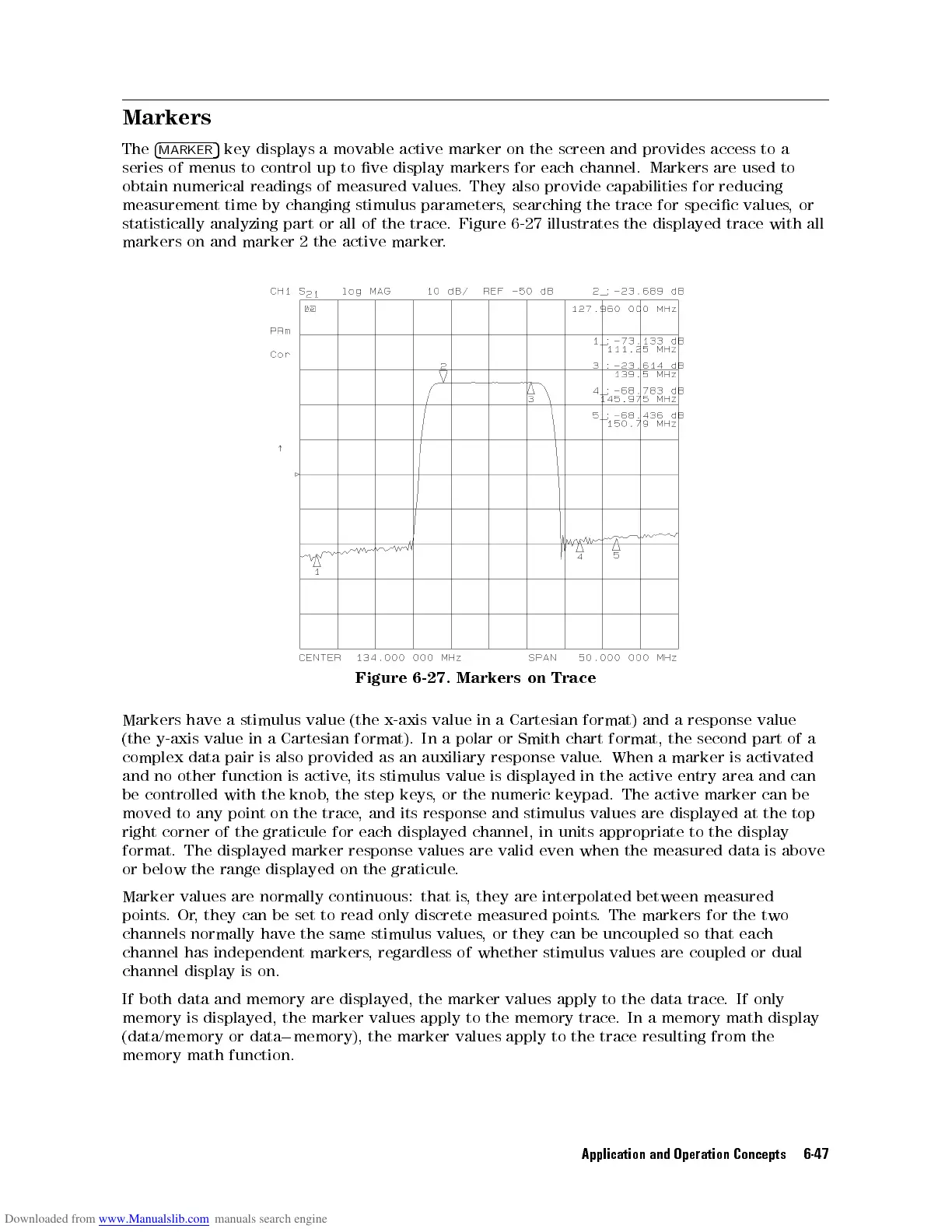
Figure
6-27
illustrates
the
displayed
trace
with
all
markers
on
and
marker
2
the
active
marker
.
Figure
6-27.
Markers
on
Trace
Markers
have
a
stimulus
value
(the
x-axis
value
in a
Cartesian format)
and a
response value
(the
y-axis
value
in
a
Cartesian
format).
In
a
polar
or Smith
chart format,
the second
part
of
a
complex
data
pair
is
also
provided
as
an
auxiliary
response
value.
When a
marker is
activated
and
no
other
function
is
active
,
its
stimulus
value
is displayed
in the
active entry
area and
can
be
controlled
with the
knob,
the step
keys,
or
the
numeric
keypad.
The
active
marker
can
be
moved to
any point
on the
trace,
and its
response and
stimulus
values
are
displayed
at
the
top
right
corner
of
the
graticule
for
each
displayed
channel,
in
units
appropriate
to the
display
format. The displayed marker response values are valid even when the measured data is above
or below the range displayed on the graticule
.
Marker values are normally continuous:
that is
, they are interpolated between measured
points.Or
, they can
be set to read only discrete measured points
. The markers for the two
channels normally have the same stimulus values
, or they can be uncoupled so that each
channel has independent markers
, regardless of
whether stimulus values are coupled or dual
channel display is on.
If both data and memory are displayed, the marker values apply to the data trace. If only
memory is displayed, the marker values apply to the memory trace. In a memory math display
(data/memory or data
0
memory), the marker values apply to the trace resulting from the
memory math function.
Application and Operation Concepts 6-47



 To Next Page