Hardware options installation 44
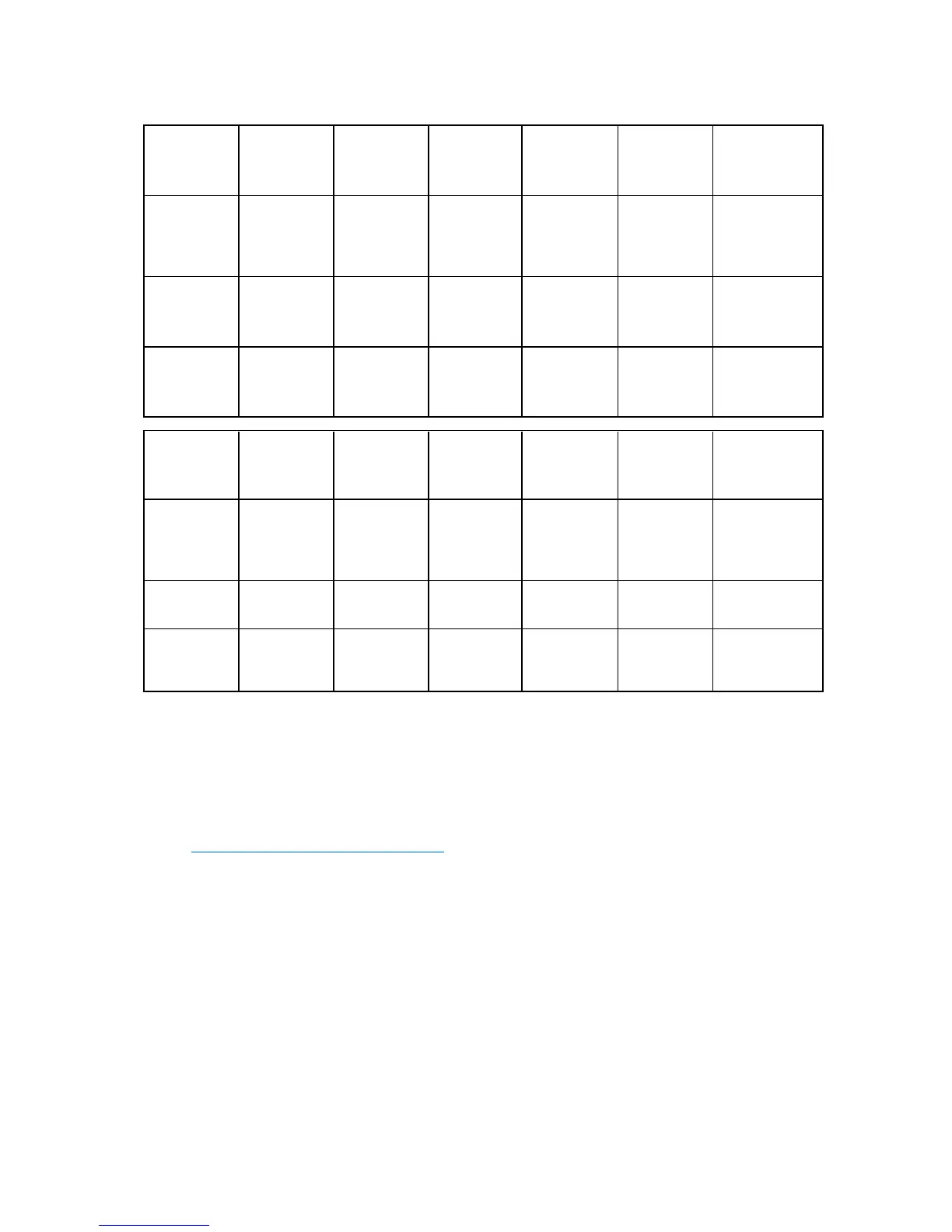
• QR memory modules must be installed only in memory sockets 2, 5, 8, and 11, while following the
population order for those memory sockets.
Processor
memory
socket
1 2 3 4 5 6
Rank
support per
memory
socket
SR/DR SR/DR/QR SR/DR SR/DR SR/DR/QR SR/DR
Population
order
A I E C K G
Processor
memory
channel
A A A B B B
Processor
memory
socket
7 8 9 10 11 12
Rank
support per
memory
socket
SR/DR SR/DR/QR SR/DR SR/DR SR/DR/QR SR/DR
Population
order
B J F D L H
Processor
memory
channel
C C C D D D
Population rules
When installing memory modules, observe the following population rules:
• Use only HP memory modules listed in the DL585 QuickSpecs at the HP website
(http://www.hp.com/servers/proliant
).
• Advanced ECC is not available if x4 and x8 memory modules are mixed in channels (A and B), (C
and D), or both, but standard ECC is still available. Advanced ECC is available if x4 and x8
memory modules are mixed in memory channels (A and C), (B and D), or both.
Population guidelines
While adhering to the memory population rules, performance can be improved by following the
guidelines below:
• Memory modules may be installed one at a time per processor, but installing two at a time per
processor provides for additional performance and installing four at a time per processor provides
for better performance.






 To Next Page