Command
Quick Reference
1
ntroduction
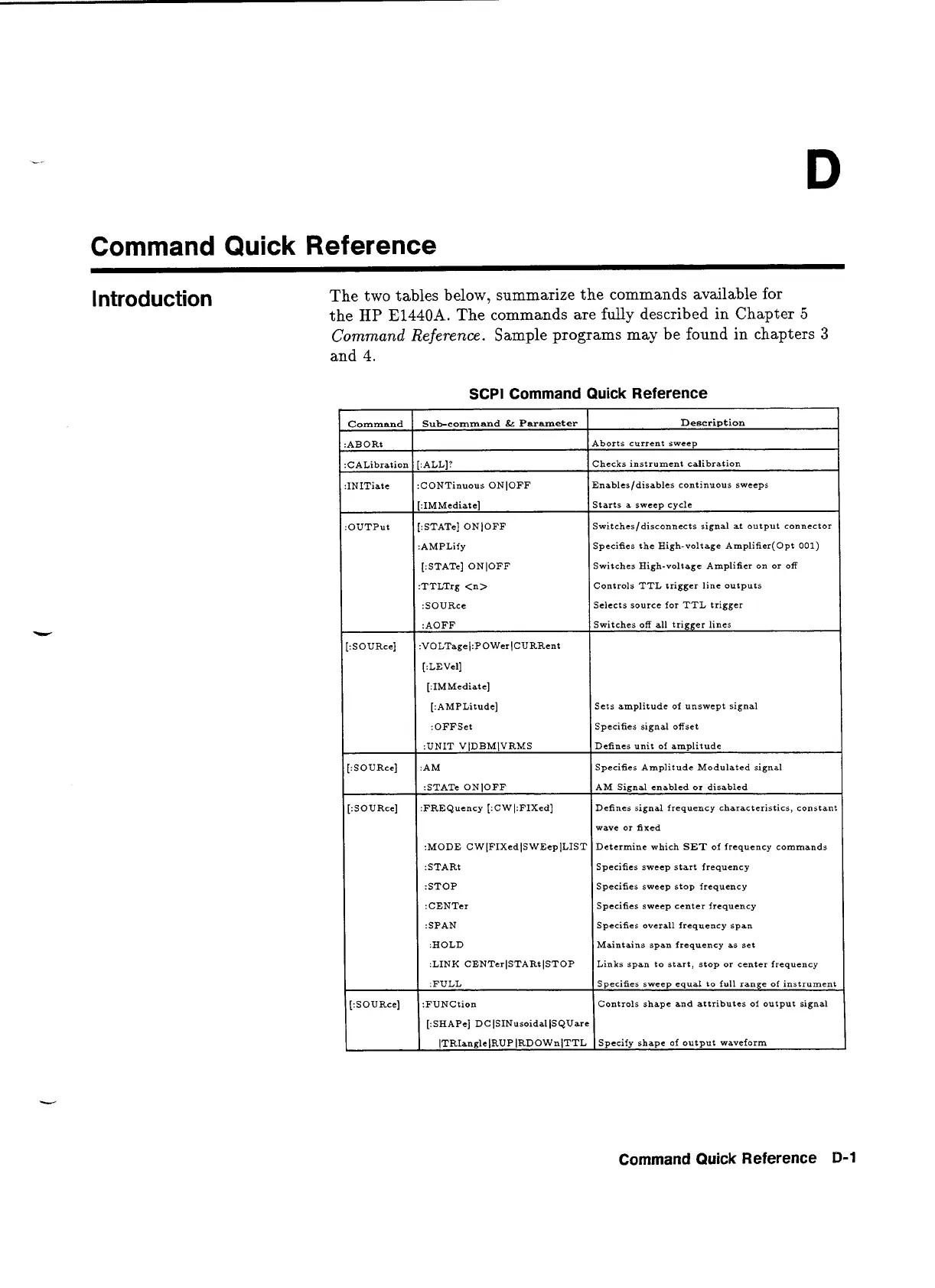
The two tables below, summarize the commands available for
the
HP
E1440A.
The commands are
fully
described
in
Chapter
5
Command
Reference.
Sample programs may be found in chapters
3
and
4.
SCPl Command Quick Reference
I
1
[:STATe] ONlOFF
I
Switches High-voltage Amplifier on or off
I
[:IMMediate]
[:STATe] ONlOFF
:AMPLify
Controls TTL trigger line outputs
Selects source for TTL trigger
Description
Aborts current sweep
Checks instrument calibration
Enables/disables continuous sweeps
Command
:ABORt
:CALibration
:INITiate
Starts a sweep cycle
Switches/disconnects signal at output connector
Specifies the High-voltage Amplifier(0pt
001)
Sub-command
&
Parameter
[:ALL]?
:CONTinuous ONlOFF
:AOFF
:VOLTagel:POWer(CURRent
[:LEVel]
[:IMMediate]
[:AMPLitude]
:OFFSet
:UNIT VlDBMlVRMS
:AM
Switches off all trigger lines
Sets amplitude of unswept signal
Specifies signal offset
Defines unit of amplitude
Specifies Amplitude Modulated signal
:STAT= ONlOFF
:FREQuency [:CWI:FIXed]
I
I
:STOP
I
Specifies sweep stop frequency
I
AM Signal enabled or disabled
Defines signal frequency characteristics, constant
:MODE CWlFIXedlSWEeplLIST
:STARt
Specifies sweep center frequency
Specifies overall frequency span
wave or fixed
Determine which
SET
of frequency commands
Specifies sweep start frequency
I
I
:HOLD
I
Maintains span frequency as set
:LINK CENTerlSTARtlSTOP Links span to start, stop or center frequency
Command Quick Reference
B-1
[:SOURce]
:FULL
:FUNCtion
[:SHAPe] DCISINusoidalJSQUare
(TRIanglelRUP(RDOWn/TTL
Specifies sweep equa1 to full range of instrument
Controls shape and attributes of output signal
Specify shape of output waveform
Artisan Technology Group - Quality Instrumentation ... Guaranteed | (888) 88-SOURCE | www.artisantg.com


 To Next Page