Component Function
(8) Application Key 4 Press to launch the Calendar. Press and hold to launch the Contacts
list.
(9) Light Sensor Use to detect environment light change and adjust backlight setting
automatically in a small range by the current backlight setting.
(10) Audio Receiver Use to listen during VoIP calls.
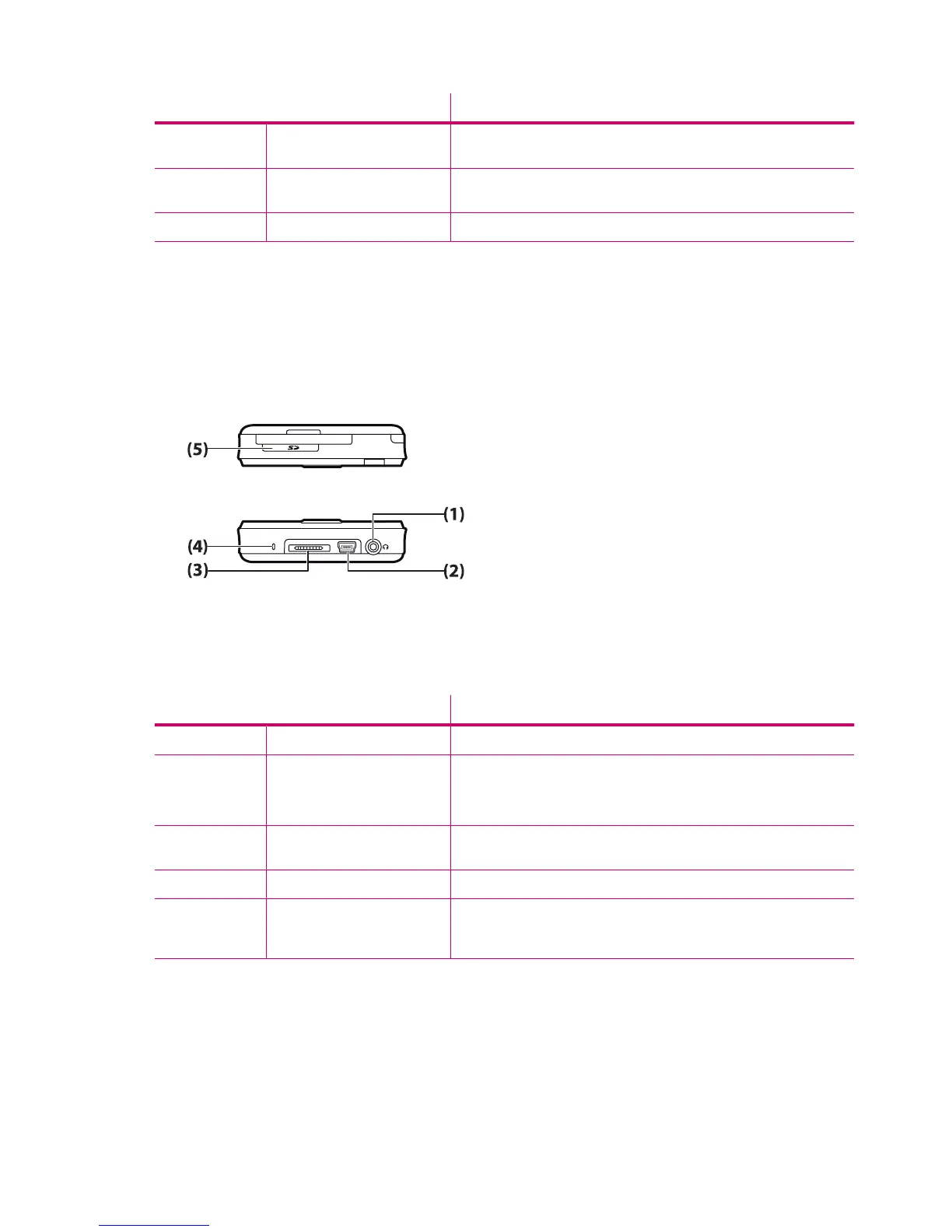
Top and bottom panel components
Component Function
(1) 3.5 mm Headphone Connector Plug headset into this connector to listen to audio through a headset.
(2) Charging/Communications
Port
Use to connect the mini-USB charging/synchronization cable.
NOTE: Mini-USB charging/synchronization cable is an optional
accessory.
(3) Docking Connector Use to charge your HP iPAQ using the AC adapter with the HP 24-pin
connector.
(4) Microphone Use to record voice notes.
(5) SD/SDIO/CF Card Slot Insert a Secure Digital (SD) storage card, a Secure Digital Input Output
(SDIO) card, or a Compact Flash (CF) card with the label side up for data
storage.
4 Chapter 3 Components












 To Next Page