EasyManua.ls Logo

HP HP-67 - Exchangingxand I

HP HP-67
364 pages
Print Icon
To Next Page IconTo Next Page
To Previous Page IconTo Previous Page
Loading...
214
Controlling
the
I-Register
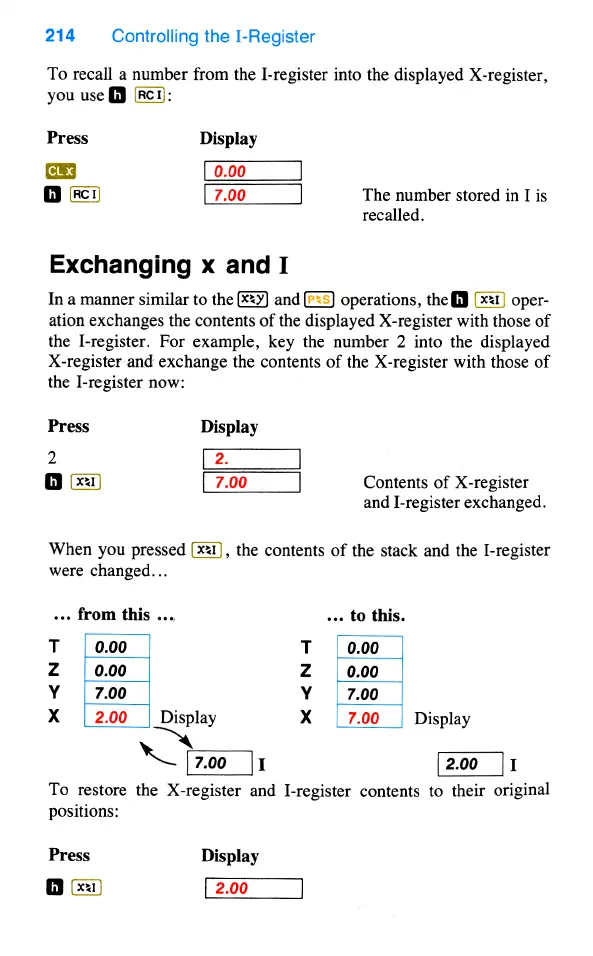
To
recall
a
number
from
the
I-register
into
the
displayed
X-register,
you
use
(Rc1):
Press
Display
0
7.00
The
number
stored
in
I is
recalled.
Exchanging
x
and
I
In a
manner
similar
to
the
and
operations,
the
[
(xx1)
oper-
ation
exchanges
the
contents
of
the
displayed
X-register
with
those
of
the
I-register.
For
example,
key
the
number
2
into
the
displayed
X-register
and
exchange
the
contents
of
the
X-register
with
those
of
the
I-register
now:
Press
Display
2
(2.
0
(xx1)
7.00
Contents
of
X-register
and
I-register
exchanged.
When
you
pressed
(xx1],
the
contents
of
the
stack
and
the
I-register
were
changed...
...
from
this
...
...
to
this.
T
0.00
T
0.00
z
0.00
Z
0.00
Y
7.00
Y
7.00
X
2.00
Display
X
7.00
Display
3
[7.00
|1
(200
|1
To
restore
the
X-register
and
I-register
contents
to
their
original
positions:
Press
Display
=

Table of Contents

Other manuals for HP HP-67

Related product manuals