EasyManua.ls Logo

HP HP-67 - Indirect Display Control

HP HP-67
364 pages
Print Icon
To Next Page IconTo Next Page
To Previous Page IconTo Previous Page
Loading...
Using
the
I-Register
for
Indirect
Control
225
You
can
already
see
that
using
the
I-register
and
[0,
(5z(),
and
in
conjunction with
these other
functions
gives
you
a
tremen-
dous
amount
of
computing
power
and
exceptional
programming
control.
Now
let’s
have
a
closer
look
at
these
operations.
Indirect
Display
Control
You
can
use
the
current
number
in
the
I-register
in
conjunction
with
the
EE3
key
to
control
the
number
of
decimal
places
to
which
a
number
is
displayed
and
printed.
When
53
(@
is
performed,
the
display
is
seen
rounded
to
the
number
of
decimal
places
specified
by
the
current
value
contained
in
the
I-register.
(The
display
is
seen
rounded,
but
of
course,
the
calculator
maintains
its
full
accuracy,
10
digits
multiplied
by
10
raised
to
a
two-digit
exponent,
internally.)
The
number
in
the
I-register
can
be
any
value,
positive
or
negative,
from
O
through
9.
The
CE@
[@
operation
is
most
useful
as
part
of
a
program,
but
it
can
also
be
executed
manually
from
the
keyboard.
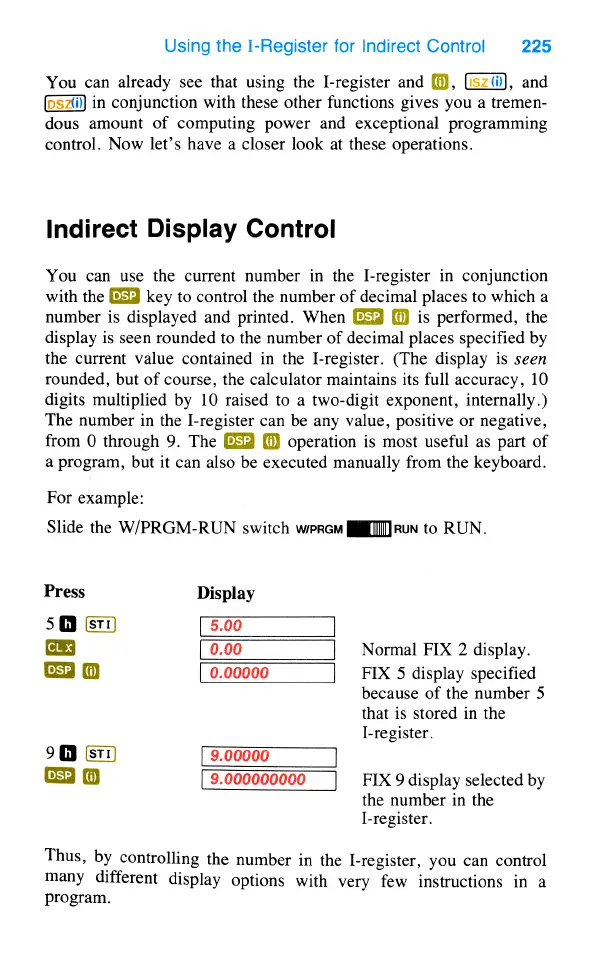
For
example:
Slide
the
W/PRGM-RUN
switch
werem
[lIMIRuN
to
RUN.
Press
Display
50
o
Normal
FIX
2
display.
@
0.00000
FIX
5
display
specified
because
of
the
number
5
that
is
stored
in
the
I-register.
o0
(st
9.00000
R
@
9.000000000
FIX
9
display
selected
by
the
number
in
the
I-register.
Thus,
by
controlling
the
number
in
the
I-register,
you
can
control
many
different
display
options
with
very
few
instructions
in
a
program.

Table of Contents

Other manuals for HP HP-67

Related product manuals