Eco-Tips
HP is committed to helping customers reduce their environmental footprint. HP has
provided the Eco-Tips below to help you focus on ways to assess and reduce the impact
of your printing choices. In addition to specific features in this printer, please visit the HP
Eco Solutions Web site for more information on HP's environmental initiatives.
www.hp.com/hpinfo/globalcitizenship/environment/
• Energy Savings Information: To determine the ENERGY STAR® qualification
status for this printer, see
Power consumption.
• Recycled Materials: For more information regarding recycling of HP products,
please visit:
www.hp.com/hpinfo/globalcitizenship/environment/recycle/
Understand the printer parts
This section contains the following topics:
•
Front view
•
Printing supplies area
•
Back view
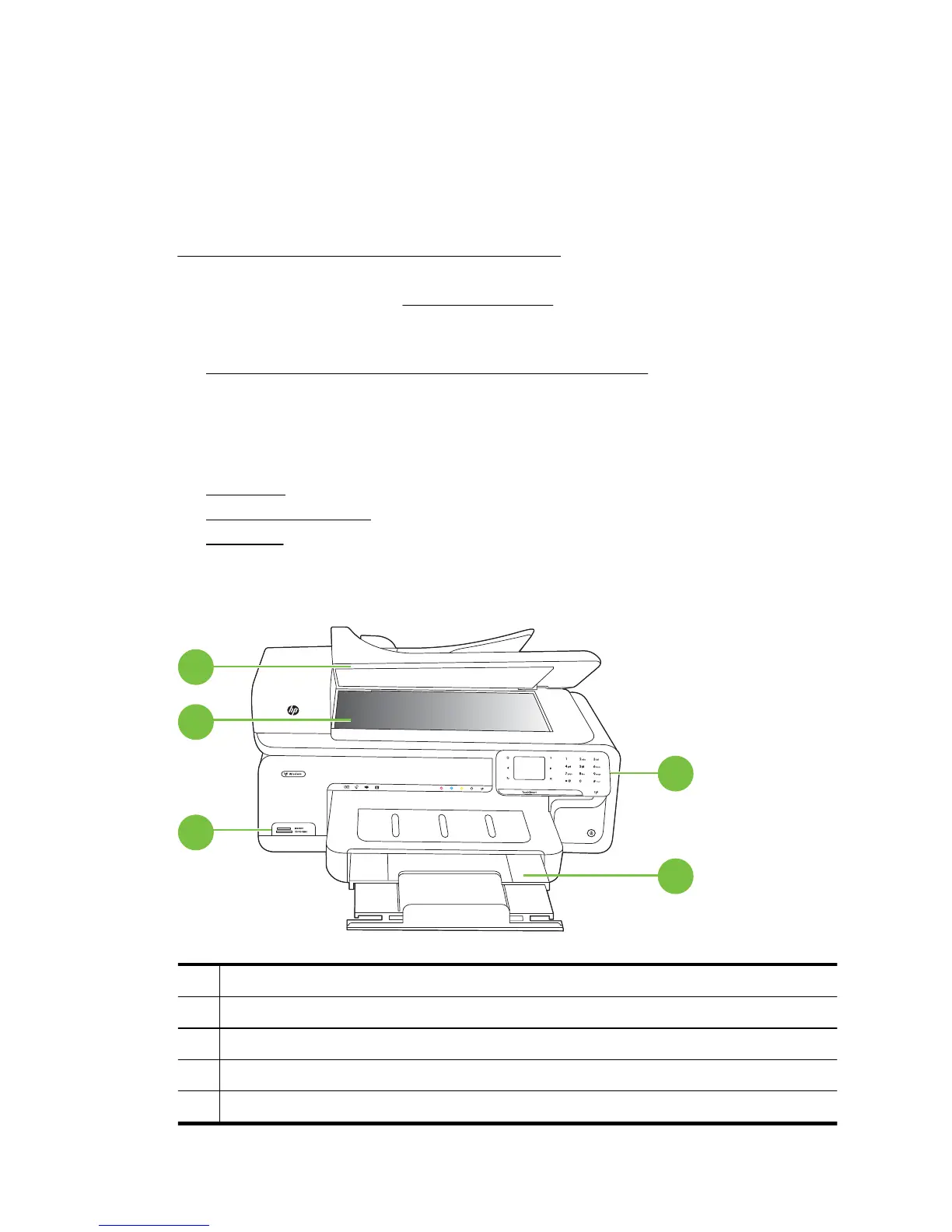
Front view
3
4
5
2
1
1 Control panel
2 Main tray
3 Memory card slots
4 Scanner glass
5 Automatic document feeder
Chapter 1
10 Get started



 To Next Page