The printer is having problems sending a manual fax
Solution:
NOTE: This possible solution applies only in the countries/regions that receive
a 2-wire phone cord in the box with the printer, including: Argentina, Australia,
Brazil, Canada, Chile, China, Colombia, Greece, India, Indonesia, Ireland, Japan,
Korea, Latin America, Malaysia, Mexico, Philippines, Poland, Portugal, Russia,
Saudi Arabia, Singapore, Spain, Taiwan, Thailand, USA, Venezuela, and
Vietnam.
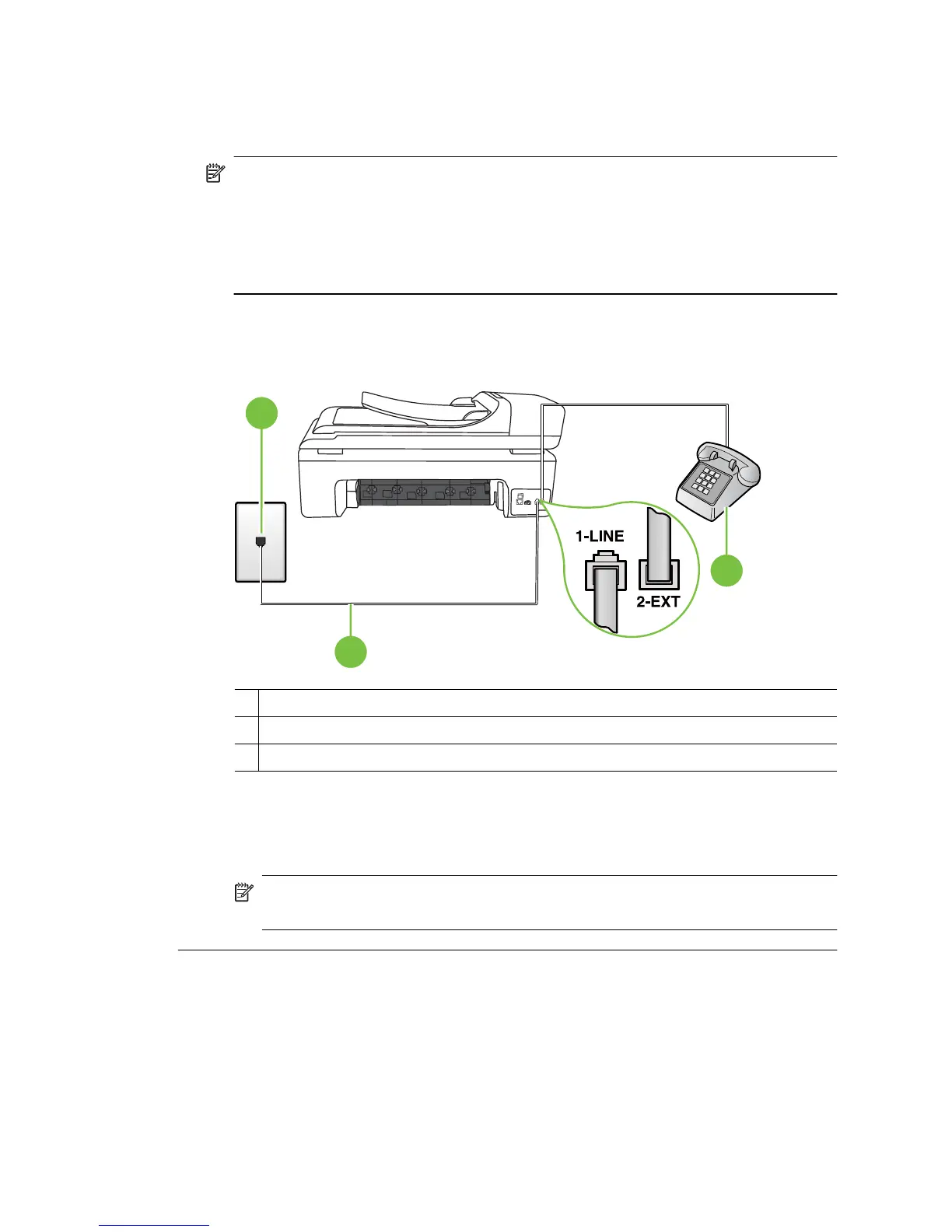
• Make sure the telephone you use to initiate the fax call is connected directly to
the printer. To send a fax manually, the telephone must be connected directly to
the port labeled 2-EXT on the printer, as shown below.
1
2
3
1 Telephone wall jack
2 Use the phone cord supplied in the box with the printer to connect to the "1-LINE" port
3 Telephone
• If you are sending a fax manually from your phone that is connected directly to
the printer, you must use the keypad on the telephone to send the fax. You cannot
use the keypad on the printer control panel.
NOTE: If using a serial-type phone system, please connect your phone
directly on top of the printer cable which has a wall plug attached to it.
Chapter 8
144 Solve a problem



 To Next Page